

Page Summary
-
This Google Workspace add-on translates selected text within Google Docs, Sheets, and Slides using the Google Translate service.
-
Users can select text, trigger the add-on, and view the translated output directly within their document.
-
The add-on is customizable, allowing users to specify the source and target languages for translation.
-
It requires a Google Cloud project and setup for authorization and deployment.
-
The Apps Script code utilizes Card service for the user interface and Language service for translation functionality.
Coding level: Intermediate
Duration: 30 minutes
Project type: Google Workspace add-on
Objectives
- Understand what the solution does.
- Understand what the Apps Script services do within the solution.
- Set up the script.
- Run the script.
About this solution
With this solution, you can translate text from within Google Docs, Sheets, and Slides.
How it works
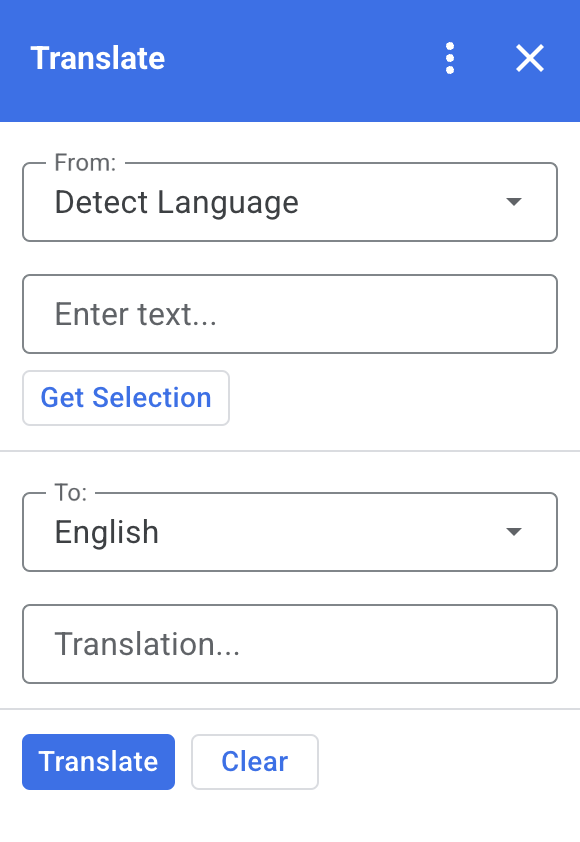
When you select text in Docs, Sheets, or Slides and click Get Selection in the add-on, the script copies the text into the add-on, translates it and displays the translated text.
By default, the script detects the source language and translates the text to English. You can edit the source and target languages.
Apps Script services
This solution uses the following services:
- Card service–Creates the user interface of the add-on.
- Language service–Translates the text using Google Translate.
Prerequisites
To use this sample, you need the following prerequisites:
- A Google Account (Google Workspace accounts might require administrator approval).
- A web browser with access to the internet.
Set up the script
Create the Apps Script project
Click the following button to open the Translate Apps Script project.
Open the projectClick Overview .
On the overview page, click Make a copy
 .
.
Install a test deployment
- In your copied Apps Script project, click Editor .
- Open the
Code.gsfile and click Run. When prompted, authorize the script. - Click Deploy > Test deployments.
- Click Install > Done.
Run the script
- Open a file in Google Docs, Sheets or Slides, or create a new one.
- On the right sidebar open the Translate add-on .
- If prompted, authorize the add-on.
- Select text in your file.
- In the add-on, click Get Selection > Translate.
Review the code
To review the Apps Script code for this solution, click View source code below:
View source code
Code.gs
const DEFAULT_INPUT_TEXT = '';
const DEFAULT_OUTPUT_TEXT = '';
const DEFAULT_ORIGIN_LAN = ''; // Empty string means detect langauge
const DEFAULT_DESTINATION_LAN = 'en' // English

const LANGUAGE_MAP =
  [
    { text: 'Detect Language', val: '' },
    { text: 'Afrikaans', val: 'af' },
    { text: 'Albanian', val: 'sq' },
    { text: 'Amharic', val: 'am' },
    { text: 'Arabic', val: 'ar' },
    { text: 'Armenian', val: 'hy' },
    { text: 'Azerbaijani', val: 'az' },
    { text: 'Basque', val: 'eu' },
    { text: 'Belarusian', val: 'be' },
    { text: 'Bengali', val: 'bn' },
    { text: 'Bosnian', val: 'bs' },
    { text: 'Bulgarian', val: 'bg' },
    { text: 'Catalan', val: 'ca' },
    { text: 'Cebuano', val: 'ceb' },
    { text: 'Chinese (Simplified)', val: 'zh-CN' },
    { text: 'Chinese (Traditional)', val: 'zh-TW' },
    { text: 'Corsican', val: 'co' },
    { text: 'Croatian', val: 'hr' },
    { text: 'Czech', val: 'cs' },
    { text: 'Danish', val: 'da' },
    { text: 'Dutch', val: 'nl' },
    { text: 'English', val: 'en' },
    { text: 'Esperanto', val: 'eo' },
    { text: 'Estonian', val: 'et' },
    { text: 'Finnish', val: 'fi' },
    { text: 'French', val: 'fr' },
    { text: 'Frisian', val: 'fy' },
    { text: 'Galician', val: 'gl' },
    { text: 'Georgian', val: 'ka' },
    { text: 'German', val: 'de' },
    { text: 'Greek', val: 'el' },
    { text: 'Gujarati', val: 'gu' },
    { text: 'Haitian Creole', val: 'ht' },
    { text: 'Hausa', val: 'ha' },
    { text: 'Hawaiian', val: 'haw' },
    { text: 'Hebrew', val: 'he' },
    { text: 'Hindi', val: 'hi' },
    { text: 'Hmong', val: 'hmn' },
    { text: 'Hungarian', val: 'hu' },
    { text: 'Icelandic', val: 'is' },
    { text: 'Igbo', val: 'ig' },
    { text: 'Indonesian', val: 'id' },
    { text: 'Irish', val: 'ga' },
    { text: 'Italian', val: 'it' },
    { text: 'Japanese', val: 'ja' },
    { text: 'Javanese', val: 'jv' },
    { text: 'Kannada', val: 'kn' },
    { text: 'Kazakh', val: 'kk' },
    { text: 'Khmer', val: 'km' },
    { text: 'Korean', val: 'ko' },
    { text: 'Kurdish', val: 'ku' },
    { text: 'Kyrgyz', val: 'ky' },
    { text: 'Lao', val: 'lo' },
    { text: 'Latin', val: 'la' },
    { text: 'Latvian', val: 'lv' },
    { text: 'Lithuanian', val: 'lt' },
    { text: 'Luxembourgish', val: 'lb' },
    { text: 'Macedonian', val: 'mk' },
    { text: 'Malagasy', val: 'mg' },
    { text: 'Malay', val: 'ms' },
    { text: 'Malayalam', val: 'ml' },
    { text: 'Maltese', val: 'mt' },
    { text: 'Maori', val: 'mi' },
    { text: 'Marathi', val: 'mr' },
    { text: 'Mongolian', val: 'mn' },
    { text: 'Myanmar (Burmese)', val: 'my' },
    { text: 'Nepali', val: 'ne' },
    { text: 'Norwegian', val: 'no' },
    { text: 'Nyanja (Chichewa)', val: 'ny' },
    { text: 'Pashto', val: 'ps' },
    { text: 'Persian', val: 'fa' },
    { text: 'Polish', val: 'pl' },
    { text: 'Portuguese (Portugal, Brazil)', val: 'pt' },
    { text: 'Punjabi', val: 'pa' },
    { text: 'Romanian', val: 'ro' },
    { text: 'Russian', val: 'ru' },
    { text: 'Samoan', val: 'sm' },
    { text: 'Scots Gaelic', val: 'gd' },
    { text: 'Serbian', val: 'sr' },
    { text: 'Sesotho', val: 'st' },
    { text: 'Shona', val: 'sn' },
    { text: 'Sindhi', val: 'sd' },
    { text: 'Sinhala (Sinhalese)', val: 'si' },
    { text: 'Slovak', val: 'sk' },
    { text: 'Slovenian', val: 'sl' },
    { text: 'Somali', val: 'so' },
    { text: 'Spanish', val: 'es' },
    { text: 'Sundanese', val: 'su' },
    { text: 'Swahili', val: 'sw' },
    { text: 'Swedish', val: 'sv' },
    { text: 'Tagalog (Filipino)', val: 'tl' },
    { text: 'Tajik', val: 'tg' },
    { text: 'Tamil', val: 'ta' },
    { text: 'Telugu', val: 'te' },
    { text: 'Thai', val: 'th' },
    { text: 'Turkish', val: 'tr' },
    { text: 'Ukrainian', val: 'uk' },
    { text: 'Urdu', val: 'ur' },
    { text: 'Uzbek', val: 'uz' },
    { text: 'Vietnamese', val: 'vi' },
    { text: 'Welsh', val: 'cy' },
    { text: 'Xhosa', val: 'xh' },
    { text: 'Yiddish', val: 'yi' },
    { text: 'Yoruba', val: 'yo' },
    { text: 'Zulu', val: 'zu' }
  ];


/**
 * Callback for rendering the main card.
 * @return {CardService.Card} The card to show the user.
 */
function onHomepage(e) {
  return createSelectionCard(e, DEFAULT_ORIGIN_LAN, DEFAULT_DESTINATION_LAN, DEFAULT_INPUT_TEXT, DEFAULT_OUTPUT_TEXT);
}

/**
 * Main function to generate the main card.
 * @param {String} originLanguage Language of the original text.
 * @param {String} destinationLanguage Language of the translation.
 * @param {String} inputText The text to be translated.
 * @param {String} outputText The text translated.
 * @return {CardService.Card} The card to show to the user.
 */
function createSelectionCard(e, originLanguage, destinationLanguage, inputText, outputText) {
  var hostApp = e['hostApp'];
  var builder = CardService.newCardBuilder();

  // "From" language selection & text input section
  var fromSection = CardService.newCardSection()
    .addWidget(generateLanguagesDropdown('origin', 'From: ', originLanguage))
    .addWidget(CardService.newTextInput()
      .setFieldName('input')
      .setValue(inputText)
      .setTitle('Enter text...')
      .setMultiline(true));

  if (hostApp === 'docs') {
    fromSection.addWidget(CardService.newButtonSet()
      .addButton(CardService.newTextButton()
        .setText('Get Selection')
        .setOnClickAction(CardService.newAction().setFunctionName('getDocsSelection'))
        .setDisabled(false)))
  } else if (hostApp === 'sheets') {
    fromSection.addWidget(CardService.newButtonSet()
      .addButton(CardService.newTextButton()
        .setText('Get Selection')
        .setOnClickAction(CardService.newAction().setFunctionName('getSheetsSelection'))
        .setDisabled(false)))
  } else if (hostApp === 'slides') {
    fromSection.addWidget(CardService.newButtonSet()
      .addButton(CardService.newTextButton()
        .setText('Get Selection')
        .setOnClickAction(CardService.newAction().setFunctionName('getSlidesSelection'))
        .setDisabled(false)))
  }


  builder.addSection(fromSection);

  // "Translation" language selection & text input section
  builder.addSection(CardService.newCardSection()
    .addWidget(generateLanguagesDropdown('destination', 'To: ', destinationLanguage))
    .addWidget(CardService.newTextInput()
      .setFieldName('output')
      .setValue(outputText)
      .setTitle('Translation...')
      .setMultiline(true)));

  //Buttons section
  builder.addSection(CardService.newCardSection()
    .addWidget(CardService.newButtonSet()
      .addButton(CardService.newTextButton()
        .setText('Translate')
        .setTextButtonStyle(CardService.TextButtonStyle.FILLED)
        .setOnClickAction(CardService.newAction().setFunctionName('translateText'))
        .setDisabled(false))
      .addButton(CardService.newTextButton()
        .setText('Clear')
        .setOnClickAction(CardService.newAction().setFunctionName('clearText'))
        .setDisabled(false))));

  return builder.build();

}

/**
 * Helper function to generate the drop down language menu. It checks what language the user had selected.
 * @param {String} fieldName
 * @param {String} fieldTitle
 * @param {String} previousSelected The language the user previously had selected.
 * @return {CardService.SelectionInput} The card to show to the user.
 */
function generateLanguagesDropdown(fieldName, fieldTitle, previousSelected) {
  var selectionInput = CardService.newSelectionInput().setTitle(fieldTitle)
    .setFieldName(fieldName)
    .setType(CardService.SelectionInputType.DROPDOWN);

  LANGUAGE_MAP.forEach((language, index, array) => {
    selectionInput.addItem(language.text, language.val, language.val == previousSelected);
  })

  return selectionInput;
}

/**
 * Helper function to translate the text. If the originLanguage is an empty string, the API detects the language
 * @return {CardService.Card} The card to show to the user.
 */
function translateText(e) {
  var originLanguage = e.formInput.origin;
  var destinationLanguage = e.formInput.destination;
  var inputText = e.formInput.input;

  if (originLanguage !== destinationLanguage && inputText !== undefined) {
    var translation = LanguageApp.translate(e.formInput.input, e.formInput.origin, e.formInput.destination);
    return createSelectionCard(e, originLanguage, destinationLanguage, inputText, translation);
  }
}

/**
 * Helper function to clean the text.
 * @return {CardService.Card} The card to show to the user.
 */
function clearText(e) {
  var originLanguage = e.formInput.origin;
  var destinationLanguage = e.formInput.destination;
  return createSelectionCard(e, originLanguage, destinationLanguage, DEFAULT_INPUT_TEXT, DEFAULT_OUTPUT_TEXT);
}

/**
 * Helper function to get the text selected.
 * @return {CardService.Card} The selected text.
 */
function getDocsSelection(e) {
  var text = '';
  var selection = DocumentApp.getActiveDocument().getSelection();
  Logger.log(selection)
  if (selection) {
    var elements = selection.getRangeElements();
    for (var i = 0; i < elements.length; i++) {
      Logger.log(elements[i]);
      var element = elements[i];
      // Only modify elements that can be edited as text; skip images and other non-text elements.
      if (element.getElement().asText() && element.getElement().asText().getText() !== '') {
        text += element.getElement().asText().getText() + '\n';
      }
    }
  }

  if (text !== '') {
    var originLanguage = e.formInput.origin;
    var destinationLanguage = e.formInput.destination;
    var translation = LanguageApp.translate(text, e.formInput.origin, e.formInput.destination);
    return createSelectionCard(e, originLanguage, destinationLanguage, text, translation);
  }
}

/**
 * Helper function to get the text of the selected cells.
 * @return {CardService.Card} The selected text.
 */
function getSheetsSelection(e) {
  var text = '';
  var ranges = SpreadsheetApp.getActive().getSelection().getActiveRangeList().getRanges();
  for (var i = 0; i < ranges.length; i++) {
    const range = ranges[i];
    const numRows = range.getNumRows();
    const numCols = range.getNumColumns();
    for (let i = 1; i <= numCols; i++) {
      for (let j = 1; j <= numRows; j++) {
        const cell = range.getCell(j, i);
        if (cell.getValue()) {
          text += cell.getValue() + '\n';
        }
      }
    }
  }
  if (text !== '') {
    var originLanguage = e.formInput.origin;
    var destinationLanguage = e.formInput.destination;
    var translation = LanguageApp.translate(text, e.formInput.origin, e.formInput.destination);
    return createSelectionCard(e, originLanguage, destinationLanguage, text, translation);
  }
}

/**
 * Helper function to get the selected text of the active slide.
 * @return {CardService.Card} The selected text.
 */
function getSlidesSelection(e) {
  var text = '';
  var selection = SlidesApp.getActivePresentation().getSelection();
  var selectionType = selection.getSelectionType();
  if (selectionType === SlidesApp.SelectionType.TEXT) {
    var textRange = selection.getTextRange();
    if (textRange.asString() !== '') {
      text += textRange.asString() + '\n';
    }
  }
  if (text !== '') {
    var originLanguage = e.formInput.origin;
    var destinationLanguage = e.formInput.destination;
    var translation = LanguageApp.translate(text, e.formInput.origin, e.formInput.destination);
    return createSelectionCard(e, originLanguage, destinationLanguage, text, translation);
  }
}
appsscript.json
{
  "timeZone": "America/New_York",
  "dependencies": {},
  "exceptionLogging": "STACKDRIVER",
  "oauthScopes": [
    "https://www.googleapis.com/auth/documents.currentonly",
    "https://www.googleapis.com/auth/spreadsheets.currentonly",
    "https://www.googleapis.com/auth/presentations.currentonly"
  ],
  "runtimeVersion": "V8",
  "addOns": {
    "common": {
      "name": "Translate",
      "logoUrl": "https://www.gstatic.com/images/branding/product/1x/translate_24dp.png",
      "layoutProperties": {
        "primaryColor": "#2772ed"
      },
      "homepageTrigger": {
        "runFunction": "onHomepage"
      }
    },
    "docs" : {},
    "slides" : {},
    "sheets" : {}
  }
}
Contributors
This sample is maintained by Google with the help of Google Developer Experts.