将 Google Chat 应用构建为网络钩子

本页面介绍了如何设置网络钩子,以使用外部触发器将异步消息发送到 Chat 聊天室。例如,您可以配置监控应用,以便在服务器出现故障时通过 Chat 通知值班人员。如需使用 Chat 应用发送同步消息 ,请参阅 发送消息

使用此类架构设计时,用户无法与网络钩子或连接的外部应用互动,因为通信是单向的。网络钩子不是对话式的。 它们无法响应或接收来自用户或 Chat 应用互动事件的消息。 如需响应消息, 请构建 Chat 应用 而不是网络钩子。

虽然网络钩子在技术上不是 Chat 应用(网络钩子使用标准 HTTP 请求连接应用),但为了简化起见,本页面将其称为 Chat 应用。每个网络钩子仅在注册的 Chat 聊天室中运行。传入的网络钩子可在私信中使用,但前提是 所有用户都启用了 Chat 应用。 您无法将网络钩子发布到 Google Workspace Marketplace。

下图展示了连接到 Chat 的网络钩子的架构:
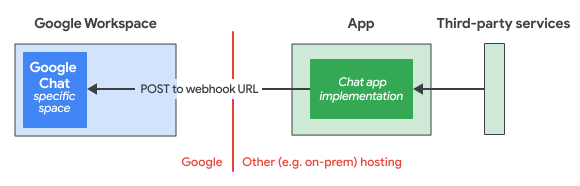
使用传入的网络钩子向 Chat 发送异步消息的架构。

在上图中,Chat 应用具有以下信息流:

  1. Chat 应用逻辑从外部第三方服务(例如项目管理系统或工单系统)接收信息。
  2. Chat 应用逻辑托管在云端或本地系统中,该系统可以使用网络钩子网址向特定 Chat 聊天室发送消息。
  3. 用户可以在该特定 Chat 聊天室中接收来自 Chat 应用的消息,但无法与 Chat 应用互动。

前提条件

Node.js

Python

  • 拥有 Google Workspace访问权限的 Business 或 Enterprise 账号,可访问 Google Chat。 您的 Google Workspace 组织必须允许用户 添加和使用传入的网络钩子
  • Python 3.6 或更高版本
  • pip 软件包管理工具
  • httplib2 库。如需安装该库,请在命令行界面中运行以下命令:

    pip install httplib2
  • Google Chat 聊天室。如需使用 Google Chat API 创建聊天室,请参阅 创建聊天室。如需在 Chat 中创建聊天室, 请访问 帮助中心文档

Java

Apps 脚本

创建网络钩子

如需创建网络钩子,请在要接收消息的 Chat 聊天室中注册该网络钩子,然后编写一个发送消息的脚本。

注册传入的网络钩子

  1. 在浏览器中,打开 Chat。 无法通过 Chat 移动应用配置网络钩子。
  2. 前往要添加网络钩子的聊天室。
  3. 点击聊天室标题旁边的 展开更多箭头,然后点击应用和集成
  4. 点击 添加网络钩子

  5. 名称 字段中,输入 Quickstart Webhook

  6. 头像网址 字段中,输入 https://developers.google.com/chat/images/chat-product-icon.png

  7. 点击保存

  8. 如需复制网络钩子网址,请依次点击 更多复制链接

    网络钩子网址包含两个参数:key(网络钩子之间共享的通用值)和 token(必须保密的唯一值,以确保网络钩子的安全性)。

编写网络钩子脚本

示例网络钩子脚本通过向网络钩子网址发送 POST 请求,向注册网络钩子的聊天室发送消息。Chat API 会使用 Message实例进行响应。

选择一种语言,了解如何创建网络钩子脚本:

Node.js

  1. 在工作目录中,创建一个名为 index.js 的文件。

  2. index.js 中,粘贴以下代码:

    solutions/webhook-chat-app/index.js
    /**
     * Sends asynchronous message to Google Chat
     * @return {Object} response
     */
    async function webhook() {
      const url = "https://chat.googleapis.com/v1/spaces/SPACE_ID/messages?key=KEY&token=TOKEN"
      const res = await fetch(url, {
        method: "POST",
        headers: {"Content-Type": "application/json; charset=UTF-8"},
        body: JSON.stringify({
          text: "Hello from a Node script!"
        })
      });
      return await res.json();
    }
    
    webhook().then(res => console.log(res));
  3. url 变量的值替换为您在注册网络钩子时复制的网络钩子网址。

Python

  1. 在工作目录中,创建一个名为 quickstart.py 的文件。

  2. quickstart.py 中,粘贴以下代码:

    solutions/webhook-chat-app/quickstart.py
    from json import dumps
    from httplib2 import Http
    
    # Copy the webhook URL from the Chat space where the webhook is registered.
    # The values for SPACE_ID, KEY, and TOKEN are set by Chat, and are included
    # when you copy the webhook URL.
    
    def main():
        """Google Chat incoming webhook quickstart."""
        url = "https://chat.googleapis.com/v1/spaces/SPACE_ID/messages?key=KEY&token=TOKEN"
        app_message = {
            "text": "Hello from a Python script!"
        }
        message_headers = {"Content-Type": "application/json; charset=UTF-8"}
        http_obj = Http()
        response = http_obj.request(
            uri=url,
            method="POST",
            headers=message_headers,
            body=dumps(app_message),
        )
        print(response)
    
    
    if __name__ == "__main__":
        main()
  3. url 变量的值替换为您在注册网络钩子时复制的网络钩子网址。

Java

  1. 在工作目录中,创建一个名为 pom.xml 的文件。

  2. pom.xml 中,复制并粘贴以下内容:

    solutions/webhook-chat-app/pom.xml
    <project xmlns="http://maven.apache.org/POM/4.0.0" xmlns:xsi="http://www.w3.org/2001/XMLSchema-instance"
      xsi:schemaLocation="http://maven.apache.org/POM/4.0.0 http://maven.apache.org/xsd/maven-4.0.0.xsd">
      <modelVersion>4.0.0</modelVersion>
    
      <groupId>com.google.chat.webhook</groupId>
      <artifactId>webhook-app</artifactId>
      <version>0.1.0</version>
      <name>webhook-app</name>
    
      <properties>
        <maven.compiler.target>11</maven.compiler.target>
        <maven.compiler.source>11</maven.compiler.source>
      </properties>
    
      <dependencies>
        <dependency>
            <groupId>com.google.code.gson</groupId>
            <artifactId>gson</artifactId>
            <version>2.9.1</version>
        </dependency>
      </dependencies>
    
      <build>
        <pluginManagement>
          <plugins>
            <plugin>
              <artifactId>maven-compiler-plugin</artifactId>
              <version>3.8.0</version>
            </plugin>
          </plugins>
        </pluginManagement>
      </build>
    </project>
  3. 在工作目录中,创建以下目录结构 src/main/java

  4. src/main/java 目录中,创建一个名为 App.java 的文件。

  5. App.java 中,粘贴以下代码:

    solutions/webhook-chat-app/src/main/java/com/google/chat/webhook/App.java
    import com.google.gson.Gson;
    import java.net.http.HttpClient;
    import java.net.http.HttpRequest;
    import java.net.http.HttpResponse;
    import java.util.Map;
    import java.net.URI;
    
    public class App {
      private static final String URL = "https://chat.googleapis.com/v1/spaces/SPACE_ID/messages?key=KEY&token=TOKEN";
      private static final Gson gson = new Gson();
      private static final HttpClient client = HttpClient.newHttpClient();
    
      public static void main(String[] args) throws Exception {
        String message = gson.toJson(Map.of(
          "text", "Hello from Java!"
        ));
    
        HttpRequest request = HttpRequest.newBuilder(URI.create(URL))
          .header("accept", "application/json; charset=UTF-8")
          .POST(HttpRequest.BodyPublishers.ofString(message)).build();
    
        HttpResponse<String> response = client.send(request, HttpResponse.BodyHandlers.ofString());
    
        System.out.println(response.body());
      }
    }
  6. URL 变量的值替换为您在注册网络钩子时复制的网络钩子网址。

Apps 脚本

  1. 在浏览器中,前往 Apps 脚本

  2. 点击新建项目

  3. 粘贴以下代码:

    solutions/webhook-chat-app/webhook.gs
    function webhook() {
      const url = "https://chat.googleapis.com/v1/spaces/SPACE_ID/messages?key=KEY&token=TOKEN"
      const options = {
        "method": "post",
        "headers": {"Content-Type": "application/json; charset=UTF-8"},
        "payload": JSON.stringify({
          "text": "Hello from Apps Script!"
        })
      };
      const response = UrlFetchApp.fetch(url, options);
      console.log(response);
    }
  4. url 变量的值替换为您在注册网络钩子时复制的网络钩子网址。

运行网络钩子脚本

在 CLI 中,运行以下脚本:

Node.js

  node index.js

Python

  python3 quickstart.py

Java

  mvn compile exec:java -Dexec.mainClass=App

Apps 脚本

  • 点击运行

运行代码后,网络钩子会向您注册的聊天室发送消息。

发起或回复消息串

  1. spaces.messages.thread.threadKey 指定为消息请求正文的一部分。根据您是发起还是回复消息串,为 threadKey 使用以下值:

    • 如果是发起消息串,请将 threadKey 设置为任意字符串,但请记下此值,以便向该消息串发布回复。

    • 如果是回复消息串,请指定在发起消息串时设置的 threadKey。例如,如需向初始消息使用 MY-THREAD 的消息串发布回复,请设置 MY-THREAD

  2. 定义在找不到指定的 threadKey 时消息串的行为:

    • 回复消息串或发起新消息串。将 messageReplyOption=REPLY_MESSAGE_FALLBACK_TO_NEW_THREAD 参数添加到网络钩子网址。传递此网址参数会导致 Chat 使用指定的 threadKey 查找现有消息串。如果找到,则消息会作为对该消息串的回复发布。如果未找到,则消息会发起与该 threadKey 对应的新消息串。

    • 回复消息串或不执行任何操作。将 messageReplyOption=REPLY_MESSAGE_OR_FAIL 参数添加到网络钩子网址。 传递此网址参数会导致 Chat 使用指定的 threadKey 查找现有消息串。如果找到,则消息会作为对该消息串的回复发布。如果未找到,则不会发送消息。

    如需了解详情,请参阅 messageReplyOption

以下代码示例用于发起或回复消息串:

Node.js

solutions/webhook-chat-app/thread-reply.js
/**
 * Sends asynchronous message to Google Chat
 * @return {Object} response
 */
async function webhook() {
  const url = "https://chat.googleapis.com/v1/spaces/SPACE_ID/messages?key=KEY&token=TOKEN&messageReplyOption=REPLY_MESSAGE_FALLBACK_TO_NEW_THREAD"
  const res = await fetch(url, {
    method: "POST",
    headers: {"Content-Type": "application/json; charset=UTF-8"},
    body: JSON.stringify({
      text: "Hello from a Node script!",
      thread: {
        threadKey: "THREAD_KEY_VALUE"
      }
    })
  });
  return await res.json();
}

webhook().then(res => console.log(res));

Python

solutions/webhook-chat-app/thread-reply.py
from json import dumps
from httplib2 import Http

# Copy the webhook URL from the Chat space where the webhook is registered.
# The values for SPACE_ID, KEY, and TOKEN are set by Chat, and are included
# when you copy the webhook URL.
#
# Then, append messageReplyOption=REPLY_MESSAGE_FALLBACK_TO_NEW_THREAD to the
# webhook URL.


def main():
    """Google Chat incoming webhook that starts or replies to a message thread."""
    url = "https://chat.googleapis.com/v1/spaces/SPACE_ID/messages?key=KEY&token=TOKEN&messageReplyOption=REPLY_MESSAGE_FALLBACK_TO_NEW_THREAD"
    app_message = {
        "text": "Hello from a Python script!",
        # To start a thread, set threadKey to an arbitratry string.
        # To reply to a thread, specify that thread's threadKey value.
        "thread": {
            "threadKey": "THREAD_KEY_VALUE"
        },
    }
    message_headers = {"Content-Type": "application/json; charset=UTF-8"}
    http_obj = Http()
    response = http_obj.request(
        uri=url,
        method="POST",
        headers=message_headers,
        body=dumps(app_message),
    )
    print(response)


if __name__ == "__main__":
    main()

Java

solutions/webhook-chat-app/src/main/java/com/google/chat/webhook/AppThread.java
import com.google.gson.Gson;
import java.net.http.HttpClient;
import java.net.http.HttpRequest;
import java.net.http.HttpResponse;
import java.util.Map;
import java.net.URI;

public class App {
  private static final String URL = "https://chat.googleapis.com/v1/spaces/SPACE_ID/messages?key=KEY&token=TOKEN&messageReplyOption=REPLY_MESSAGE_FALLBACK_TO_NEW_THREAD";
  private static final Gson gson = new Gson();
  private static final HttpClient client = HttpClient.newHttpClient();

  public static void main(String[] args) throws Exception {
    String message = gson.toJson(Map.of(
      "text", "Hello from Java!",
      "thread", Map.of(
        "threadKey", "THREAD_KEY_VALUE"
      )
    ));

    HttpRequest request = HttpRequest.newBuilder(URI.create(URL))
      .header("accept", "application/json; charset=UTF-8")
      .POST(HttpRequest.BodyPublishers.ofString(message)).build();

    HttpResponse<String> response = client.send(request, HttpResponse.BodyHandlers.ofString());

    System.out.println(response.body());
  }
}

Apps 脚本

solutions/webhook-chat-app/thread-reply.gs
function webhook() {
  const url = "https://chat.googleapis.com/v1/spaces/SPACE_ID/messages?key=KEY&token=TOKEN&messageReplyOption=REPLY_MESSAGE_FALLBACK_TO_NEW_THREAD"
  const options = {
    "method": "post",
    "headers": {"Content-Type": "application/json; charset=UTF-8"},
    "payload": JSON.stringify({
      "text": "Hello from Apps Script!",
      "thread": {
        "threadKey": "THREAD_KEY_VALUE"
      }
    })
  };
  const response = UrlFetchApp.fetch(url, options);
  console.log(response);
}

处理错误

网络钩子请求可能会因多种原因而失败,包括:

  • 请求无效。
  • 网络钩子或托管网络钩子的聊天室被删除。
  • 间歇性问题,例如网络连接或配额限制。

构建网络钩子时,您应通过以下方式妥善处理错误:

  • 记录失败。
  • 对于基于时间、配额或网络连接的错误, 使用指数退避算法重试请求
  • 不执行任何操作,如果发送网络钩子消息并不重要,则适合这样做。

Google Chat API 会将错误作为 google.rpc.Status返回, 其中包含一个 HTTP 错误 code,用于指明遇到的错误类型:客户端错误(400 系列)或服务器错误(500 系列)。如需查看所有 HTTP 映射,请参阅 google.rpc.Code

{
    "code": 503,
    "message": "The service is currently unavailable.",
    "status": "UNAVAILABLE"
}

如需了解如何解读 HTTP 状态代码和处理错误,请参阅 错误

限制和注意事项

  • 使用 Google Chat API 中的网络钩子创建消息 时,响应不包含完整消息。 响应仅填充 namethread.name 字段。
  • 网络钩子受 spaces.messages.create 的每个聊天室配额限制:每秒 1 个请求,在聊天室中的所有网络钩子之间共享。 Chat 也可能会拒绝在同一聊天室中每秒超过 1 次查询的网络钩子请求。如需详细了解 Chat API 配额,请参阅使用限制