

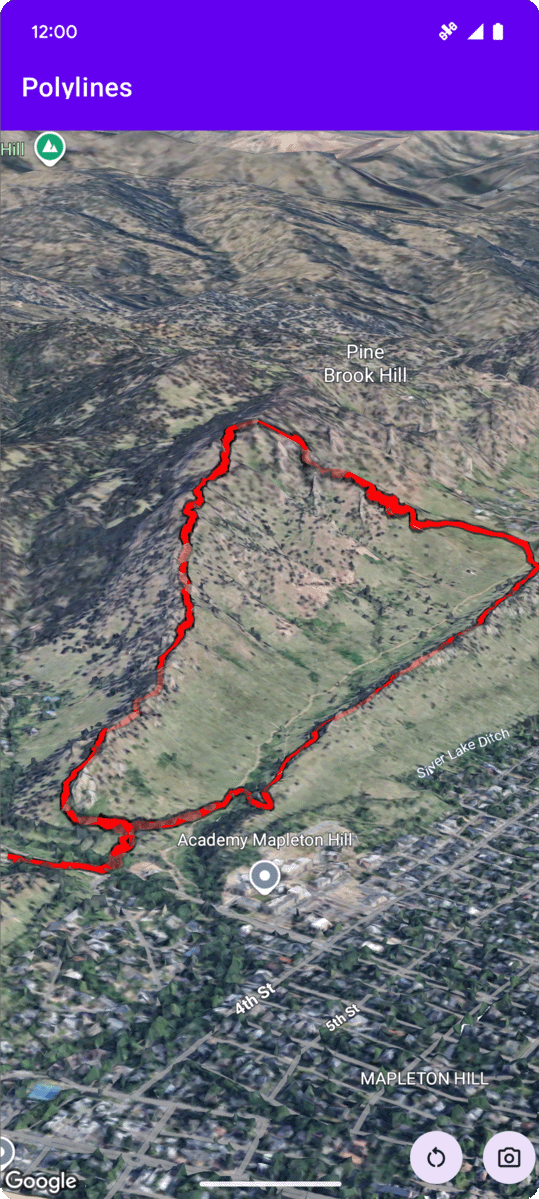
다음 코드 샘플은 addPolyline 메서드를 호출하여 다중선을 추가하고 3D 공간에 배치하는 방법을 보여줍니다. 이 코드 샘플을 사용하려면 설정 및 앱에 3D 지도 추가의 안내에 따라 기본 3D 지도로 Android 스튜디오 프로젝트를 설정하세요. 그런 다음 MainActivity.kt 파일에 다음 코드를 추가합니다.
// Add imports
import com.google.android.gms.maps3d.model.latLngAltitude

...

// Add to the onMap3DViewReady method, after the googleMap3D object has been initialized
googleMap3D.setCamera(
    camera {
        center = latLngAltitude {
            latitude = 40.029349
            longitude = -105.300354
            altitude = 1833.9
        }
        heading = 326.0
        tilt = 75.0
        range = 3757.0
    }
)
internal val trailLocations = """
    40.0201040, -105.2976640
    40.0201080, -105.2976450
    40.0201640, -105.2975120
    40.0202200, -105.2973740
    40.0202500, -105.2972760
    40.0202960, -105.2971410
    40.0203080, -105.2970990
    40.0203320, -105.2970070
    40.0203640, -105.2969400
    40.0203710, -105.2969250
    40.0203770, -105.2969220
    40.0203910, -105.2969130
    40.0203940, -105.2969120
    40.0204200, -105.2969130
    40.0204630, -105.2968910
    40.0205270, -105.2968280
    40.0206030, -105.2967570
    40.0206590, -105.2966100
    40.0206990, -105.2964870
""".trimIndent().split("\n").map {
    val (lat, lng) = it.split(",")
    latLngAltitude {
        latitude = lat.toDouble()
        longitude = lng.toDouble()
        altitude = 0.0  // The trail will be clamped to the ground
    }
}

val trailPolylineOptions = polylineOptions {
    coordinates = trailLocations
    strokeColor = Color.RED
    strokeWidth = 7.0
    altitudeMode = AltitudeMode.CLAMP_TO_GROUND
    zIndex = 5
    drawsOccludedSegments = true
}

googleMap3D.addPolyline(trailPolylineOptions)
다중선 클릭 이벤트 수신 대기
다중선의 클릭 이벤트를 수신하려면 다중선 객체에서 setClickListener를 호출합니다. 다음 예에서는 다중선에 클릭 리스너를 설정하는 방법을 보여줍니다.
polyline.setClickListener {
    lifecycleScope.launch(Dispatchers.Main) {
        Toast.makeText(this@PolylinesActivity, "Hiking time!", Toast.LENGTH_SHORT).show()
    }
}
클릭 핸들러는 기본 스레드 (또는 UI 스레드)에서 실행되지 않습니다. UI를 변경하려면 (예: Toast 메시지 표시) 기본 스레드로 전환해야 합니다. Kotlin의 경우 lifecycleScope.launch(Dispatchers.Main)를 사용하여 이 작업을 수행할 수 있습니다.