使用 Pub/Sub 构建在防火墙后的 Google Chat 应用

本页面介绍了如何使用 Pub/Sub创建 Chat 应用。如果您的组织有防火墙(这可能会阻止 Chat 向您的 Chat 应用发送消息),或者 Chat 应用使用 Google Workspace Events API,则这种 Chat 应用架构非常有用 。不过,由于这些 Chat 应用只能发送和接收 异步消息,因此这种 架构存在以下限制:

  • 无法在消息中使用对话框 。请改用 卡片消息
  • 无法使用同步响应更新单个卡片。请改为通过调用 patch 方法更新整个消息。

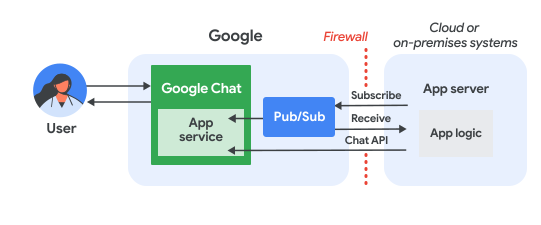
下图展示了使用 Pub/Sub 构建的 Chat 应用的架构:

使用 Pub/Sub 实现的 Chat 应用的架构。

在上图中,与 Pub/Sub Chat 应用交互的用户具有以下信息流:

  1. 用户在 Chat 中向 Chat 应用发送消息(通过私信或在 Chat 聊天室中),或者 Chat 聊天室中发生 Chat 应用具有有效 订阅的事件。

  2. Chat 将消息发送到 Pub/Sub 主题。

  3. 应用服务器(即包含 Chat 应用逻辑的云端或本地系统)订阅 Pub/Sub 主题,以便通过防火墙接收消息。

  4. (可选)Chat 应用可以调用 Chat API 以异步发布消息或执行其他操作。

前提条件

构建 Chat 应用时,您必须在 Google Cloud 控制台的 Chat API 配置页面中取消选中将此 Chat 应用构建为 Google Workspace 插件 。请参阅 将应用发布到 Google Chat

Node.js

Python

Java

设置环境

在使用 Google API 之前,您需要在 Google 云项目中启用它们。您可以在单个 Google Cloud 项目中启用一个或多个 API。
  • 在 Google Cloud 控制台中,启用 Google Chat API 和 Pub/Sub API。

    启用 API

设置 Pub/Sub

  1. 创建一个 Pub/Sub 主题 Chat API 可以向其发送消息。我们建议您为每个 Chat 应用使用一个主题。

  2. 通过向以下服务账号分配 Pub/Sub Publisher 角色,授予 Chat 向该主题发布消息的权限:

    chat-api-push@system.gserviceaccount.com
    
  3. 为 Chat 应用 创建一个服务账号,以便使用 Pub/Sub 和 Chat 进行授权,并将私钥文件保存到工作目录。

  4. 创建拉取订阅 为该主题。

  5. 为之前创建的服务账号分配订阅的 Pub/Sub 订阅者角色

编写脚本

Node.js

  1. 在 CLI 中,提供服务账号凭据

    export GOOGLE_APPLICATION_CREDENTIALS=SERVICE_ACCOUNT_FILE_PATH
    
  2. 在 CLI 中,提供 Google Cloud 项目 ID:

    export PROJECT_ID=PROJECT_ID
    
  3. 在 CLI 中,提供您之前创建的 Pub/Sub 订阅的订阅 ID:

    export SUBSCRIPTION_ID=SUBSCRIPTION_ID
    
  4. 在工作目录中,创建一个名为 package.json 的文件。

  5. package.json 文件中,粘贴以下代码:

    node/pub-sub-app/package.json
    {
      "name": "pub-sub-app",
      "version": "1.0.0",
      "description": "Google Chat App that listens for messages via Cloud Pub/Sub",
      "main": "index.js",
      "scripts": {
        "start": "node index.js",
        "test": "echo \"Error: no test specified\" && exit 1"
      },
      "dependencies": {
        "@google-apps/chat": "^0.4.0",
        "@google-cloud/pubsub": "^4.5.0"
      },
      "license": "Apache-2.0"
    }
  6. 在工作目录中,创建一个名为 index.js 的文件。

  7. index.js 中,粘贴以下代码:

    node/pub-sub-app/index.js
    const {ChatServiceClient} = require('@google-apps/chat');
    const {MessageReplyOption} = require('@google-apps/chat').protos.google.chat.v1.CreateMessageRequest;
    const {PubSub} = require('@google-cloud/pubsub');
    const {SubscriberClient} = require('@google-cloud/pubsub/build/src/v1');
    
    // Receives messages from a pull subscription.
    function receiveMessages() {
      const chat = new ChatServiceClient({
        keyFile: process.env.GOOGLE_APPLICATION_CREDENTIALS,
        scopes: ['https://www.googleapis.com/auth/chat.bot'],
      });
    
      const subscriptionPath = new SubscriberClient()
        .subscriptionPath(process.env.PROJECT_ID, process.env.SUBSCRIPTION_ID)
      const subscription = new PubSub()
        .subscription(subscriptionPath);
    
      // Handle incoming message, then ack/nack the received message
      const messageHandler = message => {
        console.log(`Id : ${message.id}`);
        const event = JSON.parse(message.data);
        console.log(`Data : ${JSON.stringify(event)}`);
    
        // Post the response to Google Chat.
        const request = formatRequest(event);
        if (request != null) {
          chat.createMessage(request);
        }
    
        // Ack the message.
        message.ack();
      }
    
      subscription.on('message', messageHandler);
      console.log(`Listening for messages on ${subscriptionPath}`);
    
      // Keep main thread from exiting while waiting for messages
      setTimeout(() => {
        subscription.removeListener('message', messageHandler);
        console.log(`Stopped listening for messages.`);
      }, 60 * 1000);
    }
    
    // Send message to Google Chat based on the type of event
    function formatRequest(event) {
      const spaceName = event.space.name;
      const eventType = event.type;
    
      // If the app was removed, we don't respond.
      if (event.type == 'REMOVED_FROM_SPACE') {
        console.log(`App removed rom space ${spaceName}`);
        return null;
      } else if (eventType == 'ADDED_TO_SPACE' && !eventType.message) {
        // An app can also be added to a space by @mentioning it in a
        // message. In that case, we fall through to the message case
        // and let the app respond. If the app was added using the
        // invite flow, we just post a thank you message in the space.
        return {
          parent: spaceName,
          message: { text: 'Thank you for adding me!' }
        };
      } else if (eventType == 'ADDED_TO_SPACE' || eventType == 'MESSAGE') {
        // In case of message, post the response in the same thread.
        return {
          parent: spaceName,
          messageReplyOption: MessageReplyOption.REPLY_MESSAGE_FALLBACK_TO_NEW_THREAD,
          message: {
            text: 'You said: `' + event.message.text + '`',
            thread: { name: event.message.thread.name }
          }
        };
      }
    }
    
    if (!process.env.PROJECT_ID) {
      console.log('Missing PROJECT_ID env var.');
      process.exit(1);
    }
    if (!process.env.SUBSCRIPTION_ID) {
      console.log('Missing SUBSCRIPTION_ID env var.');
      process.exit(1);
    }
    if (!process.env.GOOGLE_APPLICATION_CREDENTIALS) {
      console.log('Missing GOOGLE_APPLICATION_CREDENTIALS env var.');
      process.exit(1);
    }
    
    receiveMessages();

Python

  1. 在 CLI 中,提供服务账号凭据

    export GOOGLE_APPLICATION_CREDENTIALS=SERVICE_ACCOUNT_FILE_PATH
    
  2. 在 CLI 中,提供 Google Cloud 项目 ID:

    export PROJECT_ID=PROJECT_ID
    
  3. 在 CLI 中,提供您之前创建的 Pub/Sub 订阅的订阅 ID:

    export SUBSCRIPTION_ID=SUBSCRIPTION_ID
    
  4. 在工作目录中,创建一个名为 requirements.txt 的文件。

  5. requirements.txt 文件中,粘贴以下代码:

    python/pub-sub-app/requirements.txt
    google-cloud-pubsub>=2.23.0
    google-apps-chat==0.1.9
  6. 在工作目录中,创建一个名为 app.py 的文件。

  7. app.py 中,粘贴以下代码:

    python/pub-sub-app/app.py
    import json
    import logging
    import os
    import sys
    import time
    from google.apps import chat_v1 as google_chat
    from google.cloud import pubsub_v1
    from google.oauth2.service_account import Credentials
    
    
    def receive_messages():
      """Receives messages from a pull subscription."""
    
      scopes = ['https://www.googleapis.com/auth/chat.bot']
      service_account_key_path = os.environ.get(
        'GOOGLE_APPLICATION_CREDENTIALS')
      creds = Credentials.from_service_account_file(
        service_account_key_path)
      chat = google_chat.ChatServiceClient(
        credentials = creds,
        client_options = {
          "scopes": scopes
        })
    
      project_id = os.environ.get('PROJECT_ID')
      subscription_id = os.environ.get('SUBSCRIPTION_ID')
      subscriber = pubsub_v1.SubscriberClient()
      subscription_path = subscriber.subscription_path(
          project_id, subscription_id)
    
      # Handle incoming message, then ack/nack the received message
      def callback(message):
        event = json.loads(message.data)
        logging.info('Data : %s', event)
        space_name = event['space']['name']
    
        # Post the response to Google Chat.
        request = format_request(event)
        if request is not None:
          chat.create_message(request)
    
        # Ack the message.
        message.ack()
    
      subscriber.subscribe(subscription_path, callback = callback)
      logging.info('Listening for messages on %s', subscription_path)
    
      # Keep main thread from exiting while waiting for messages
      while True:
        time.sleep(60)
    
    
    def format_request(event):
      """Send message to Google Chat based on the type of event.
      Args:
        event: A dictionary with the event data.
      """
      space_name = event['space']['name']
      event_type = event['type']
    
      # If the app was removed, we don't respond.
      if event['type'] == 'REMOVED_FROM_SPACE':
        logging.info('App removed rom space %s', space_name)
        return
      elif event_type == 'ADDED_TO_SPACE' and 'message' not in event:
        # An app can also be added to a space by @mentioning it in a
        # message. In that case, we fall through to the message case
        # and let the app respond. If the app was added using the
        # invite flow, we just post a thank you message in the space.
        return google_chat.CreateMessageRequest(
            parent = space_name,
            message = {
              'text': 'Thank you for adding me!'
            }
        )
      elif event_type in ['ADDED_TO_SPACE', 'MESSAGE']:
        # In case of message, post the response in the same thread.
        return google_chat.CreateMessageRequest(
            parent = space_name,
            message_reply_option = google_chat.CreateMessageRequest.MessageReplyOption.REPLY_MESSAGE_FALLBACK_TO_NEW_THREAD,
            message = {
              'text': 'You said: `' + event['message']['text'] + '`',
              'thread': {
                'name': event['message']['thread']['name']
              }
            }
        )
    
    
    if __name__ == '__main__':
      if 'PROJECT_ID' not in os.environ:
        logging.error('Missing PROJECT_ID env var.')
        sys.exit(1)
    
      if 'SUBSCRIPTION_ID' not in os.environ:
        logging.error('Missing SUBSCRIPTION_ID env var.')
        sys.exit(1)
    
      if 'GOOGLE_APPLICATION_CREDENTIALS' not in os.environ:
        logging.error('Missing GOOGLE_APPLICATION_CREDENTIALS env var.')
        sys.exit(1)
    
      logging.basicConfig(
          level=logging.INFO,
          style='{',
          format='{levelname:.1}{asctime} {filename}:{lineno}] {message}')
      receive_messages()

Java

  1. 在 CLI 中,提供服务账号凭据

    export GOOGLE_APPLICATION_CREDENTIALS=SERVICE_ACCOUNT_FILE_PATH
    
  2. 在 CLI 中,提供 Google Cloud 项目 ID:

    export PROJECT_ID=PROJECT_ID
    
  3. 在 CLI 中,提供您之前创建的 Pub/Sub 订阅的订阅 ID:

    export SUBSCRIPTION_ID=SUBSCRIPTION_ID
    
  4. 在工作目录中,创建一个名为 pom.xml 的文件。

  5. pom.xml 文件中,粘贴以下代码:

    java/pub-sub-app/pom.xml
    <project xmlns="http://maven.apache.org/POM/4.0.0" xmlns:xsi="http://www.w3.org/2001/XMLSchema-instance"
    xsi:schemaLocation="http://maven.apache.org/POM/4.0.0 http://maven.apache.org/xsd/maven-4.0.0.xsd">
      <modelVersion>4.0.0</modelVersion>
    
      <groupId>com.google.chat</groupId>
      <artifactId>pub-sub-app</artifactId>
      <version>0.1.0</version>
    
      <name>pub-sub-app-java</name>
    
      <properties>
        <maven.compiler.release>21</maven.compiler.release>
        <maven.compiler.source>1.8</maven.compiler.source>
        <maven.compiler.target>1.8</maven.compiler.target>
      </properties>
    
      <dependencies>
        <!-- Google Chat GAPIC library -->
        <dependency>
          <groupId>com.google.api.grpc</groupId>
          <artifactId>proto-google-cloud-chat-v1</artifactId>
          <version>0.8.0</version>
        </dependency>
        <dependency>
          <groupId>com.google.api</groupId>
          <artifactId>gax</artifactId>
          <version>2.48.1</version>
        </dependency>
        <dependency>
          <groupId>com.google.cloud</groupId>
          <artifactId>google-cloud-chat</artifactId>
          <version>0.1.0</version>
        </dependency>
        <!-- Google Cloud Pub/Sub library -->
        <dependency>
          <groupId>com.google.cloud</groupId>
          <artifactId>google-cloud-pubsub</artifactId>
        <version>1.125.8</version>
        </dependency>
        <!-- JSON utilities -->
        <dependency>
          <groupId>com.fasterxml.jackson.core</groupId>
          <artifactId>jackson-databind</artifactId>
          <version>2.14.2</version>
        </dependency>
      </dependencies>
    
    </project>
  6. 在工作目录中,创建目录结构 src/main/java

  7. src/main/java 目录中,创建一个名为 Main.java 的文件。

  8. Main.java 中,粘贴以下代码:

    java/pub-sub-app/src/main/java/Main.java
    import com.fasterxml.jackson.databind.JsonNode;
    import com.fasterxml.jackson.databind.ObjectMapper;
    import com.google.api.gax.core.FixedCredentialsProvider;
    import com.google.auth.oauth2.GoogleCredentials;
    import com.google.chat.v1.ChatServiceClient;
    import com.google.chat.v1.ChatServiceSettings;
    import com.google.chat.v1.CreateMessageRequest;
    import com.google.chat.v1.CreateMessageRequest.MessageReplyOption;
    import com.google.chat.v1.Message;
    import com.google.chat.v1.Thread;
    import com.google.cloud.pubsub.v1.AckReplyConsumer;
    import com.google.cloud.pubsub.v1.MessageReceiver;
    import com.google.cloud.pubsub.v1.Subscriber;
    import com.google.pubsub.v1.ProjectSubscriptionName;
    import com.google.pubsub.v1.PubsubMessage;
    import java.io.FileInputStream;
    import java.util.Collections;
    
    public class Main {
    
      public static final String PROJECT_ID_ENV_PROPERTY = "PROJECT_ID";
      public static final String SUBSCRIPTION_ID_ENV_PROPERTY = "SUBSCRIPTION_ID";
      public static final String CREDENTIALS_PATH_ENV_PROPERTY = "GOOGLE_APPLICATION_CREDENTIALS";
    
      public static void main(String[] args) throws Exception {
        ProjectSubscriptionName subscriptionName = ProjectSubscriptionName.of(
          System.getenv(Main.PROJECT_ID_ENV_PROPERTY),
          System.getenv(Main.SUBSCRIPTION_ID_ENV_PROPERTY));
    
        // Instantiate app, which implements an asynchronous message receiver.
        EchoApp echoApp = new EchoApp();
    
        // Create a subscriber for <var>SUBSCRIPTION_ID</var> bound to the message receiver
        final Subscriber subscriber = Subscriber.newBuilder(subscriptionName, echoApp).build();
        System.out.println("Subscriber is listening to events...");
        subscriber.startAsync();
    
        // Wait for termination
        subscriber.awaitTerminated();
      }
    }
    
    /**
     * A demo app which implements {@link MessageReceiver} to receive messages. It simply echoes the
     * incoming messages.
     */
    class EchoApp implements MessageReceiver {
    
      // Path to the private key JSON file of the service account to be used for posting response
      // messages to Google Chat.
      // In this demo, we are using the same service account for authorizing with Cloud Pub/Sub to
      // receive messages and authorizing with Google Chat to post messages. If you are using
      // different service accounts, please set the path to the private key JSON file of the service
      // account used to post messages to Google Chat here.
      private static final String SERVICE_ACCOUNT_KEY_PATH =
        System.getenv(Main.CREDENTIALS_PATH_ENV_PROPERTY);
    
      // Developer code for Google Chat API scope.
      private static final String GOOGLE_CHAT_API_SCOPE = "https://www.googleapis.com/auth/chat.bot";
    
      private static final String ADDED_RESPONSE = "Thank you for adding me!";
    
      ChatServiceClient chatServiceClient;
    
      EchoApp() throws Exception {
        GoogleCredentials credential = GoogleCredentials
          .fromStream(new FileInputStream(SERVICE_ACCOUNT_KEY_PATH))
          .createScoped(Collections.singleton(GOOGLE_CHAT_API_SCOPE));
    
        // Create the ChatServiceSettings with the app credentials
        ChatServiceSettings chatServiceSettings = ChatServiceSettings.newBuilder()
          .setCredentialsProvider(FixedCredentialsProvider.create(credential)).build();
    
        // Set the Chat service client
        chatServiceClient = ChatServiceClient.create(chatServiceSettings);
      }
    
      // Called when a message is received by the subscriber.
      @Override
      public void receiveMessage(PubsubMessage pubsubMessage, AckReplyConsumer consumer) {
        System.out.println("Id : " + pubsubMessage.getMessageId());
        // Handle incoming message, then ack/nack the received message
        try {
          ObjectMapper mapper = new ObjectMapper();
          JsonNode dataJson = mapper.readTree(pubsubMessage.getData().toStringUtf8());
          System.out.println("Data : " + dataJson.toString());
          handle(dataJson);
          consumer.ack();
        } catch (Exception e) {
          System.out.println(e);
          consumer.nack();
        }
      }
    
      // Send message to Google Chat based on the type of event.
      public void handle(JsonNode eventJson) throws Exception {
        CreateMessageRequest createMessageRequest;
        switch (eventJson.get("type").asText()) {
          case "ADDED_TO_SPACE":
            // An app can also be added to a space by @mentioning it in a message. In that case, we fall
            // through to the MESSAGE case and let the app respond. If the app was added using the
            // invite flow, we just post a thank you message in the space.
            if (!eventJson.has("message")) {
              createMessageRequest = CreateMessageRequest.newBuilder()
                .setParent(eventJson.get("space").get("name").asText())
                .setMessage(Message.newBuilder().setText(ADDED_RESPONSE).build()).build();
              break;
            }
          case "MESSAGE":
            // In case of message, post the response in the same thread.
            createMessageRequest = CreateMessageRequest.newBuilder()
              .setParent(eventJson.get("space").get("name").asText())
              .setMessageReplyOption(MessageReplyOption.REPLY_MESSAGE_FALLBACK_TO_NEW_THREAD)
              .setMessage(Message.newBuilder()
                .setText("You said: `" + eventJson.get("message").get("text").asText() + "`")
                .setThread(Thread.newBuilder()
                  .setName(eventJson.get("message").get("thread").get("name").asText())
                  .build()).build()).build();
            break;
          case "REMOVED_FROM_SPACE":
          default:
            // Do nothing
            return;
        }
    
        // Post the response to Google Chat.
        chatServiceClient.createMessage(createMessageRequest);
      }
    }

将应用发布到 Chat

  1. 在 Google Cloud 控制台中,依次前往菜单 > API 和服务 > 已启用的 API 和服务 > Google Chat API > 配置

    转到“配置”

  2. 为 Pub/Sub 配置 Chat 应用:

    1. 取消选中将此 Chat 应用构建为 Google Workspace 插件 。系统会打开一个对话框,要求您确认。在该对话框中,点击停用
    2. 应用名称 中,输入 Quickstart App
    3. 头像网址 中,输入 https://developers.google.com/chat/images/quickstart-app-avatar.png
    4. 说明 中,输入 Quickstart app
    5. 功能 下,选择加入聊天室和群组对话
    6. 连接设置 下,选择 Cloud Pub/Sub ,然后粘贴您之前创建的 Pub/Sub 主题的 名称。
    7. 公开范围 下,选择面向您网域中的特定人员和群组提供此 Google Chat 应用 ,然后输入您的电子邮件地址。
    8. 日志 下,选择将错误记录到 Logging
  3. 点击保存

该应用已准备好接收和回复 Chat 上的消息。

运行脚本

在 CLI 中,切换到工作目录并运行脚本:

Node.js

npm install
npm start

Python

python -m venv env
source env/bin/activate
pip install -r requirements.txt -U
python app.py

Java

mvn compile exec:java -Dexec.mainClass=Main

运行代码后,应用会开始监听发布到 Pub/Sub 主题的消息。

测试 Chat 应用

如需测试 Chat 应用,请打开与 Chat 应用的私信聊天室并发送消息:

  1. 使用您在添加自己作为受信任的测试人员时提供的 Google Workspace 账号打开 Google Chat。

    前往 Google Chat

  2. 点击 发起新聊天
  3. 添加 1 位或多位用户 字段中,输入 Chat 应用的名称。
  4. 从结果中选择 Chat 应用。系统会打开私信。

  5. 在与该应用的新私信中,输入 Hello 并按 enter 键。

如需添加受信任的测试人员并详细了解如何测试互动功能,请参阅 测试 Google Chat 应用的互动功能

问题排查

当 Google Chat 应用或 卡片返回错误时, Chat 界面会显示“出了点问题。” 或“无法处理您的请求。”有时,Chat 界面 不会显示任何错误消息,但 Chat 应用或 卡片会产生意外结果;例如,卡片消息可能不会 显示。

虽然 Chat 界面中可能不会显示错误消息, 但如果为 Chat 应用启用了错误日志记录,您可以使用描述性错误消息和日志数据来帮助您修复错误 。如需获得有关查看、 调试和修复错误的帮助,请参阅 排查和修复 Google Chat 错误

清理

为避免因本教程中使用的 资源导致您的 Google Cloud 账号产生费用,我们建议您删除 云项目。

  1. 在 Google Cloud 控制台中,前往管理资源 页面。依次点击 菜单 > IAM 和管理 > 管理资源

    转到 Resource Manager

  2. 在项目列表中,选择要删除的项目,然后点击 删除 .
  3. 在对话框中输入项目 ID,然后点击关停 以删除 项目。