为 Google Chat 应用构建首页

本页面介绍了如何为与您的 Google Chat 应用构建首页。首页(在 Google Chat API 中称为 应用首页)是一个可自定义的卡片界面,显示在用户与 Chat 应用之间的 私信空间首页 标签页中。

包含两个 widget 的应用首页卡片。
图 1:显示在与 Chat 应用的私信中的首页示例。

您可以使用应用首页分享与 Chat 应用互动的提示,或让用户从 Chat 访问和使用 外部服务或工具


使用卡片构建器为 Chat 应用设计和预览消息传递和界面:

打开卡片构建器

前提条件

Node.js

一个接收和响应互动事件的 Google Chat 应用。如需使用 互动式 Chat 应用,请完成此 快速入门

Python

一个接收和响应互动事件的 Google Chat 应用。如需使用 互动式 Chat 应用,请完成此 快速入门

Java

一个接收和响应互动事件的 Google Chat 应用。如需使用 互动式 Chat 应用,请完成此 快速入门

Apps 脚本

一个接收和响应互动事件的 Google Chat 应用。如需在 Apps 脚本中创建互动式 Chat 应用,请完成此 快速入门

为 Chat 应用配置应用首页

如需支持应用首页,您必须将 Chat 应用 配置为接收 APP_HOME互动事件。 每当用户 从与 Chat 应用的私信中点击 首页 标签页时,Chat 应用都会收到此事件。

如需在 Google Cloud 控制台中更新配置设置,请执行以下操作:

  1. 在 Google Cloud 控制台中,依次点击菜单 > API 和服务 > 已启用的 API 和服务 > Google Chat API > 配置前往 Chat API 配置
  2. 互动功能下,前往功能部分, 然后选择支持应用首页
  3. 如果 Chat 应用使用 HTTP 服务,请前往 连接设置 ,然后在 应用首页网址 字段中指定端点。您可以使用在 HTTP 端点网址 字段中指定的同一网址。
  4. 点击保存

构建应用首页卡片

当用户打开应用首页时,Chat 应用必须处理 APP_HOME互动事件,方法是返回包含 RenderActions pushCard导航和 Card的实例。为了创建互动体验,该卡片可以包含互动式微件(例如按钮或文本输入),Chat 应用可以处理这些微件并使用其他卡片或对话框做出响应。

在以下示例中,Chat 应用会显示一个初始应用首页卡片,其中显示了卡片的创建时间和按钮。当用户点击该按钮时,Chat 应用会返回一个更新后的卡片,其中显示了更新后的卡片的创建时间。

Node.js

node/app-home/index.js
app.post('/', async (req, res) => {
  let event = req.body.chat;

  let body = {};
  if (event.type === 'APP_HOME') {
    // App home is requested
    body = { action: { navigations: [{
      pushCard: getHomeCard()
    }]}}
  } else if (event.type === 'SUBMIT_FORM') {
    // The update button from app home is clicked
    commonEvent = req.body.commonEventObject;
    if (commonEvent && commonEvent.invokedFunction === 'updateAppHome') {
      body = updateAppHome()
    }
  }

  return res.json(body);
});

// Create the app home card
function getHomeCard() {
  return { sections: [{ widgets: [
    { textParagraph: {
      text: "Here is the app home 🏠 It's " + new Date().toTimeString()
    }},
    { buttonList: { buttons: [{
      text: "Update app home",
      onClick: { action: {
        function: "updateAppHome"
      }}
    }]}}
  ]}]};
}

Python

python/app-home/main.py
@app.route('/', methods=['POST'])
def post() -> Mapping[str, Any]:
  """Handle requests from Google Chat

  Returns:
      Mapping[str, Any]: the response
  """
  event = request.get_json()
  match event['chat'].get('type'):

    case 'APP_HOME':
      # App home is requested
      body = { "action": { "navigations": [{
        "pushCard": get_home_card()
      }]}}

    case 'SUBMIT_FORM':
      # The update button from app home is clicked
      event_object = event.get('commonEventObject')
      if event_object is not None:
        if 'update_app_home' == event_object.get('invokedFunction'):
          body = update_app_home()

    case _:
      # Other response types are not supported
      body = {}

  return json.jsonify(body)


def get_home_card() -> Mapping[str, Any]:
  """Create the app home card

  Returns:
      Mapping[str, Any]: the card
  """
  return { "sections": [{ "widgets": [
    { "textParagraph": {
      "text": "Here is the app home 🏠 It's " +
        datetime.datetime.now().isoformat()
    }},
    { "buttonList": { "buttons": [{
      "text": "Update app home",
      "onClick": { "action": {
        "function": "update_app_home"
      }}
    }]}}
  ]}]}

Java

java/app-home/src/main/java/com/google/chat/app/home/App.java
// Process Google Chat events
@PostMapping("/")
@ResponseBody
public GenericJson onEvent(@RequestBody JsonNode event) throws Exception {
  switch (event.at("/chat/type").asText()) {
    case "APP_HOME":
      // App home is requested
      GenericJson navigation = new GenericJson();
      navigation.set("pushCard", getHomeCard());

      GenericJson action = new GenericJson();
      action.set("navigations", List.of(navigation));

      GenericJson response = new GenericJson();
      response.set("action", action);
      return response;
    case "SUBMIT_FORM":
      // The update button from app home is clicked
      if (event.at("/commonEventObject/invokedFunction").asText().equals("updateAppHome")) {
        return updateAppHome();
      }
  }

  return new GenericJson();
}

// Create the app home card
GoogleAppsCardV1Card getHomeCard() {
  return new GoogleAppsCardV1Card()
    .setSections(List.of(new GoogleAppsCardV1Section()
      .setWidgets(List.of(
        new GoogleAppsCardV1Widget()
          .setTextParagraph(new GoogleAppsCardV1TextParagraph()
            .setText("Here is the app home 🏠 It's " + new Date())),
        new GoogleAppsCardV1Widget()
          .setButtonList(new GoogleAppsCardV1ButtonList().setButtons(List.of(new GoogleAppsCardV1Button()
            .setText("Update app home")
            .setOnClick(new GoogleAppsCardV1OnClick()
              .setAction(new GoogleAppsCardV1Action()
                .setFunction("updateAppHome"))))))))));
}

Apps 脚本

实现 onAppHome 函数,该函数会在所有 APP_HOME 互动事件之后调用:

此示例通过返回 卡片 JSON来发送卡片消息。 您还可以使用 Apps 脚本卡片服务

apps-script/app-home/app-home.gs
/**
 * Responds to a APP_HOME event in Google Chat.
 */
function onAppHome() {
  return { action: { navigations: [{
    pushCard: getHomeCard()
  }]}};
}

/**
 * Returns the app home card.
 */
function getHomeCard() {
  return { sections: [{ widgets: [
    { textParagraph: {
      text: "Here is the app home 🏠 It's " + new Date().toTimeString()
    }},
    { buttonList: { buttons: [{
      text: "Update app home",
      onClick: { action: {
        function: "updateAppHome"
      }}
    }]}}
  ]}]};
}

响应应用首页互动

如果初始应用首页卡片包含互动式微件(例如按钮 或选择输入),Chat 应用必须处理 相关互动事件,方法是返回 RenderActions 包含 updateCard 导航的实例。如需详细了解如何处理互动式 微件,请参阅 处理用户输入的信息

在前面的示例中,初始应用首页卡片包含一个按钮。每当 用户点击该按钮时,CARD_CLICKED互动事件 都会触发updateAppHome函数来刷新应用首页卡片,如以下代码所示:

Node.js

node/app-home/index.js
// Update the app home
function updateAppHome() {
  return { renderActions: { action: { navigations: [{
    updateCard: getHomeCard()
  }]}}}
};

Python

python/app-home/main.py
def update_app_home() -> Mapping[str, Any]:
  """Update the app home

  Returns:
      Mapping[str, Any]: the update card render action
  """
  return { "renderActions": { "action": { "navigations": [{
    "updateCard": get_home_card()
  }]}}}

Java

java/app-home/src/main/java/com/google/chat/app/home/App.java
// Update the app home
GenericJson updateAppHome() {
  GenericJson navigation = new GenericJson();
  navigation.set("updateCard", getHomeCard());

  GenericJson action = new GenericJson();
  action.set("navigations", List.of(navigation));

  GenericJson renderActions = new GenericJson();
  renderActions.set("action", action);

  GenericJson response = new GenericJson();
  response.set("renderActions", renderActions);
  return response;
}

Apps 脚本

此示例通过返回 卡片 JSON来发送卡片消息。 您还可以使用 Apps 脚本卡片服务

apps-script/app-home/app-home.gs
/**
 * Updates the home app.
 */
function updateAppHome() {
  return { renderActions: { action: { navigations: [{
    updateCard: getHomeCard()
  }]}}};
}

打开对话框

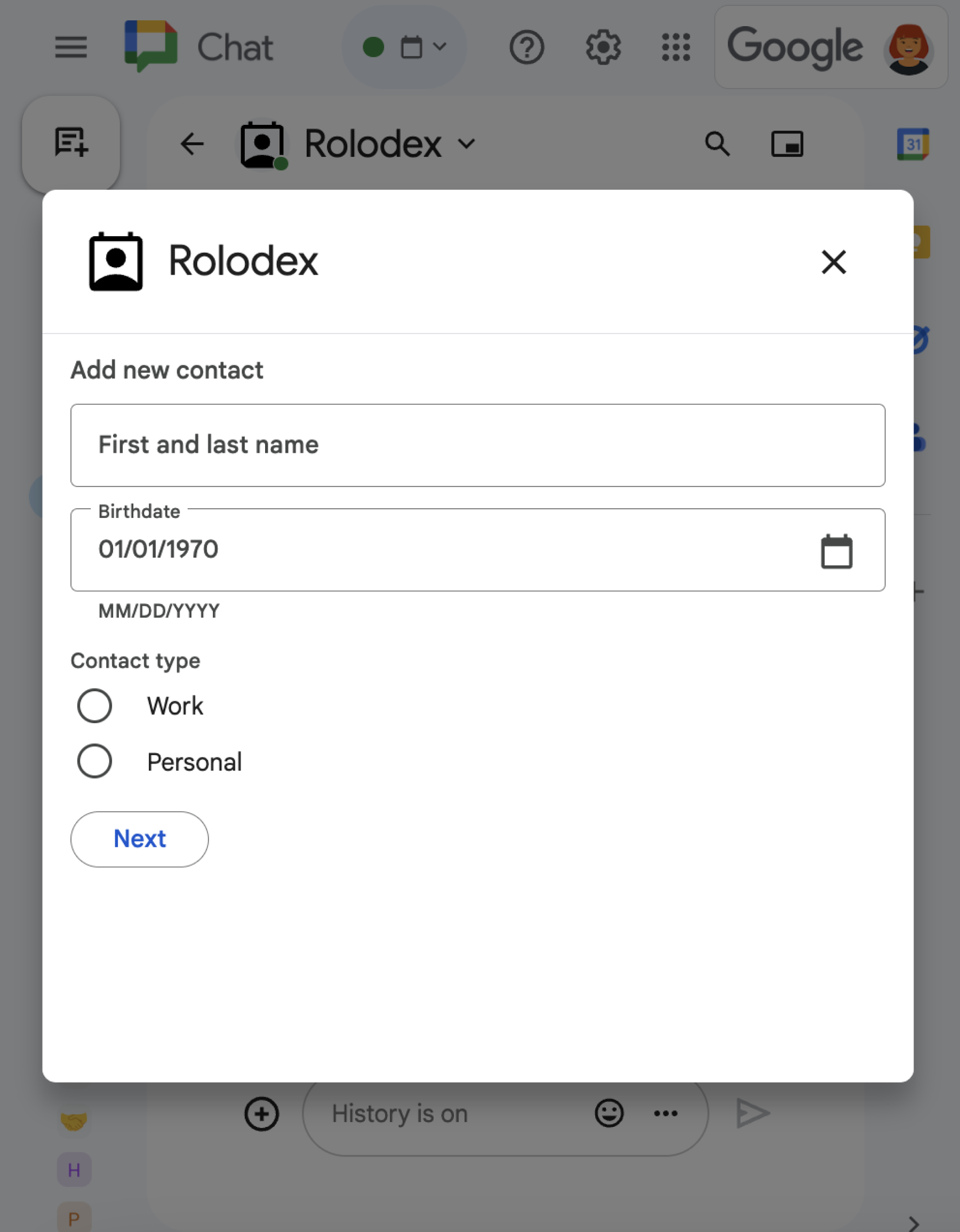
Chat 应用还可以通过打开 对话框来响应应用首页中的互动 。

一个包含各种不同 widget 的对话框。
图 3:提示用户添加联系人的对话框。

如需从应用首页打开对话框,请通过 返回 renderActionsupdateCard 导航来处理相关互动事件,其中包含 Card 对象。在以下示例中,Chat 应用通过处理 CARD_CLICKED 互动事件并打开对话框来响应应用首页卡片中的按钮点击操作:

{ renderActions: { action: { navigations: [{ updateCard: { sections: [{
  header: "Add new contact",
  widgets: [{ "textInput": {
    label: "Name",
    type: "SINGLE_LINE",
    name: "contactName"
  }}, { textInput: {
    label: "Address",
    type: "MULTIPLE_LINE",
    name: "address"
  }}, { decoratedText: {
    text: "Add to favorites",
    switchControl: {
      controlType: "SWITCH",
      name: "saveFavorite"
    }
  }}, { decoratedText: {
    text: "Merge with existing contacts",
    switchControl: {
      controlType: "SWITCH",
      name: "mergeContact",
      selected: true
    }
  }}, { buttonList: { buttons: [{
    text: "Next",
    onClick: { action: { function: "openSequentialDialog" }}
  }]}}]
}]}}]}}}

如需关闭对话框,请处理以下互动事件:

  • CLOSE_DIALOG:关闭对话框并返回到 Chat 应用的初始应用首页卡片。
  • CLOSE_DIALOG_AND_EXECUTE:关闭对话框并刷新应用首页卡片。

以下代码示例使用 CLOSE_DIALOG 关闭对话框并返回到应用首页卡片:

{ renderActions: { action: {
  navigations: [{ endNavigation: { action: "CLOSE_DIALOG" }}]
}}}

如需从用户处收集信息,您还可以构建顺序对话框。如需了解如何构建顺序对话框,请参阅 打开对话框并做出响应