To adopt Android latency and stability improvements, use GMA Next-Gen SDK. This guide covers configuring Google Mobile Ads Unity Plugin to use GMA Next-Gen SDK for Android.
Prerequisites
Before you continue, do the following:
- Install Google Mobile Ads Unity Plugin version 10.6.0 or higher.
- Use Unity version 2019.4 or higher.
- Set up Google Mobile Ads Unity Plugin.
- Have a Unity project.
Update minimum API level to 24
GMA Next-Gen SDK requires a minimum API level of 24. To update the minimum API level, do the following:
- From the menu bar, click File > Build Profiles > Player Settings > Android > Other Settings > Identification.
- Set Minimum API Level to Android 7.0 'Nougat' (API Level 24) or higher.
Modify the dependency file
11.1.0 and higher
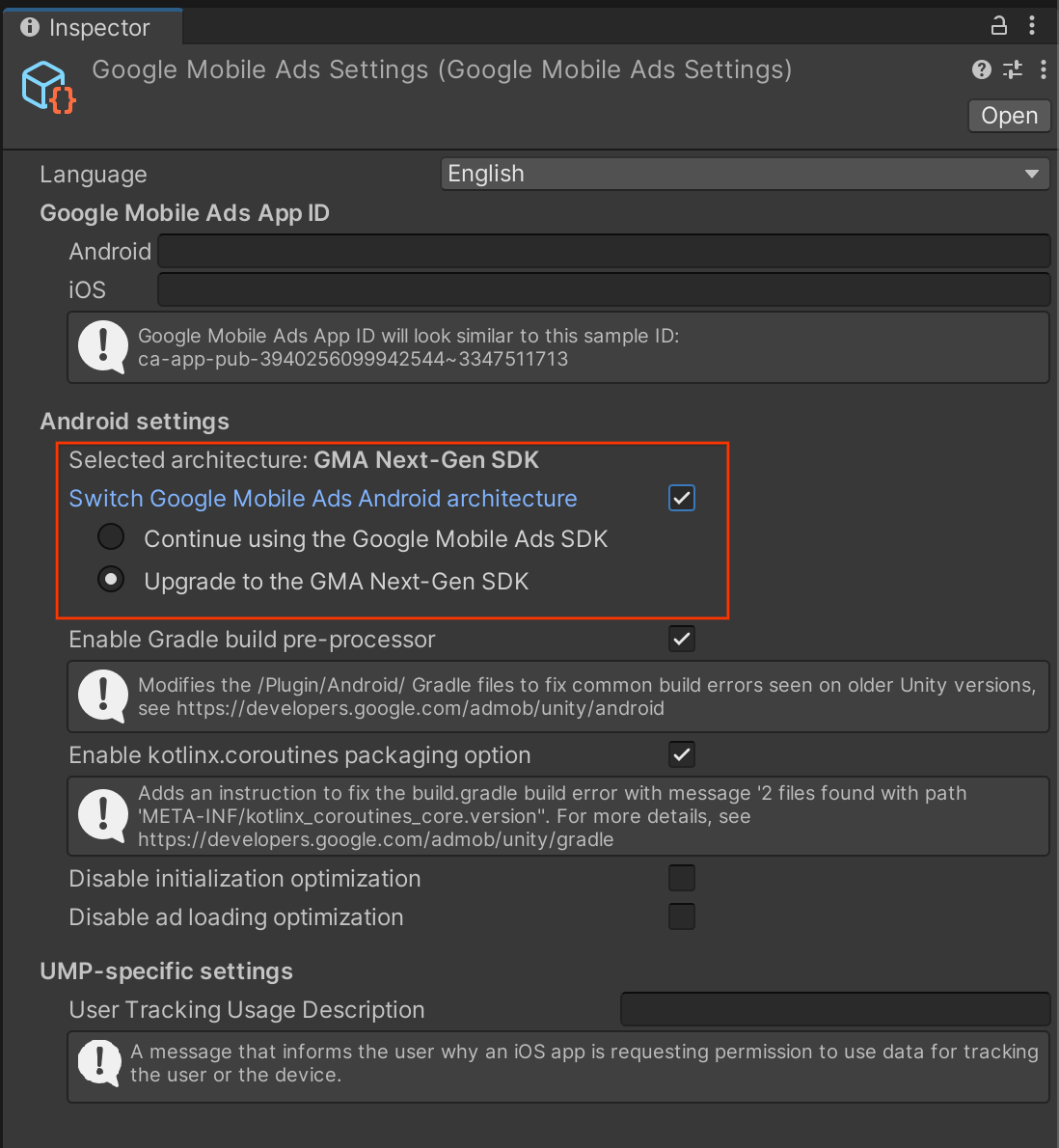
To enable GMA Next-Gen SDK for your Android builds, select Assets > Google Mobile Ads > Settings in the Unity editor:

Inside the GMA Next-Gen SDK settings inspector, enable both
Switch Google Mobile Ads Android Architecture and GMA Next-Gen SDK.
11.0.0 - 10.6.0
To enable GMA Next-Gen SDK for your Android builds, modify the dependency file:
In your Unity project, navigate to the
Assets/GoogleMobileAds/Editor/GoogleMobileAdsDependencies.xmlfile.- If you use Unity Package Manager, navigate to Packages > Google Mobile Ads for Unity > GoogleMobileAds > Editor > GoogleMobileAdsDependencies.xml.
Locate the
<androidPackage>element with speccom.google.android.gms:play-services-ads.Replace the element with the latest available version of
com.google.android.libraries.ads.mobile.sdk:ads-mobile-sdk:<androidPackage spec="com.google.android.libraries.ads.mobile.sdk:ads-mobile-sdk:1.5.0"> <repositories> <repository>https://maven.google.com/</repository> </repositories> </androidPackage>Save the file.
During the build process, Google Mobile Ads Unity Plugin detects the presence of GMA Next-Gen SDK and uses your implementation.
The following example shows the updated GoogleMobileAdsDependencies.xml file:
<dependencies>
<androidPackages>
<androidPackage spec="com.google.android.libraries.ads.mobile.sdk:ads-mobile-sdk:1.5.0">
  <repositories>
    <repository>https://maven.google.com/</repository>
  </repositories>
</androidPackage>
<androidPackage spec="androidx.constraintlayout:constraintlayout:2.1.4">
<repositories>
<repository>https://maven.google.com/</repository>
</repositories>
</androidPackage>
<androidPackage spec="androidx.lifecycle:lifecycle-process:2.6.2">
<repositories>
<repository>https://maven.google.com/</repository>
</repositories>
</androidPackage>
</androidPackages>
<iosPods>
<iosPod name="Google-Mobile-Ads-SDK" version="~> 12.11.0">
<sources>
<source>https://github.com/CocoaPods/Specs</source>
</sources>
</iosPod>
</iosPods>
</dependencies>
Exclude com.google.android.gms modules in mediation integrations
If you use mediation, follow the Android migration guide to exclude com.google.android.gms modules in your mediation integrations to avoid duplicate class errors.