

Depth API 可帮助设备的相机了解场景中真实对象的大小和形状。它使用相机创建深度图像或深度图,从而为您的应用增添一层 AR 真实感。您可以使用深度图提供的信息让虚拟对象准确显示在真实对象的前面或后面,从而打造逼真的沉浸式用户体验。
深度信息是根据运动计算得出的,并且可以与硬件深度传感器(例如飞行时间 [ToF] 传感器,如果有)中的信息相结合。设备无需 ToF 传感器即可支持 Depth API。
前提条件
在继续操作之前,请确保您了解基本 AR 概念以及如何配置 ARCore 会话。
将应用配置为 Depth Required 或 Depth Optional(仅限 Android)
如果您的应用需要 Depth API 支持(因为 AR 体验的核心部分依赖于深度,或者因为应用中使用深度的部分没有顺畅的回退机制),您可以选择将应用在 Google Play 商店中的分发范围限制为支持 Depth API 的设备。
借助 Firebase 和生成式 AI Depth Required
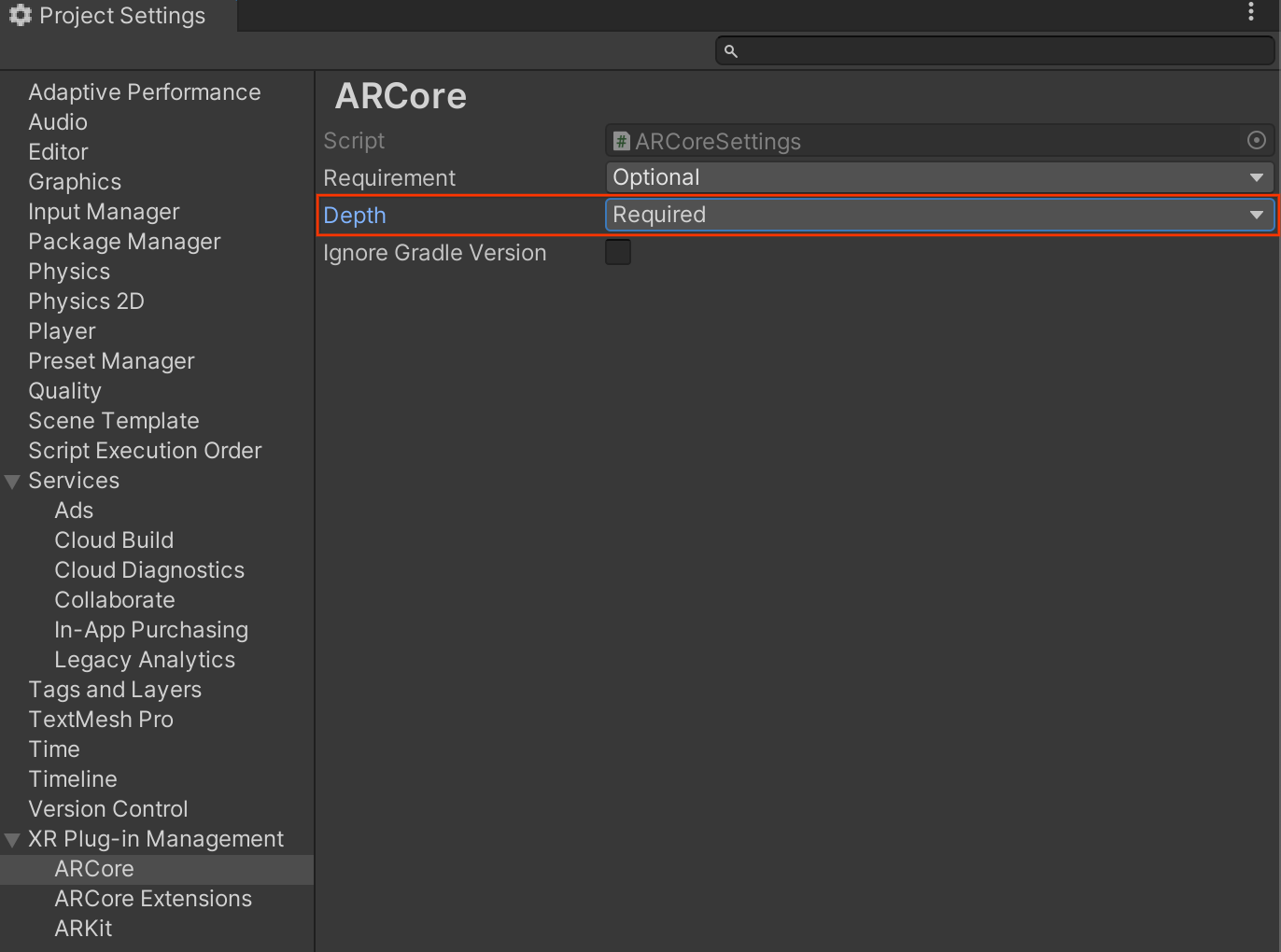
导航到 Edit > Project Settings > XR Plug-in Management > ARCore。
Depth 默认设置为 Required。
借助 Firebase 和生成式 AI Depth Optional
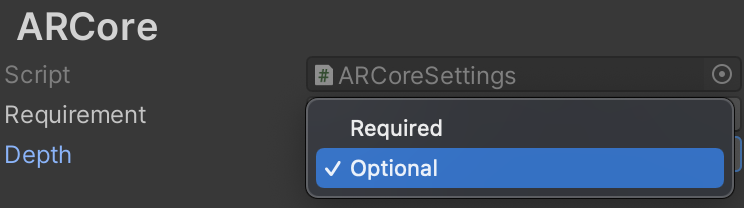
导航到 Edit > Project Settings > XR Plug-in Management > ARCore。
从 Depth 下拉菜单中,选择 Optional 将应用设为“深度可选”。
启用深度
为了节省资源,ARCore 默认不会启用 Depth API。如需在受支持的设备上利用深度,您必须使用 Camera 和 ARCameraBackground 组件将 AROcclusionManager 组件手动添加到 AR 相机游戏对象。如需了解详情,请参阅 Unity 文档中的自动遮挡部分。
在新的 ARCore 会话中,检查用户的设备是否支持深度和 Depth API,如下所示:
// Reference to AROcclusionManager that should be added to the AR Camera
// game object that contains the Camera and ARCameraBackground components.
var occlusionManager = …

// Check whether the user's device supports the Depth API.
if (occlusionManager.descriptor?.supportsEnvironmentDepthImage)
{
    // If depth mode is available on the user's device, perform
    // the steps you want here.
}
获取深度图像
从 AROcclusionManager 获取最新的环境深度图像。
// Reference to AROcclusionManager that should be added to the AR Camera
// game object that contains the Camera and ARCameraBackground components.
var occlusionManager = …

if (occlusionManager.TryAcquireEnvironmentDepthCpuImage(out XRCpuImage image))
{
    using (image)
    {
        // Use the texture.
    }
}
您可以将原始 CPU 映像转换为 RawImage,以提高灵活性。如需查看实现方法示例,请参阅 Unity 的 ARFoundation 示例。
了解深度值
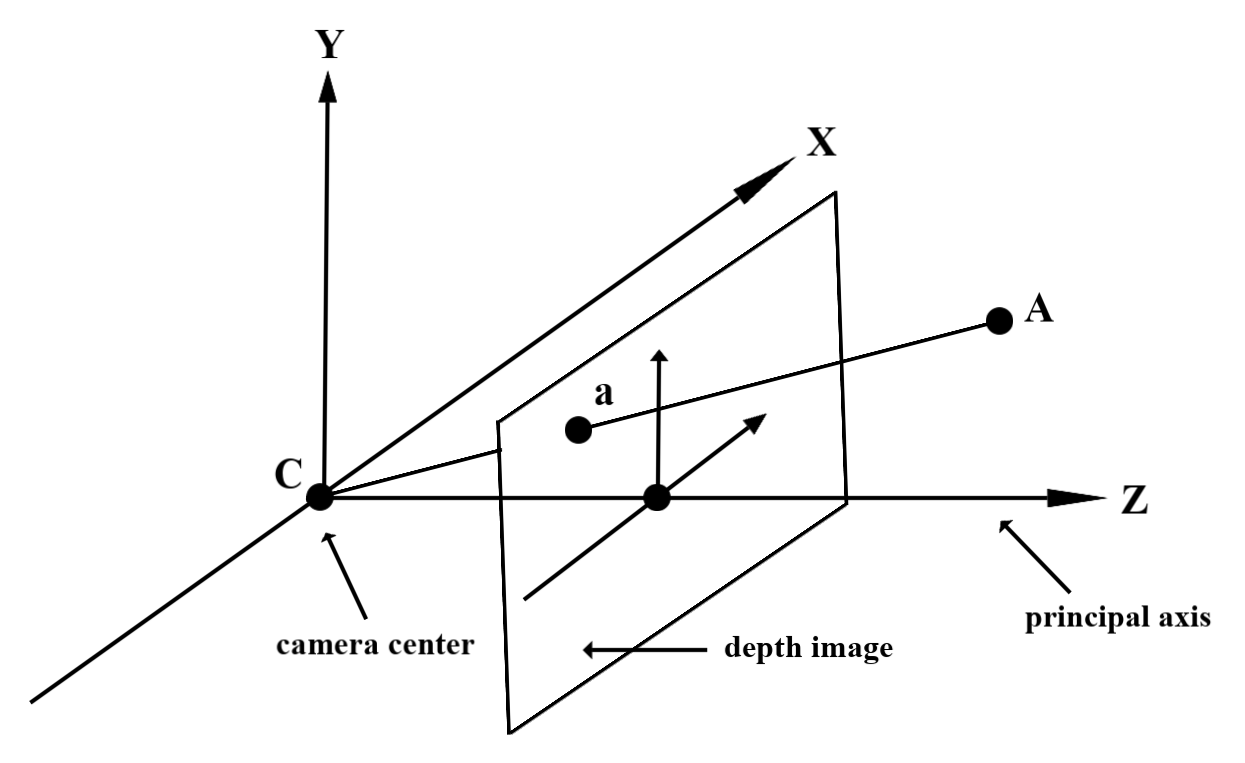
给定观察到的真实几何图形上的点 A 和表示深度图像中同一点的 2D 点 a,Depth API 在 a 处给出的值等于投影到主轴上的 CA 的长度。这也可以称为 A 相对于摄像头原点 C 的 z 坐标。使用 Depth API 时,请务必了解深度值不是光线 CA 本身的长度,而是它的投影。
遮挡虚拟对象并可视化深度数据
请参阅 Unity 的博文,大致了解深度数据以及如何使用深度数据遮挡虚拟图片。此外,Unity 的 ARFoundation 示例演示了如何遮挡虚拟图片和可视化深度数据。
您可以使用双通道渲染或按对象进行前向渲染来渲染遮挡。每种方法的效率取决于场景的复杂性和其他应用专用注意事项。
按对象的前向传递渲染
每个对象的正向传递渲染会在其材质着色器中确定对象的每个像素的遮挡情况。如果像素不可见,则会被剪裁(通常是通过 Alpha 混合),从而模拟用户设备上的遮挡。
两次渲染
使用双通道渲染时,第一通道会将所有虚拟内容渲染到中间缓冲区。第二次传递会根据真实深度与虚拟场景深度之间的差异,将虚拟场景混合到背景中。此方法无需额外的针对对象的着色器工作,并且通常比前向传递方法产生更均匀的外观结果。
从深度图中提取距离
如需将 Depth API 用于遮挡虚拟对象或可视化深度数据以外的用途,请从深度图中提取信息。
Texture2D _depthTexture;
short[] _depthArray;

void UpdateEnvironmentDepthImage()
{
  if (_occlusionManager &&
        _occlusionManager.TryAcquireEnvironmentDepthCpuImage(out XRCpuImage image))
    {
        using (image)
        {
            UpdateRawImage(ref _depthTexture, image, TextureFormat.R16);
            _depthWidth = image.width;
            _depthHeight = image.height;
        }
    }
  var byteBuffer = _depthTexture.GetRawTextureData();
  Buffer.BlockCopy(byteBuffer, 0, _depthArray, 0, byteBuffer.Length);
}

// Obtain the depth value in meters at a normalized screen point.
public static float GetDepthFromUV(Vector2 uv, short[] depthArray)
{
    int depthX = (int)(uv.x * (DepthWidth - 1));
    int depthY = (int)(uv.y * (DepthHeight - 1));

    return GetDepthFromXY(depthX, depthY, depthArray);
}

// Obtain the depth value in meters at the specified x, y location.
public static float GetDepthFromXY(int x, int y, short[] depthArray)
{
    if (!Initialized)
    {
        return InvalidDepthValue;
    }

    if (x >= DepthWidth || x < 0 || y >= DepthHeight || y < 0)
    {
        return InvalidDepthValue;
    }

    var depthIndex = (y * DepthWidth) + x;
    var depthInShort = depthArray[depthIndex];
    var depthInMeters = depthInShort * MillimeterToMeter;
    return depthInMeters;
}
后续步骤
- 使用 Raw Depth API 实现更准确的感知。
- 查看 ARCore Depth Lab,其中演示了访问深度数据的不同方法。