

סקירה כללית
Google Street View מספק תצוגות פנורמיות של 360 מעלות מכבישים ייעודיים בכל אזור הכיסוי. הכיסוי של Street View API זהה לכיסוי של אפליקציית מפות Google (https://maps.google.com/). רשימת הערים שנתמכות כרגע ב-Street View זמינה באתר מפות Google.
למטה מוצגת דוגמה לתמונה ב-Street View.
ממשק API של JavaScript במפות Google מספק שירות Street View לקבלת תמונות שמשמשות ב-Street View במפות Google ולשינוי שלהן. שירות Street View הזה נתמך באופן מקורי בדפדפן.
שימוש במפת Street View
אפשר להשתמש ב-Street View בתוך רכיב DOM עצמאי, אבל הוא הכי שימושי כשמציינים מיקום במפה. כברירת מחדל, Street View מופעל במפה, ואמצעי הבקרה של אטב-איש מופיע כחלק מאמצעי הבקרה של הניווט (התקרבות והזזה). אפשר להסתיר את אמצעי הבקרה הזה בתוך המפה MapOptions על ידי הגדרת streetViewControl לערך false. אפשר גם לשנות את מיקום ברירת המחדל של אמצעי הבקרה של תצוגת הרחוב על ידי הגדרת המאפיין Map של streetViewControlOptions.position לערך ControlPosition חדש.
האפשרות 'אטב-איש' ב-Street View מאפשרת לכם לראות תמונות פנורמיות של Street View ישירות במפה. כשמשתמש לוחץ לחיצה ארוכה על האטב-איש, המפה מתעדכנת ומוצגים בה קווי מתאר כחולים של רחובות שבהם אפשר לראות תמונות Street View, וחוויית המשתמש דומה לזו של אפליקציית מפות Google.
כשהמשתמש משחרר את הסמן של אטב-איש ברחוב, המפה מתעדכנת ומוצגת פנורמה של Street View של המיקום שצוין.
תמונות פנורמה ב-Street View
תמונות Street View נתמכות באמצעות האובייקט StreetViewPanorama, שמספק ממשק API ל'צפייה' ב-Street View. כל מפה מכילה פנורמה של Street View שמוגדרת כברירת מחדל, שאפשר לאחזר באמצעות קריאה לשיטה getStreetView() של המפה. כשמוסיפים את אמצעי הבקרה של Street View למפה על ידי הגדרת האפשרות streetViewControl שלו ל-true, אמצעי הבקרה של אטב-איש מתחבר אוטומטית לפנורמה הזו של Street View שמוגדרת כברירת מחדל.
אפשר גם ליצור אובייקט StreetViewPanorama משלכם ולהגדיר את המפה כך שתשתמש בו במקום בברירת המחדל. כדי לעשות זאת, צריך להגדיר את המאפיין streetView של המפה באופן מפורש לאובייקט הזה. אם רוצים לשנות את התנהגות ברירת המחדל, כמו שיתוף אוטומטי של שכבות-על בין המפה לבין הפנורמה, אפשר לשנות את הגדרות ברירת המחדל של הפנורמה. (מידע נוסף מופיע בקטע שכבות-על ב-Street View בהמשך).
מאגרי תמונות Street View
אפשר גם להציג את StreetViewPanorama בתוך רכיב DOM נפרד, לרוב רכיב <div>.
פשוט מעבירים את רכיב ה-DOM בתוך הבונה של StreetViewPanorama. כדי שהתמונות יוצגו בצורה אופטימלית, מומלץ להשתמש בתמונות בגודל מינימלי של 200 x 200 פיקסלים.
הערה: למרות שהפונקציונליות של Street View מיועדת לשימוש בשילוב עם מפה, לא חייבים להשתמש בה כך. אפשר להשתמש באובייקט Street View עצמאי בלי מפה.
מיקומים ונקודות מבט (POV) ב-Street View
ה-constructor StreetViewPanorama מאפשר גם להגדיר את המיקום ב-Street View ואת נקודת המבט באמצעות הפרמטר StreetViewOptions. אחרי בניית האובייקט, אפשר להתקשר אל
setPosition() ו-setPov() כדי לשנות את המיקום ואת נקודת המבט שלו.
המיקום ב-Street View מגדיר את המיקום של המיקוד של המצלמה בתמונה, אבל הוא לא מגדיר את הכיוון של המצלמה בתמונה הזו. לשם כך, אובייקט StreetViewPov מגדיר שני מאפיינים:
-
heading(ברירת מחדל0) מגדיר את זווית הסיבוב סביב מיקום המצלמה במעלות ביחס לצפון האמיתי. הכותרות נמדדות בכיוון השעון (90 מעלות הוא כיוון מזרח אמיתי). -
pitch(ברירת מחדל0) מגדיר את השונות בזווית 'למעלה' או 'למטה' מברירת המחדל הראשונית של המצלמה, שלרוב היא אופקית (אבל לא תמיד). (לדוגמה, תמונה שצולמה על גבעה כנראה תציג הטיה שאינה אופקית כברירת מחדל). זוויות הגובה נמדדות עם ערכים חיוביים כשמסתכלים למעלה (עד +90 מעלות ישר למעלה ובניצב לגובה ברירת המחדל) ועם ערכים שליליים כשמסתכלים למטה (עד -90 מעלות ישר למטה ובניצב לגובה ברירת המחדל).
האובייקט StreetViewPov משמש לרוב כדי לקבוע את נקודת המבט של מצלמת Street View. אפשר גם לקבוע את נקודת המבט של הצלם – בדרך כלל הכיוון שאליו פונה המכונית או התלת-אופן – באמצעות השיטה StreetViewPanorama.getPhotographerPov().
הקוד הבא מציג מפה של בוסטון עם תצוגה ראשונית של פנוויי פארק. אם בוחרים את האטב-איש וגוררים אותו למיקום נתמך במפה, הפנורמה של Street View משתנה:
TypeScript
function initialize() { const fenway = { lat: 42.345573, lng: -71.098326 }; const map = new google.maps.Map( document.getElementById("map") as HTMLElement, { center: fenway, zoom: 14, } ); const panorama = new google.maps.StreetViewPanorama( document.getElementById("pano") as HTMLElement, { position: fenway, pov: { heading: 34, pitch: 10, }, } ); map.setStreetView(panorama); } declare global { interface Window { initialize: () => void; } } window.initialize = initialize;
JavaScript
function initialize() { const fenway = { lat: 42.345573, lng: -71.098326 }; const map = new google.maps.Map(document.getElementById("map"), { center: fenway, zoom: 14, }); const panorama = new google.maps.StreetViewPanorama( document.getElementById("pano"), { position: fenway, pov: { heading: 34, pitch: 10, }, }, ); map.setStreetView(panorama); } window.initialize = initialize;
CSS
html, body { height: 100%; margin: 0; padding: 0; } #map, #pano { float: left; height: 100%; width: 50%; }
HTML
<html>
<head>
<title>Street View split-map-panes</title>
<link rel="stylesheet" type="text/css" href="./style.css" />
<script type="module" src="./index.js"></script>
</head>
<body>
<div id="map"></div>
<div id="pano"></div>
<!--
The `defer` attribute causes the script to execute after the full HTML
document has been parsed. For non-blocking uses, avoiding race conditions,
and consistent behavior across browsers, consider loading using Promises. See
https://developers.google.com/maps/documentation/javascript/load-maps-js-api
for more information.
-->
<script
src="https://maps.googleapis.com/maps/api/js?key=AIzaSyB41DRUbKWJHPxaFjMAwdrzWzbVKartNGg&callback=initialize&v=weekly"
defer
></script>
</body>
</html>דוגמה לניסיון
מעקב תנועה במכשירים ניידים
במכשירים שתומכים באירועים של כיוון המכשיר, ממשק ה-API מאפשר למשתמשים לשנות את נקודת המבט ב-Street View על סמך התנועה של המכשיר. המשתמשים יכולים להזיז את המכשירים כדי להסתכל סביב. התכונה הזו נקראת מעקב תנועה או מעקב סיבוב המכשיר.
מפתחי אפליקציות יכולים לשנות את התנהגות ברירת המחדל באופן הבא:
- הפעלה או השבתה של הפונקציונליות של מעקב התנועה. כברירת מחדל, מעקב התנועה מופעל בכל מכשיר שתומך בו. בדוגמה הבאה מושבת מעקב התנועה, אבל פקד מעקב התנועה נשאר גלוי.
(הערה: המשתמש יכול להפעיל את מעקב התנועה בהקשה על אמצעי הבקרה).
var panorama = new google.maps.StreetViewPanorama(
    document.getElementById('pano'), {
      position: {lat: 37.869260, lng: -122.254811},
      pov: {heading: 165, pitch: 0},
      motionTracking: false
    });
-
הסתרה או הצגה של אמצעי הבקרה למעקב אחר תנועה. כברירת מחדל, אמצעי הבקרה מוצג במכשירים שתומכים במעקב תנועה. המשתמש יכול להקיש על אמצעי הבקרה כדי להפעיל או להשבית את מעקב התנועה. שימו לב שאמצעי הבקרה לא יופיע אף פעם אם המכשיר לא תומך במעקב תנועה, ללא קשר לערך של
motionTrackingControl.בדוגמה הבאה מושבתים גם מעקב התנועה וגם אמצעי הבקרה של מעקב התנועה. במקרה הזה, המשתמש לא יכול להפעיל את התכונה 'מעקב אחרי תנועות':
var panorama = new google.maps.StreetViewPanorama(
    document.getElementById('pano'), {
      position: {lat: 37.869260, lng: -122.254811},
      pov: {heading: 165, pitch: 0},
      motionTracking: false,
      motionTrackingControl: false
    });
- שינוי מיקום ברירת המחדל של אמצעי הבקרה למעקב אחר תנועה. כברירת מחדל,
הפקד מופיע ליד הפינה השמאלית התחתונה של התמונה הפנורמית (מיקום
RIGHT_BOTTOM). בדוגמה הבאה מוגדר שהפקד יופיע בפינה השמאלית התחתונה:var panorama = new google.maps.StreetViewPanorama( document.getElementById('pano'), { position: {lat: 37.869260, lng: -122.254811}, pov: {heading: 165, pitch: 0}, motionTrackingControlOptions: { position: google.maps.ControlPosition.LEFT_BOTTOM } });
כדי לראות את מעקב התנועה בפעולה, צופים בדוגמה הבאה בנייד (או בכל מכשיר שתומך באירועי כיוון המכשיר):
שכבות-על ב-Street View
אובייקט StreetViewPanorama שמוגדר כברירת מחדל תומך בתצוגה המקורית של שכבות-על במפה.
שכבות-על בדרך כלל מופיעות ב'מפלס הרחוב' ומעוגנות במיקומים LatLng. (לדוגמה, הסמנים יופיעו כשהזנבות שלהם מעוגנים למישור האופקי של המיקום בתצוגת הפנורמה של Street View).
בשלב הזה, סוגי שכבות העל שנתמכים בתמונות פנורמיות של Street View מוגבלים לMarker, לInfoWindow ולOverlayView מותאמים אישית. שכבות-על שמוצגות במפה יכולות להיות מוצגות בתמונת פנורמה ב-Street View אם מתייחסים לתמונת הפנורמה כאל תחליף לאובייקט Map, קוראים ל-setMap() ומעבירים את StreetViewPanorama כארגומנט במקום מפה. באופן דומה, אפשר לפתוח חלונות מידע בפנורמה של Street View על ידי קריאה ל-open() והעברת StreetViewPanorama() במקום מפה.
בנוסף, כשיוצרים מפה עם StreetViewPanorama ברירת מחדל, כל הסמנים שנוצרים במפה משותפים אוטומטית עם תמונת הפנורמה המשויכת של Street View, בתנאי שתמונת הפנורמה גלויה. כדי לאחזר את תמונת הפנורמה של Street View שמוגדרת כברירת מחדל, שולחים קריאה ל-getStreetView() באובייקט Map. שימו לב: אם תגדירו במפורש את המאפיין streetView של המפה לערך StreetViewPanorama משלכם, תבטלו את הפנורמה שמוגדרת כברירת מחדל.
בדוגמה הבאה מוצגים סמנים שמציינים מיקומים שונים באזור כיכר אסטור בניו יורק. כדי לראות את הסמנים המשותפים בתוך StreetViewPanorama, מעבירים את התצוגה ל-Street View.
TypeScript
let panorama: google.maps.StreetViewPanorama; let innerMap: google.maps.Map; async function init() { // Request needed libraries. const [{ Marker }] = await Promise.all([ google.maps.importLibrary('marker'), google.maps.importLibrary('maps'), ]); // Set the location of Astor Place. const astorPlace = { lat: 40.729884, lng: -73.990988 }; const mapElement = document.querySelector('gmp-map')!; innerMap = mapElement.innerMap; document .getElementById('streetview-toggle-button')! .addEventListener('click', toggleStreetView); const cafeIcon = document.createElement('img'); cafeIcon.src = new URL('./public/cafe_icon.svg', import.meta.url).href; const dollarIcon = document.createElement('img'); dollarIcon.src = new URL('./public/bank_icon.svg', import.meta.url).href; const busIcon = document.createElement('img'); busIcon.src = new URL('./public/bus_icon.svg', import.meta.url).href; // Set up the markers on the map new Marker({ position: { lat: 40.730031, lng: -73.991428 }, map: innerMap, title: 'Cafe', icon: cafeIcon.src, }); new Marker({ position: { lat: 40.729681, lng: -73.991138 }, map: innerMap, title: 'Bank', icon: dollarIcon.src, }); new Marker({ position: { lat: 40.729559, lng: -73.990741 }, map: innerMap, title: 'Bus Stop', icon: busIcon.src, }); // We get the map's default panorama and set up some defaults. // Note that we don't yet set it visible. panorama = innerMap.getStreetView()!; // TODO fix type panorama.setPosition(astorPlace); panorama.setPov({ heading: 265, pitch: 0, }); } function toggleStreetView(): void { const toggle = panorama.getVisible(); if (!toggle) { panorama.setVisible(true); } else { panorama.setVisible(false); } } void init();
JavaScript
let panorama; let innerMap; async function init() { // Request needed libraries. const [{ Marker }] = await Promise.all([ google.maps.importLibrary('marker'), google.maps.importLibrary('maps'), ]); // Set the location of Astor Place. const astorPlace = { lat: 40.729884, lng: -73.990988 }; const mapElement = document.querySelector('gmp-map'); innerMap = mapElement.innerMap; document .getElementById('streetview-toggle-button') .addEventListener('click', toggleStreetView); const cafeIcon = document.createElement('img'); cafeIcon.src = new URL('./public/cafe_icon.svg', import.meta.url).href; const dollarIcon = document.createElement('img'); dollarIcon.src = new URL('./public/bank_icon.svg', import.meta.url).href; const busIcon = document.createElement('img'); busIcon.src = new URL('./public/bus_icon.svg', import.meta.url).href; // Set up the markers on the map new Marker({ position: { lat: 40.730031, lng: -73.991428 }, map: innerMap, title: 'Cafe', icon: cafeIcon.src, }); new Marker({ position: { lat: 40.729681, lng: -73.991138 }, map: innerMap, title: 'Bank', icon: dollarIcon.src, }); new Marker({ position: { lat: 40.729559, lng: -73.990741 }, map: innerMap, title: 'Bus Stop', icon: busIcon.src, }); // We get the map's default panorama and set up some defaults. // Note that we don't yet set it visible. panorama = innerMap.getStreetView(); // TODO fix type panorama.setPosition(astorPlace); panorama.setPov({ heading: 265, pitch: 0, }); } function toggleStreetView() { const toggle = panorama.getVisible(); if (!toggle) { panorama.setVisible(true); } else { panorama.setVisible(false); } } void init(); export {};
CSS
/* * Always set the map height explicitly to define the size of the div element * that contains the map. */ #map { height: 100%; } /* * Optional: Makes the sample page fill the window. */ html, body { height: 100%; margin: 0; padding: 0; } #floating-panel { position: absolute; top: 10px; left: 25%; z-index: 5; background-color: #fff; padding: 5px; border: 1px solid #999; text-align: center; font-family: 'Roboto', sans-serif; line-height: 30px; padding-left: 10px; } #streetview-toggle-button { height: 40px; display: flex; align-items: center; justify-content: center; padding: 0 17px; border: none; background: white; cursor: pointer; border-radius: 2px; box-shadow: 0 1px 4px -1px rgba(0, 0, 0, 0.3); margin: 10px 0px 10px -2px; font-family: Roboto, Arial, sans-serif; font-size: 18px; font-weight: 400; color: rgb(86, 86, 86); } #streetview-toggle-button:hover { background: #f4f4f4; color: #000; }
HTML
<html>
<head>
<title>Overlays Within Street View</title>
<link rel="stylesheet" type="text/css" href="./style.css" />
<script type="module" src="./index.js"></script>
<script>
// prettier-ignore
(g=>{var h,a,k,p="The Google Maps JavaScript API",c="google",l="importLibrary",q="__ib__",m=document,b=window;b=b[c]||(b[c]={});var d=b.maps||(b.maps={}),r=new Set,e=new URLSearchParams,u=()=>h||(h=new Promise(async(f,n)=>{await (a=m.createElement("script"));e.set("libraries",[...r]+"");for(k in g)e.set(k.replace(/[A-Z]/g,t=>"_"+t[0].toLowerCase()),g[k]);e.set("callback",c+".maps."+q);a.src=`https://maps.${c}apis.com/maps/api/js?`+e;d[q]=f;a.onerror=()=>h=n(Error(p+" could not load."));a.nonce=m.querySelector("script[nonce]")?.nonce||"";m.head.append(a)}));d[l]?console.warn(p+" only loads once. Ignoring:",g):d[l]=(f,...n)=>r.add(f)&&u().then(()=>d[l](f,...n))})({
key: "AIzaSyA6myHzS10YXdcazAFalmXvDkrYCp5cLc8"
});
</script>
</head>
<body>
<gmp-map map-id="DEMO_MAP_ID" center="40.729884, -73.990988" zoom="18">
<input
type="button"
value="Toggle Street View"
id="streetview-toggle-button"
slot="control-block-start-inline-start" />
</gmp-map>
</body>
</html>דוגמה לניסיון
אירועים ב-Street View
כשעוברים בין תצוגות Street View או משנים את הכיוון שלהן, כדאי לעקוב אחרי כמה אירועים שמציינים שינויים במצב של StreetViewPanorama:
-
pano_changedמופעל בכל פעם שמזהה הפנורמה משתנה. האירוע הזה לא מבטיח שנתונים משויכים בפנורמה (כמו הקישורים) השתנו גם הם עד שהאירוע הזה מופעל. האירוע הזה מציין רק שמזהה הפנורמה השתנה. שימו לב שמזהה הפנורמה (שאפשר להשתמש בו כדי להפנות לפנורמה הזו) יציב רק בסשן הדפדפן הנוכחי. - הפונקציה
position_changedמופעלת בכל פעם שהמיקום הבסיסי (LatLng) של התמונה הפנורמית משתנה. האירוע הזה לא יופעל אם תסובבו תמונה פנורמית. שימו לב שאפשר לשנות את המיקום הבסיסי של תמונה פנורמית בלי לשנות את מזהה התמונה הפנורמית שמשויך אליה, כי ה-API ישייך אוטומטית את מזהה התמונה הפנורמית הקרוב ביותר למיקום של התמונה הפנורמית. -
pov_changedמופעל בכל פעם ש-StreetViewPovשל Street View משתנה. חשוב לדעת שהאירוע הזה עשוי להופעל בזמן שהמיקום ומזהה הפנורמה נשארים קבועים. -
links_changedמופעל בכל פעם שהקישורים של Street View משתנים. חשוב לזכור שהאירוע הזה עשוי להיות מופעל באופן אסינכרוני אחרי שינוי במזהה הפנורמה שמצוין באמצעותpano_changed. -
visible_changedמופעל בכל פעם שסטטוס החשיפה של Street View משתנה. חשוב לזכור שהאירוע הזה עשוי להיות מופעל באופן אסינכרוני אחרי שינוי במזהה הפנורמה שמצוין באמצעותpano_changed.
בדוגמת הקוד הבאה אפשר לראות איך לטפל באירועים האלה כדי לאסוף נתונים על StreetViewPanorama הבסיסי:
TypeScript
function initPano() { const panorama = new google.maps.StreetViewPanorama( document.getElementById("pano") as HTMLElement, { position: { lat: 37.869, lng: -122.255 }, pov: { heading: 270, pitch: 0, }, visible: true, } ); panorama.addListener("pano_changed", () => { const panoCell = document.getElementById("pano-cell") as HTMLElement; panoCell.innerHTML = panorama.getPano(); }); panorama.addListener("links_changed", () => { const linksTable = document.getElementById("links_table") as HTMLElement; while (linksTable.hasChildNodes()) { linksTable.removeChild(linksTable.lastChild as ChildNode); } const links = panorama.getLinks(); for (const i in links) { const row = document.createElement("tr"); linksTable.appendChild(row); const labelCell = document.createElement("td"); labelCell.innerHTML = "<b>Link: " + i + "</b>"; const valueCell = document.createElement("td"); valueCell.innerHTML = links[i].description as string; linksTable.appendChild(labelCell); linksTable.appendChild(valueCell); } }); panorama.addListener("position_changed", () => { const positionCell = document.getElementById( "position-cell" ) as HTMLElement; (positionCell.firstChild as HTMLElement).nodeValue = panorama.getPosition() + ""; }); panorama.addListener("pov_changed", () => { const headingCell = document.getElementById("heading-cell") as HTMLElement; const pitchCell = document.getElementById("pitch-cell") as HTMLElement; (headingCell.firstChild as HTMLElement).nodeValue = panorama.getPov().heading + ""; (pitchCell.firstChild as HTMLElement).nodeValue = panorama.getPov().pitch + ""; }); } declare global { interface Window { initPano: () => void; } } window.initPano = initPano;
JavaScript
function initPano() { const panorama = new google.maps.StreetViewPanorama( document.getElementById("pano"), { position: { lat: 37.869, lng: -122.255 }, pov: { heading: 270, pitch: 0, }, visible: true, }, ); panorama.addListener("pano_changed", () => { const panoCell = document.getElementById("pano-cell"); panoCell.innerHTML = panorama.getPano(); }); panorama.addListener("links_changed", () => { const linksTable = document.getElementById("links_table"); while (linksTable.hasChildNodes()) { linksTable.removeChild(linksTable.lastChild); } const links = panorama.getLinks(); for (const i in links) { const row = document.createElement("tr"); linksTable.appendChild(row); const labelCell = document.createElement("td"); labelCell.innerHTML = "<b>Link: " + i + "</b>"; const valueCell = document.createElement("td"); valueCell.innerHTML = links[i].description; linksTable.appendChild(labelCell); linksTable.appendChild(valueCell); } }); panorama.addListener("position_changed", () => { const positionCell = document.getElementById("position-cell"); positionCell.firstChild.nodeValue = panorama.getPosition() + ""; }); panorama.addListener("pov_changed", () => { const headingCell = document.getElementById("heading-cell"); const pitchCell = document.getElementById("pitch-cell"); headingCell.firstChild.nodeValue = panorama.getPov().heading + ""; pitchCell.firstChild.nodeValue = panorama.getPov().pitch + ""; }); } window.initPano = initPano;
CSS
/* * Always set the map height explicitly to define the size of the div element * that contains the map. */ #map { height: 100%; } /* * Optional: Makes the sample page fill the window. */ html, body { height: 100%; margin: 0; padding: 0; } #floating-panel { position: absolute; top: 10px; left: 25%; z-index: 5; background-color: #fff; padding: 5px; border: 1px solid #999; text-align: center; font-family: "Roboto", "sans-serif"; line-height: 30px; padding-left: 10px; } #pano { width: 50%; height: 100%; float: left; } #floating-panel { width: 45%; height: 100%; float: right; text-align: left; overflow: auto; position: static; border: 0px solid #999; }
HTML
<html>
<head>
<title>Street View Events</title>
<link rel="stylesheet" type="text/css" href="./style.css" />
<script type="module" src="./index.js"></script>
</head>
<body>
<div id="pano"></div>
<div id="floating-panel">
<table>
<tr>
<td><b>Position</b></td>
<td id="position-cell"> </td>
</tr>
<tr>
<td><b>POV Heading</b></td>
<td id="heading-cell">270</td>
</tr>
<tr>
<td><b>POV Pitch</b></td>
<td id="pitch-cell">0.0</td>
</tr>
<tr>
<td><b>Pano ID</b></td>
<td id="pano-cell"> </td>
</tr>
<table id="links_table"></table>
</table>
</div>
<!--
The `defer` attribute causes the script to execute after the full HTML
document has been parsed. For non-blocking uses, avoiding race conditions,
and consistent behavior across browsers, consider loading using Promises. See
https://developers.google.com/maps/documentation/javascript/load-maps-js-api
for more information.
-->
<script
src="https://maps.googleapis.com/maps/api/js?key=AIzaSyB41DRUbKWJHPxaFjMAwdrzWzbVKartNGg&callback=initPano&v=weekly"
defer
></script>
</body>
</html>דוגמה לניסיון
אמצעי הבקרה של Street View
כשמציגים StreetViewPanorama, מופיעים מגוון אמצעי בקרה בפנורמה כברירת מחדל. אפשר להפעיל או להשבית את אמצעי הבקרה האלה על ידי הגדרת השדות המתאימים שלהם ב-StreetViewPanoramaOptions לערך true או false:
panControlמאפשרת לסובב את תמונת הפנורמה. אמצעי הבקרה הזה מופיע כברירת מחדל כמצפן משולב רגיל וכאמצעי בקרה של הטיה. אפשר לשנות את מיקום אמצעי הבקרה על ידי הזנתPanControlOptionsבשדהpanControlOptions.zoomControlמאפשרת להגדיל את התמונה. הלחצן הזה מופיע כברירת מחדל בפינה השמאלית התחתונה של התמונה הפנורמית. אפשר לשנות את המראה של אמצעי הבקרה על ידי ציוןZoomControlOptionsבשדהzoomControlOptions.addressControlמספק שכבת-על טקסטואלית שמציינת את הכתובת של המיקום המשויך, ומציע קישור לפתיחת המיקום במפות Google. אפשר לשנות את המראה של אמצעי הבקרה על ידי ציוןStreetViewAddressControlOptionsבשדהaddressControlOptions.- ב-
fullscreenControlיש אפשרות לפתוח את Street View במסך מלא. אפשר לשנות את המראה של אמצעי הבקרה על ידי ציוןFullscreenControlOptionsבשדהfullscreenControlOptions. motionTrackingControlמאפשרת להפעיל או להשבית את מעקב התנועה במכשירים ניידים. אמצעי הבקרה הזה מופיע רק במכשירים שתומכים באירועים של כיוון המכשיר. כברירת מחדל, אמצעי הבקרה מופיעים ליד הפינה השמאלית התחתונה של התמונה הפנורמית. אפשר לשנות את המיקום של הרכיב באמצעותMotionTrackingControlOptions. מידע נוסף זמין בקטע בנושא מעקב אחרי תנועה.linksControlמספקת חיצים מנחים בתמונה למעבר לתמונות פנורמיות סמוכות.- אמצעי בקרה לסגירה מאפשר למשתמש לסגור את כלי הצפייה ב-Street View. אפשר
להפעיל או להשבית את אמצעי הבקרה לסגירה על ידי הגדרת
enableCloseButtonל-trueאו ל-false.
בדוגמה הבאה משנים את אמצעי הבקרה שמוצגים בתצוגת Street View המשויכת ומסירים את הקישורים של התצוגה:
TypeScript
function initPano() { // Note: constructed panorama objects have visible: true // set by default. const panorama = new google.maps.StreetViewPanorama( document.getElementById("map") as HTMLElement, { position: { lat: 42.345573, lng: -71.098326 }, addressControlOptions: { position: google.maps.ControlPosition.BOTTOM_CENTER, }, linksControl: false, panControl: false, enableCloseButton: false, } ); } declare global { interface Window { initPano: () => void; } } window.initPano = initPano;
JavaScript
function initPano() { // Note: constructed panorama objects have visible: true // set by default. const panorama = new google.maps.StreetViewPanorama( document.getElementById("map"), { position: { lat: 42.345573, lng: -71.098326 }, addressControlOptions: { position: google.maps.ControlPosition.BOTTOM_CENTER, }, linksControl: false, panControl: false, enableCloseButton: false, }, ); } window.initPano = initPano;
CSS
/* * Always set the map height explicitly to define the size of the div element * that contains the map. */ #map { height: 100%; } /* * Optional: Makes the sample page fill the window. */ html, body { height: 100%; margin: 0; padding: 0; }
HTML
<html>
<head>
<title>Street View Controls</title>
<link rel="stylesheet" type="text/css" href="./style.css" />
<script type="module" src="./index.js"></script>
</head>
<body>
<div id="map"></div>
<!--
The `defer` attribute causes the script to execute after the full HTML
document has been parsed. For non-blocking uses, avoiding race conditions,
and consistent behavior across browsers, consider loading using Promises. See
https://developers.google.com/maps/documentation/javascript/load-maps-js-api
for more information.
-->
<script
src="https://maps.googleapis.com/maps/api/js?key=AIzaSyB41DRUbKWJHPxaFjMAwdrzWzbVKartNGg&callback=initPano&v=weekly"
defer
></script>
</body>
</html>דוגמה לניסיון
גישה ישירה לנתוני Street View
יכול להיות שתרצו לקבוע באופן פרוגרמטי את הזמינות של נתוני Street View, או להחזיר מידע על תמונות פנורמיות מסוימות, בלי שתצטרכו לבצע מניפולציה ישירה של מפה או תמונה פנורמית. אפשר לעשות זאת באמצעות אובייקט StreetViewService, שמספק ממשק לנתונים שמאוחסנים בשירות Google Street View.
בקשות לשירותי Street View
הגישה לשירות Street View היא אסינכרונית, כי Google Maps API צריך לבצע קריאה לשרת חיצוני. לכן, צריך להעביר שיטת קריאה חוזרת לביצוע עם השלמת הבקשה. שיטת הקריאה החוזרת הזו מעבדת את התוצאה.
אפשר לשלוח בקשות ל-StreetViewService באמצעות StreetViewPanoRequest או StreetViewLocationRequest.
בקשה באמצעות StreetViewPanoRequest מחזירה נתוני פנורמה בהינתן מזהה הפניה שמזהה את הפנורמה באופן ייחודי. חשוב לזכור:
מזהי ההפניה האלה יציבים רק למשך החיים של התמונות בפנורמה הזו.
בקשה באמצעות StreetViewLocationRequest מחפשת נתוני פנורמה במיקום שצוין, באמצעות הפרמטרים הבאים:
-
locationמציין את המיקום (קו רוחב וקו אורך) שבו מחפשים תמונת פנורמה. -
preferenceמגדיר העדפה לגבי התמונה הפנורמית שצריך למצוא ברדיוס: התמונה הקרובה ביותר למיקום שצוין, או התמונה הטובה ביותר ברדיוס. - הפרמטר
radiusמגדיר רדיוס, שצוין במטרים, שבתוכו יתבצע חיפוש של תמונה פנורמית, במרכז קו הרוחב וקו האורך שצוינו. אם לא מציינים ערך, ברירת המחדל היא 50. -
sourceמציין את המקור של תמונות הפנורמה לחיפוש. הערכים התקינים הם:-
defaultמשתמש במקורות ברירת המחדל של Street View; החיפושים לא מוגבלים למקורות ספציפיים. -
outdoorמגביל את החיפושים לאוספים חיצוניים. שימו לב: יכול להיות שלא קיימות תמונות פנורמיות של המיקום שצוין.
-
תשובות של שירות Street View
הפונקציה getPanorama()
צריכה פונקציית callback כדי לפעול אחרי אחזור תוצאה
משירות Street View. פונקציית הקריאה החוזרת הזו מחזירה קבוצה של נתוני פנורמה באובייקט StreetViewPanoramaData וקוד StreetViewStatus שמציין את סטטוס הבקשה, בסדר הזה.
מפרט אובייקט StreetViewPanoramaData מכיל מטא-נתונים לגבי פנורמה של תצוגת רחוב, מהסוג הבא:
{
  "location": {
    "latLng": LatLng,
    "description": string,
    "pano": string
  },
  "copyright": string,
  "links": [{
      "heading": number,
      "description": string,
      "pano": string,
      "roadColor": string,
      "roadOpacity": number
    }],
  "tiles": {
    "worldSize": Size,
    "tileSize": Size,
    "centerHeading": number
  }
}
חשוב לזכור שאובייקט הנתונים הזה הוא לא אובייקט StreetViewPanorama בעצמו. כדי ליצור אובייקט Street View באמצעות הנתונים האלה, צריך ליצור StreetViewPanorama ולהתקשר אל setPano(), ולהעביר לו את המזהה כמו שצוין בשדה location.pano שמוחזר.
הקוד status יכול להחזיר אחד מהערכים הבאים:
-
OKמציין שהשירות מצא פנורמה תואמת. -
ZERO_RESULTSמציין שהשירות לא הצליח למצוא פנורמה שתואמת לקריטריונים שהועברו. -
UNKNOWN_ERRORמציין שלא ניתן היה לעבד בקשה ל-Street View, אבל הסיבה המדויקת לא ידועה.
הקוד הבא יוצר StreetViewService שמגיב לקליקים של משתמשים במפה על ידי יצירת סמנים, שכאשר לוחצים עליהם, מוצג StreetViewPanorama של המיקום הזה. הקוד משתמש בתוכן של StreetViewPanoramaData
שמוחזר מהשירות.
TypeScript
/* * Click the map to set a new location for the Street View camera. */ let map: google.maps.Map; let panorama: google.maps.StreetViewPanorama; function initMap(): void { const berkeley = { lat: 37.869085, lng: -122.254775 }; const sv = new google.maps.StreetViewService(); panorama = new google.maps.StreetViewPanorama( document.getElementById("pano") as HTMLElement ); // Set up the map. map = new google.maps.Map(document.getElementById("map") as HTMLElement, { center: berkeley, zoom: 16, streetViewControl: false, }); // Set the initial Street View camera to the center of the map sv.getPanorama({ location: berkeley, radius: 50 }).then(processSVData); // Look for a nearby Street View panorama when the map is clicked. // getPanorama will return the nearest pano when the given // radius is 50 meters or less. map.addListener("click", (event) => { sv.getPanorama({ location: event.latLng, radius: 50 }) .then(processSVData) .catch((e) => console.error("Street View data not found for this location.") ); }); } function processSVData({ data }: google.maps.StreetViewResponse) { const location = data.location!; const marker = new google.maps.Marker({ position: location.latLng, map, title: location.description, }); panorama.setPano(location.pano as string); panorama.setPov({ heading: 270, pitch: 0, }); panorama.setVisible(true); marker.addListener("click", () => { const markerPanoID = location.pano; // Set the Pano to use the passed panoID. panorama.setPano(markerPanoID as string); panorama.setPov({ heading: 270, pitch: 0, }); panorama.setVisible(true); }); } declare global { interface Window { initMap: () => void; } } window.initMap = initMap;
JavaScript
/* * Click the map to set a new location for the Street View camera. */ let map; let panorama; function initMap() { const berkeley = { lat: 37.869085, lng: -122.254775 }; const sv = new google.maps.StreetViewService(); panorama = new google.maps.StreetViewPanorama( document.getElementById("pano"), ); // Set up the map. map = new google.maps.Map(document.getElementById("map"), { center: berkeley, zoom: 16, streetViewControl: false, }); // Set the initial Street View camera to the center of the map sv.getPanorama({ location: berkeley, radius: 50 }).then(processSVData); // Look for a nearby Street View panorama when the map is clicked. // getPanorama will return the nearest pano when the given // radius is 50 meters or less. map.addListener("click", (event) => { sv.getPanorama({ location: event.latLng, radius: 50 }) .then(processSVData) .catch((e) => console.error("Street View data not found for this location."), ); }); } function processSVData({ data }) { const location = data.location; const marker = new google.maps.Marker({ position: location.latLng, map, title: location.description, }); panorama.setPano(location.pano); panorama.setPov({ heading: 270, pitch: 0, }); panorama.setVisible(true); marker.addListener("click", () => { const markerPanoID = location.pano; // Set the Pano to use the passed panoID. panorama.setPano(markerPanoID); panorama.setPov({ heading: 270, pitch: 0, }); panorama.setVisible(true); }); } window.initMap = initMap;
CSS
/* * Always set the map height explicitly to define the size of the div element * that contains the map. */ #map { height: 100%; } /* * Optional: Makes the sample page fill the window. */ html, body { height: 100%; margin: 0; padding: 0; }
HTML
<html>
<head>
<title>Directly Accessing Street View Data</title>
<link rel="stylesheet" type="text/css" href="./style.css" />
<script type="module" src="./index.js"></script>
</head>
<body>
<div id="map" style="width: 45%; height: 100%; float: left"></div>
<div id="pano" style="width: 45%; height: 100%; float: left"></div>
<!--
The `defer` attribute causes the script to execute after the full HTML
document has been parsed. For non-blocking uses, avoiding race conditions,
and consistent behavior across browsers, consider loading using Promises. See
https://developers.google.com/maps/documentation/javascript/load-maps-js-api
for more information.
-->
<script
src="https://maps.googleapis.com/maps/api/js?key=AIzaSyB41DRUbKWJHPxaFjMAwdrzWzbVKartNGg&callback=initMap&v=weekly"
defer
></script>
</body>
</html>דוגמה לניסיון
הוספת תמונות פנורמיות מותאמות אישית ל-Street View
Maps JavaScript API תומך בהצגה של תמונות פנורמיות בהתאמה אישית בתוך אובייקט StreetViewPanorama. באמצעות פנורמות מותאמות אישית, אתם יכולים להציג את פנים הבניינים, נופים ממיקומים ציוריים או כל דבר אחר שעולה בדמיונכם. אפשר אפילו לקשר את הפנורמות המותאמות אישית האלה לפנורמות קיימות של Street View של Google.
כדי להגדיר קבוצה של תמונות פנורמיות בהתאמה אישית, צריך לבצע את השלבים הבאים:
- יוצרים תמונת פנורמה בסיסית לכל פנורמה בהתאמה אישית. תמונת הבסיס הזו צריכה להיות התמונה ברזולוציה הכי גבוהה שאתם רוצים להציג בה תמונות בהגדלה.
- (אופציונלי, אבל מומלץ) יוצרים קבוצה של משבצות פנורמיות ברמות זום שונות מהתמונה הבסיסית.
- יוצרים קישורים בין תמונות הפנורמה המותאמות אישית.
- (אופציונלי) מציינים פנורמות של 'כניסה' בתוך תמונות Street View הקיימות של Google, ומגדירים קישורים בהתאמה אישית אל וממערכת התמונות המותאמת אישית למערכת התמונות הרגילה.
- מגדירים מטא-נתונים לכל תמונה פנורמית באובייקט
StreetViewPanoramaData. - מטמיעים שיטה שקובעת את הנתונים והתמונות של הפנורמה המותאמת אישית, ומגדירים את השיטה הזו כמטפל המותאם אישית בתוך האובייקט
StreetViewPanorama.
בקטעים הבאים מוסבר על התהליך הזה.
יצירת תמונות פנורמה בהתאמה אישית
כל תמונת פנורמה ב-Street View היא תמונה או קבוצת תמונות
שמציגה תצוגה מלאה של 360 מעלות ממיקום יחיד.
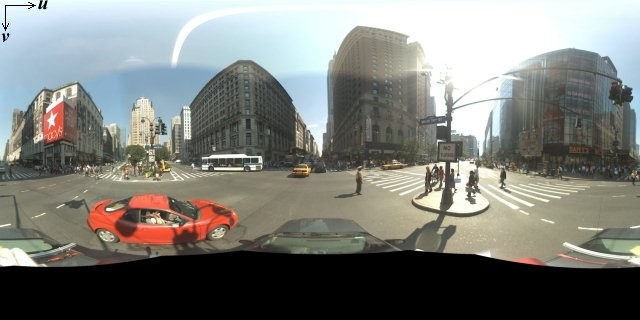
אובייקט StreetViewPanorama משתמש בתמונות שתואמות להטלה מלבנית (Plate Carrée). ההטלה הזו מכילה 360 מעלות של תצוגה אופקית (היקפית מלאה) ו-180 מעלות של תצוגה אנכית (מלמעלה למטה). שדות הראייה האלה יוצרים תמונה עם יחס גובה-רוחב של 2:1. A
תמונת פנורמה מלאה מוצגת בהמשך.
תמונות פנורמה מתקבלות בדרך כלל מצילום של כמה תמונות מאותו מיקום וחיבור שלהן באמצעות תוכנת פנורמה. (מידע נוסף זמין ב השוואה בין אפליקציות לאיחוי תמונות בוויקיפדיה). התמונות האלה צריכות להיות מצולמות מאותו מיקום של המצלמה. התמונה הפנורמית ב-360 מעלות שמתקבלת יכולה להגדיר הקרנה על כדור, כשהתמונה עוטפת את המשטח הדו-ממדי של הכדור.
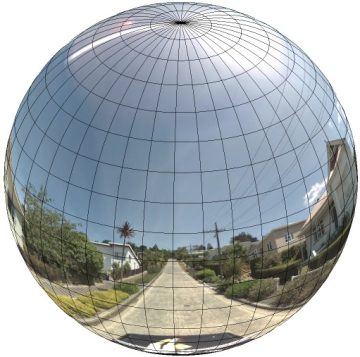
התייחסות לתמונה הפנורמית כאל הטלה על כדור עם מערכת קואורדינטות ישרת זווית היא יתרון כשמחלקים את התמונה למשבצות ישרות זווית ומציגים תמונות על סמך קואורדינטות המשבצות המחושבות.
יצירת משבצות פנורמה בהתאמה אישית
תצוגת Street View תומכת גם ברמות שונות של פרטי תמונה באמצעות פקד זום, שמאפשר להתקרב ולהתרחק מתצוגת ברירת המחדל. בדרך כלל, ב-Street View יש חמש רמות של רזולוציית זום לכל תמונת פנורמה. אם תסתמכו על תמונה פנורמית אחת כדי להציג את כל רמות הזום, התמונה תהיה גדולה מאוד ותאט משמעותית את הפעולה של האפליקציה, או שהרזולוציה שלה תהיה נמוכה מדי ברמות זום גבוהות יותר, כך שתוצג תמונה מפוקסלת. למזלנו, אנחנו יכולים להשתמש בדפוס עיצוב דומה לזה שמשמש להצגת משבצות של מפות Google ברמות זום שונות, כדי לספק תמונות ברזולוציה מתאימה לפנורמות בכל רמת זום.
כשStreetViewPanorama נטען לראשונה, הוא מציג כברירת מחדל תמונה שמורכבת מ-25% (90 מעלות של קשת) מהרוחב האופקי של הפנורמה ברמת זום 1. התצוגה הזו
תואמת בערך לשדה הראייה הרגיל של בני אדם. הקטנת התצוגה מהתצוגה הזו שמוגדרת כברירת מחדל בעצם מספקת קשת רחבה יותר, בעוד שהגדלת התצוגה מצמצמת את שדה הראייה לקשת קטנה יותר. StreetViewPanorama מחשב אוטומטית את שדה הראייה המתאים לרמת הזום שנבחרה, ואז בוחר את התמונות המתאימות ביותר לרזולוציה הזו על ידי בחירת קבוצת משבצות שתואמת בערך לממדים של שדה הראייה האופקי. המיפוי הבא של שדות הראייה מתאים לרמות הזום ב-Street View:
| רמת הזום ב-Street View | שדה הראייה (מעלות) |
|---|---|
| 0 | 180 |
| 1 (ברירת מחדל) | 90 |
| 2 | 45 |
| 3 | 22.5 |
| 4 | 11.25 |
שימו לב: הגודל של התמונה שמוצגת ב-Street View תלוי לחלוטין בגודל המסך (הרוחב) של מאגר Street View. אם תספקו מאגר רחב יותר, השירות עדיין יספק את אותו שדה ראייה לכל רמת זום נתונה, אבל יכול להיות שהוא יבחר משבצות שמתאימות יותר לרזולוציה הזו.
כל תמונת פנורמה מורכבת מהטלה מלבנית שוות-שטח, ולכן יחסית קל ליצור משבצות פנורמה. ההקרנה מספקת תמונה עם יחס גובה-רוחב של 2:1, ולכן קל יותר להשתמש במשבצות עם יחסים של 2:1, אבל משבצות ריבועיות עשויות לספק ביצועים טובים יותר במפות ריבועיות (כי שדה הראייה יהיה ריבועי).
בפסיפסים ביחס 2:1, תמונה אחת שמקיפה את הפנורמה כולה מייצגת את הפנורמה כולה (תמונת הבסיס) ברמת הזום 0, וכל רמת זום עולה מציעה 4zoomLevel משבצות. (לדוגמה, ברמת זום 2, הפנורמה כולה מורכבת מ-16 אריחים). הערה: דרגות הזום ב-Street View בחלוקה לאריחים לא תואמות ישירות לדרגות הזום שמוצגות באמצעות הכלי לשליטה ב-Street View. במקום זאת, דרגות הזום בכלי לשליטה ב-Street View בוחרות שדה ראייה (FoV), שממנו נבחרים האריחים המתאימים.
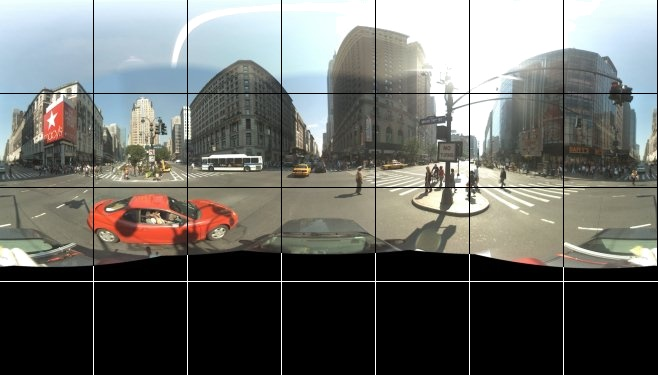
בדרך כלל, כדאי לתת שמות למשבצות התמונות כדי שאפשר יהיה לבחור אותן באופן פרוגרמטי. סכמת שמות כזו מוסברת בהמשך בקטע טיפול בבקשות מותאמות אישית של Panorama.
טיפול בבקשות לפנורמה בהתאמה אישית
כדי להשתמש בפנורמה בהתאמה אישית, קוראים ל-StreetViewPanorama.registerPanoProvider() ומציינים את השם של שיטת ספק הפנורמה בהתאמה אישית. השיטה של ספק הפנורמה
צריכה להחזיר אובייקט StreetViewPanoramaData, והיא כוללת את החתימה הבאה:
Function(pano):StreetViewPanoramaData
StreetViewPanoramaData הוא אובייקט מהצורה הבאה:
{
  copyright: string,
  location: {
    description: string,
    latLng: google.maps.LatLng,
    pano: string
  },
  tiles: {
    tileSize: google.maps.Size,
    worldSize: google.maps.Size,
    heading: number,
    getTileUrl: Function
  },
  links: [
    description: string,
    heading: number,
    pano: string,
    roadColor: string,
    roadOpacity: number
  ]
}
כדי להציג פנורמה בהתאמה אישית:
- מגדירים את המאפיין
StreetViewPanoramaOptions.panoלערך מותאם אישית. - Call
StreetViewPanorama.registerPanoProvider()to supply a custom panorama provider function. - מטמיעים את פונקציית ספק הפנורמה המותאמת אישית כדי לטפל בערך
panoשצוין. - בניית אובייקט
StreetViewPanoramaData. - מגדירים את המאפיין
StreetViewTileData.getTileUrlלשם של פונקציית ספק של משבצות בהתאמה אישית שאתם מספקים. לדוגמה,getCustomPanoramaTileUrl. - מטמיעים את הפונקציה של ספק המשבצות בהתאמה אישית, כמו בדוגמאות שלמטה.
- החזרת האובייקט
StreetViewPanoramaData.
הערה: אם רוצים להציג תמונות פנורמיות בהתאמה אישית, אסור להגדיר ישירות position
ב-StreetViewPanorama, כי מיקום כזה יגרום לשירות Street View לבקש את תמונות Street View שמוגדרות כברירת מחדל בקרבת המיקום הזה. במקום זאת, צריך להגדיר את המיקום הזה בשדה StreetViewPanoramaData של אובייקטlocation.latLng מותאם אישית.
בדוגמה הבאה מוצגת פנורמה בהתאמה אישית של המשרד של Google בסידני. הערה: בדוגמה הזו לא נעשה שימוש במפה או בתמונות ברירת מחדל של Street View:
TypeScript
function initPano() { // Set up Street View and initially set it visible. Register the // custom panorama provider function. Set the StreetView to display // the custom panorama 'reception' which we check for below. const panorama = new google.maps.StreetViewPanorama( document.getElementById("map") as HTMLElement, { pano: "reception", visible: true } ); panorama.registerPanoProvider(getCustomPanorama); } // Return a pano image given the panoID. function getCustomPanoramaTileUrl( pano: string, zoom: number, tileX: number, tileY: number ): string { return ( "https://developers.google.com/maps/documentation/javascript/examples/full/images/" + "panoReception1024-" + zoom + "-" + tileX + "-" + tileY + ".jpg" ); } // Construct the appropriate StreetViewPanoramaData given // the passed pano IDs. function getCustomPanorama(pano: string): google.maps.StreetViewPanoramaData { if (pano === "reception") { return { location: { pano: "reception", description: "Google Sydney - Reception", }, links: [], // The text for the copyright control. copyright: "Imagery (c) 2010 Google", // The definition of the tiles for this panorama. tiles: { tileSize: new google.maps.Size(1024, 512), worldSize: new google.maps.Size(2048, 1024), // The heading in degrees at the origin of the panorama // tile set. centerHeading: 105, getTileUrl: getCustomPanoramaTileUrl, }, }; } // @ts-ignore TODO fix typings return null; } declare global { interface Window { initPano: () => void; } } window.initPano = initPano;
JavaScript
function initPano() { // Set up Street View and initially set it visible. Register the // custom panorama provider function. Set the StreetView to display // the custom panorama 'reception' which we check for below. const panorama = new google.maps.StreetViewPanorama( document.getElementById("map"), { pano: "reception", visible: true }, ); panorama.registerPanoProvider(getCustomPanorama); } // Return a pano image given the panoID. function getCustomPanoramaTileUrl(pano, zoom, tileX, tileY) { return ( "https://developers.google.com/maps/documentation/javascript/examples/full/images/" + "panoReception1024-" + zoom + "-" + tileX + "-" + tileY + ".jpg" ); } // Construct the appropriate StreetViewPanoramaData given // the passed pano IDs. function getCustomPanorama(pano) { if (pano === "reception") { return { location: { pano: "reception", description: "Google Sydney - Reception", }, links: [], // The text for the copyright control. copyright: "Imagery (c) 2010 Google", // The definition of the tiles for this panorama. tiles: { tileSize: new google.maps.Size(1024, 512), worldSize: new google.maps.Size(2048, 1024), // The heading in degrees at the origin of the panorama // tile set. centerHeading: 105, getTileUrl: getCustomPanoramaTileUrl, }, }; } // @ts-ignore TODO fix typings return null; } window.initPano = initPano;
CSS
/* * Always set the map height explicitly to define the size of the div element * that contains the map. */ #map { height: 100%; } /* * Optional: Makes the sample page fill the window. */ html, body { height: 100%; margin: 0; padding: 0; }
HTML
<html>
<head>
<title>Custom Street View Panoramas</title>
<link rel="stylesheet" type="text/css" href="./style.css" />
<script type="module" src="./index.js"></script>
</head>
<body>
<div id="map"></div>
<!--
The `defer` attribute causes the script to execute after the full HTML
document has been parsed. For non-blocking uses, avoiding race conditions,
and consistent behavior across browsers, consider loading using Promises. See
https://developers.google.com/maps/documentation/javascript/load-maps-js-api
for more information.
-->
<script
src="https://maps.googleapis.com/maps/api/js?key=AIzaSyB41DRUbKWJHPxaFjMAwdrzWzbVKartNGg&callback=initPano&v=weekly"
defer
></script>
</body>
</html>דוגמה לניסיון
ספק הפנורמה בהתאמה אישית מחזיר את המשבצת המתאימה בהינתן מזהה הפנורמה, רמת הזום והקואורדינטות של משבצת הפנורמה שהועברו.
מכיוון שהבחירה של התמונה תלויה בערכים האלה, כדאי לתת שמות לתמונות שאפשר לבחור באופן פרוגרמטי על סמך הערכים האלה, למשל pano_zoom_tileX_tileY.png.
בדוגמה הבאה נוסף חץ נוסף לתמונה, בנוסף לחצים של ניווט ב-Street View שמוגדרים כברירת מחדל, שמצביע על Google Sydney ומקשר לתמונות בהתאמה אישית:
TypeScript
let panorama: google.maps.StreetViewPanorama; // StreetViewPanoramaData of a panorama just outside the Google Sydney office. let outsideGoogle: google.maps.StreetViewPanoramaData; // StreetViewPanoramaData for a custom panorama: the Google Sydney reception. function getReceptionPanoramaData(): google.maps.StreetViewPanoramaData { return { location: { pano: "reception", // The ID for this custom panorama. description: "Google Sydney - Reception", latLng: new google.maps.LatLng(-33.86684, 151.19583), }, links: [ { heading: 195, description: "Exit", pano: (outsideGoogle.location as google.maps.StreetViewLocation).pano, }, ], copyright: "Imagery (c) 2010 Google", tiles: { tileSize: new google.maps.Size(1024, 512), worldSize: new google.maps.Size(2048, 1024), centerHeading: 105, getTileUrl: function ( pano: string, zoom: number, tileX: number, tileY: number ): string { return ( "https://developers.google.com/maps/documentation/javascript/examples/full/images/" + "panoReception1024-" + zoom + "-" + tileX + "-" + tileY + ".jpg" ); }, }, }; } function initPanorama() { panorama = new google.maps.StreetViewPanorama( document.getElementById("street-view") as HTMLElement, { pano: (outsideGoogle.location as google.maps.StreetViewLocation).pano } ); // Register a provider for the custom panorama. panorama.registerPanoProvider( (pano: string): google.maps.StreetViewPanoramaData => { if (pano === "reception") { return getReceptionPanoramaData(); } // @ts-ignore TODO fix typings return null; } ); // Add a link to our custom panorama from outside the Google Sydney office. panorama.addListener("links_changed", () => { if ( panorama.getPano() === (outsideGoogle.location as google.maps.StreetViewLocation).pano ) { panorama.getLinks().push({ description: "Google Sydney", heading: 25, pano: "reception", }); } }); } function initMap(): void { // Use the Street View service to find a pano ID on Pirrama Rd, outside the // Google office. new google.maps.StreetViewService() .getPanorama({ location: { lat: -33.867386, lng: 151.195767 } }) .then(({ data }: google.maps.StreetViewResponse) => { outsideGoogle = data; initPanorama(); }); } declare global { interface Window { initMap: () => void; } } window.initMap = initMap;
JavaScript
let panorama; // StreetViewPanoramaData of a panorama just outside the Google Sydney office. let outsideGoogle; // StreetViewPanoramaData for a custom panorama: the Google Sydney reception. function getReceptionPanoramaData() { return { location: { pano: "reception", // The ID for this custom panorama. description: "Google Sydney - Reception", latLng: new google.maps.LatLng(-33.86684, 151.19583), }, links: [ { heading: 195, description: "Exit", pano: outsideGoogle.location.pano, }, ], copyright: "Imagery (c) 2010 Google", tiles: { tileSize: new google.maps.Size(1024, 512), worldSize: new google.maps.Size(2048, 1024), centerHeading: 105, getTileUrl: function (pano, zoom, tileX, tileY) { return ( "https://developers.google.com/maps/documentation/javascript/examples/full/images/" + "panoReception1024-" + zoom + "-" + tileX + "-" + tileY + ".jpg" ); }, }, }; } function initPanorama() { panorama = new google.maps.StreetViewPanorama( document.getElementById("street-view"), { pano: outsideGoogle.location.pano }, ); // Register a provider for the custom panorama. panorama.registerPanoProvider((pano) => { if (pano === "reception") { return getReceptionPanoramaData(); } // @ts-ignore TODO fix typings return null; }); // Add a link to our custom panorama from outside the Google Sydney office. panorama.addListener("links_changed", () => { if (panorama.getPano() === outsideGoogle.location.pano) { panorama.getLinks().push({ description: "Google Sydney", heading: 25, pano: "reception", }); } }); } function initMap() { // Use the Street View service to find a pano ID on Pirrama Rd, outside the // Google office. new google.maps.StreetViewService() .getPanorama({ location: { lat: -33.867386, lng: 151.195767 } }) .then(({ data }) => { outsideGoogle = data; initPanorama(); }); } window.initMap = initMap;
CSS
html, body { height: 100%; margin: 0; padding: 0; } #street-view { height: 100%; }
HTML
<html>
<head>
<title>Custom Street View Panorama Tiles</title>
<link rel="stylesheet" type="text/css" href="./style.css" />
<script type="module" src="./index.js"></script>
</head>
<body>
<div id="street-view"></div>
<!--
The `defer` attribute causes the script to execute after the full HTML
document has been parsed. For non-blocking uses, avoiding race conditions,
and consistent behavior across browsers, consider loading using Promises. See
https://developers.google.com/maps/documentation/javascript/load-maps-js-api
for more information.
-->
<script
src="https://maps.googleapis.com/maps/api/js?key=AIzaSyB41DRUbKWJHPxaFjMAwdrzWzbVKartNGg&callback=initMap&v=weekly"
defer
></script>
</body>
</html>