

בדף הזה מוסבר איך מפתחי אפליקציות של צד שלישי יכולים להשתמש בשירות לפתרון בעיות כדי ליצור דף אבחון בתוך האפליקציה לעסק שלהם.
אתם יכולים להשתמש ב-Accounts API כדי לראות את הבעיות שמשפיעות על החשבון העסקי שלכם ועל כל חשבון שיש לכם גישה אליו.
אתם אחראים לפעול בהתאם למדיניות בנושא מודעות שופינג וכרטיסי מוצר חינמיים. אנחנו שומרים לעצמנו את הזכות לאכוף את כללי המדיניות של Google שופינג ולהגיב בהתאם אם נזהה תוכן או התנהגות שמפרים את כללי המדיניות האלה.
אתם יכולים להשתמש בשירות הזה כדי ליצור ממשקי משתמש שדומים לדפים אבחון חשבון ותובנות על מוצרים ב-Merchant Center.
השירות "פתרון בעיות" מיועד רק לממשקי משתמש של צד שלישי. הבקשות צריכות להישלח כשעסק יוצר אינטראקציה עם ממשק המשתמש של האפליקציה. כדי להפוך את האבחון של חשבון העסק שלכם לאוטומטי, עיינו במדריך בנושא בעיות בחשבון.
כדי לעזור לעסק שלכם לפתור בעיות, מומלץ לספק את הדפים הבאים באפליקציה:
- אבחון החשבון
- ניתוח נתוני מוצרים
אפשרויות שונות להטמעת דף אבחון
אפשר להטמיע את דף האבחון בכמה דרכים. בהתאם לצורך, בוחרים את האפשרות שקובעת איך המערכת תטפל בפעולות אבחון מורכבות. בבקשה, אפשר להגדיר את user_input_action_option לאחת מהאפשרויות הבאות:
REDIRECT_TO_MERCHANT_CENTER: זוהי אפשרות ברירת המחדל. פעולות שדורשות הצגת תוכן נוסף או קבלת קלט נוסף מהעסק לא מוטמעות באופן מלא באפליקציה. בשבילן, ה-API מספק קישור להפניה מחדש לדף המתאים ב-Merchant Center שבו העסק יכול לבצע את הפעולה.BUILT_IN_USER_INPUT_ACTIONS: אתם יכולים להטמיע פעולות מורכבות שדורשות קלט מהמשתמשים כפתרון בתוך האפליקציה.
הטמעה של דף אבחון
בקטע הזה מוסבר איך להטמיע את דף האבחון. הוא משתמש באפשרות ברירת המחדל (הפשוטה) כדי לטפל בפעולות מורכבות כהפניות ל-Merchant Center.
הטמעה
כך אנחנו מציעים שהתהליך בדף האבחון ייראה:
- עסק פותח דף אבחון באפליקציה שלכם.
- האפליקציה מבקשת אבחון על ידי קריאה לשירות
issueresolution.
הכנו לכם דוגמה לפנייה:
POST https://merchantapi.googleapis.com/issueresolution/v1/accounts/{ACCOUNT_ID}:renderaccountissues?timeZone=America/Los_Angeles&languageCode=en-GB { }
מחליפים את {ACCOUNT_ID} במזהה הייחודי של החשבון שבו רוצים להפעיל את עיבוד הפעולה.
האפליקציה מציגה לעסק את הניתוח ואת הפעולות המומלצות מהתגובה. דוגמה לתשובה:
{
  "renderedIssues": [
    {
      "title": "Misrepresentation",
      "impact": {
        "message": "Prevents all products from showing in all countries",
        "severity": "ERROR",
        "breakdowns": [
          {
            "regions": [
              {
                "code": "001",
                "name": "All countries"
              }
            ],
            "details": [
              "Products not showing organically"
            ]
          }
        ]
      },
      "prerenderedContent": "\u003cdiv class=\"issue-detail\"\u003e\u003cdiv class=\"issue-content\"\u003e\u003cp class=\"content-element\"\u003e\u003cspan class=\"segment\"\u003eBased on the information available about your business, there is reason to believe that customers are being misled on Google. Review the Misrepresentation policy and make changes to your Merchant Center and/or online store.u003c/span\u003e\u003c/p\u003e\u003cp class=\"content-element root-causes-intro\"\u003e\u003cspan class=\"segment\"\u003eMake sure your Merchant Center and online store follow the following best practices / guidelines\u003c/span\u003e\u003c/p\u003e\u003cul class=\"content-element root-causes\"\u003e\u003cli\u003e\u003cp\u003e\u003cspan class=\"segment\"\u003eProvide transparency about your business identity, business model, policies and how your customers can interact with you\u003c/span\u003e\u003c/p\u003e\u003c/li\u003e\u003cli\u003e\u003cp\u003e\u003cspan class=\"segment\"\u003ePromote your online reputation by showing reviews or highlighting any badges or seals of approval\u003c/span\u003e\u003c/p\u003e\u003c/li\u003e\u003cli\u003e\u003cp class=\"tooltip tooltip-style-info\"\u003e\u003cspan class=\"segment\"\u003eUse a professional design for your online store that includes an SSL certificate\u003c/span\u003e\u003cspan class=\"tooltip-icon\"\u003e\u003cbr\u003e\u003c/span\u003e\u003cspan class=\"tooltip-text\"\u003e\u003cspan class=\"segment\"\u003eMake sure it's accessible for all users without any redirects and doesn't have any placeholders for text and images.u003c/span\u003e\u003c/span\u003e\u003c/p\u003e\u003c/li\u003e\u003cli\u003e\u003cp class=\"tooltip tooltip-style-info\"\u003e\u003cspan class=\"segment\"\u003eProvide information in the business information settings in your Merchant Center\u003c/span\u003e\u003cspan class=\"tooltip-icon\"\u003e\u003cbr\u003e\u003c/span\u003e\u003cspan class=\"tooltip-text\"\u003e\u003cspan class=\"segment\"\u003eLink any relevant third-party platforms to your Merchant Center and create a Google Business Profile.u003c/span\u003e\u003c/span\u003e\u003c/p\u003e\u003c/li\u003e\u003cli\u003e\u003cp\u003e\u003cspan class=\"segment\"\u003eFollow SEO guidelines, improve your eligibility for seller ratings and match your product data in your Merchant Center with your online store\u003c/span\u003e\u003c/p\u003e\u003c/li\u003e\u003c/ul\u003e\u003ca href=\"https://support.google.com/merchants/answer/6150127?hl=en-US\" class=\"content-element\"\u003eLearn more about the Misrepresentation policy\u003c/a\u003e\u003c/div\u003e\u003c/div\u003e",
      "actions": [
        {
          "externalAction": {
            "type": "REVIEW_ACCOUNT_ISSUE_IN_MERCHANT_CENTER",
            "uri": "https://merchants.google.com/mc/products/diagnostics/accountissues?a=672911686&hl=en-US"
          },
          "buttonLabel": "Request review",
          "isAvailable": true
        }
      ],
      "prerenderedOutOfCourtDisputeSettlement": "\u003cdetails class=\"ods-section\"\u003e\u003csummary\u003eShow additional options available to you\u003c/summary\u003e\u003cp class=\"ods-description\"\u003e\u003cspan class=\"segment\"\u003eYou may have the option to request an external appeal. You'll also be asked to provide your routing and reference IDs.\u003c/span\u003e \u003ca href=\"https://support.google.com/european-union-digital-services-act-redress-options?hl=en-GB\" target=\"_blank\" class=\"segment\"\u003eLearn more about external appeals\u003c/a\u003e\u003c/p\u003e\u003cp class=\"ods-param ods-routing-id\"\u003e\u003cspan class=\"segment ods-param-header\"\u003eRouting ID:\u003c/span\u003e \u003cspan class=\"segment ods-param-value\"\u003eRDAX\u003c/span\u003e\u003c/p\u003e\u003cp class=\"ods-param ods-reference-id\"\u003e\u003cspan class=\"segment ods-param-header\"\u003eReference ID:\u003c/span\u003e \u003cspan class=\"segment ods-param-value\"\u003e672911686\u003c/span\u003e\u003c/p\u003e\u003c/details\u003e"
    },
    {
      "title": "Adult-oriented content",
      "impact": {
        "message": "Prevents all products from showing in all countries",
        "severity": "ERROR",
        "breakdowns": [
          {
            "regions": [
              {
                "code": "001",
                "name": "All countries"
              }
            ],
            "details": [
              "Products not showing organically"
            ]
          }
        ]
      },
      "prerenderedContent": "\u003cdiv class=\"issue-detail\"\u003e\u003cdiv class=\"callout-banners\"\u003e\u003cdiv class=\"callout-banner callout-banner-info\"\u003e\u003cp\u003e\u003cspan class=\"segment\"\u003eReview requested on Aug 9, 2023. It can take a few days to complete.u003c/span\u003e\u003c/p\u003e\u003c/div\u003e\u003c/div\u003e\u003cdiv class=\"issue-content\"\u003e\u003cp class=\"content-element\"\u003e\u003cspan class=\"segment\"\u003eThere was a problem identified with the sale of prohibited adult products on your online store. In the case that you are intentionally selling adult items, enable Adult content in Settings in your Merchant Center. In your product file, use the \u003c/span\u003e\u003cspan class=\"segment segment-attribute\"\u003eadult\u003c/span\u003e\u003cspan class=\"segment\"\u003e attribute for specific products.u003c/span\u003e\u003c/p\u003e\u003cp class=\"content-element root-causes-intro\"\u003e\u003cspan class=\"segment\"\u003eMake sure the products meet the policy requirements\u003c/span\u003e\u003c/p\u003e\u003cul class=\"content-element root-causes\"\u003e\u003cli\u003e\u003cp class=\"tooltip tooltip-style-info\"\u003e\u003cspan class=\"segment\"\u003eAdult oriented content may be prohibited or restricted depending on the product sold and the country it is sold\u003c/span\u003e\u003cspan class=\"tooltip-icon\"\u003e\u003cbr\u003e\u003c/span\u003e\u003cspan class=\"tooltip-text\"\u003e\u003cspan class=\"segment\"\u003eSee a full list of countries in the HelpCenter\u003c/span\u003e\u003c/span\u003e\u003c/p\u003e\u003c/li\u003e\u003cli\u003e\u003cp class=\"tooltip tooltip-style-info\"\u003e\u003cspan class=\"segment\"\u003eDon't list sexually explicit content that is intended to arouse or includes content such as text, image, audio, or video of graphic sexual acts intended to arouse\u003c/span\u003e\u003cspan class=\"tooltip-icon\"\u003e\u003cbr\u003e\u003c/span\u003e\u003cspan class=\"tooltip-text\"\u003e\u003cspan class=\"segment\"\u003eExamples: Graphic depictions of sexual acts in progress, including hardcore pornography, any type of genital, anal, or oral sexual activity; graphic depictions of masturbation or genital arousal and language explicitly referencing arousal, masturbation, cartoon porn, or hentai\u003c/span\u003e\u003c/span\u003e\u003c/p\u003e\u003c/li\u003e\u003c/ul\u003e\u003ca href=\"https://support.google.com/merchants/answer/6150138?hl=en-US#wycd-restricted-adult-content\" class=\"content-element\"\u003eLearn more about the Adult-oriented content policy\u003c/a\u003e\u003c/div\u003e\u003c/div\u003e"
    },
    {
      "title": "Missing return and refund policy",
      "impact": {
        "message": "Limits visibility of all products in all countries",
        "severity": "ERROR",
        "breakdowns": [
          {
            "regions": [
              {
                "code": "001",
                "name": "All countries"
              }
            ],
            "details": [
              "Limited visibility for products showing organically"
            ]
          }
        ]
      },
      "prerenderedContent": "\u003cdiv class=\"issue-detail\"\u003e\u003cdiv class=\"issue-content\"\u003e\u003cp class=\"content-element\"\u003e\u003cspan class=\"segment\"\u003eThere was a problem identified with the return and/or refund policy of your online store. Update your return or refund policy to provide customers a transparent shopping experience.u003c/span\u003e\u003c/p\u003e\u003cp class=\"content-element root-causes-intro\"\u003e\u003cspan class=\"segment\"\u003eMake sure your products meet the Shopping policy requirements\u003c/span\u003e\u003c/p\u003e\u003cul class=\"content-element root-causes\"\u003e\u003cli\u003e\u003cp class=\"tooltip tooltip-style-info\"\u003e\u003cspan class=\"segment\"\u003eIt's available on your online store\u003c/span\u003e\u003cspan class=\"tooltip-icon\"\u003e\u003cbr\u003e\u003c/span\u003e\u003cspan class=\"tooltip-text\"\u003e\u003cspan class=\"segment\"\u003eWe recommend that you have a separate landing page for your policy and link to it from the other pages on your online store, so that it's easy to find.u003c/span\u003e\u003c/span\u003e\u003c/p\u003e\u003c/li\u003e\u003cli\u003e\u003cp class=\"tooltip tooltip-style-info\"\u003e\u003cspan class=\"segment\"\u003eIt's available in the language of the country you're selling in or in English\u003c/span\u003e\u003cspan class=\"tooltip-icon\"\u003e\u003cbr\u003e\u003c/span\u003e\u003cspan class=\"tooltip-text\"\u003e\u003cspan class=\"segment\"\u003eMake sure that the return and/or refund policy is available in the target language or in English. Ideally, users should be given the option to select the return and/or refund policy in their own language.u003c/span\u003e\u003c/span\u003e\u003c/p\u003e\u003c/li\u003e\u003cli\u003e\u003cp\u003e\u003cspan class=\"segment\"\u003eIt's accessible to everyone visiting your online store, without having to log in, sign up or enter any personal information\u003c/span\u003e\u003c/p\u003e\u003c/li\u003e\u003c/ul\u003e\u003ca href=\"https://support.google.com/merchants/answer/9158778?hl=en-US\" class=\"content-element\"\u003eLearn more about Missing return and refund policy\u003c/a\u003e\u003c/div\u003e\u003c/div\u003e",
      "actions": [
        {
          "externalAction": {
            "type": "REVIEW_ACCOUNT_ISSUE_IN_MERCHANT_CENTER",
            "uri": "https://merchants.google.com/mc/products/diagnostics/accountissues?a=672911686&hl=en-US"
          },
         "buttonLabel": "Request review",
         "isAvailable": true
        }
      ]
    }
  ]
}
מומלץ להציג את הבעיות בסדר שבו הן מוחזרות, עם
titleו-impact.message. מומלץ גם להציג את ה-impact.breakdownsשל הבעיה כשבעל העסק מעביר את העכבר מעל הכותרת או התיאור של הבעיה.העסק לוחץ על בעיה מהרשימה.
באפליקציה מוצג
impactמפורט של כל בעיה לפיcountry,destination,prerendered_content,prerendered_out_of_court_dispute_settlementוכפתורים לactionsשהעסק יכול לבצע כדי לפתור את הבעיה. יש כמה סוגים של פעולות:- פעולות חיצוניות: קישור לדף חיצוני, למשל ב-Merchant Center, שבו אפשר לפתור את הבעיה.
- פעולות פשוטות מובנות: מפנים לדף באפליקציה שבו העסק יכול לפתור את הבעיה.
- פעולות מובנות לקלט של משתמשים: פתיחת תיבת דו-שיח שבה העסק יכול לספק את המידע הנדרש ולבקש את הפעולה. סוג הפעולה הזה זמין רק אם נשלחה בקשה ל-
BUILT_IN_USER_INPUT_ACTIONS.
- העסק פועל לפי ההוראות כדי לפתור את הבעיה.
- העסק טוען מחדש את דף האבחון באפליקציה שלכם.
- האפליקציה שולחת בקשה נוספת לשירות
IssueResolutionומציגה רשימה מעודכנת של בעיות.
כדי לוודא שההטמעה בוצעה כמו שצריך, אתם יכולים להשוות בין המידע שמוצג באפליקציה המוגמרת לבין דפי האבחון ב-Merchant Center.
הדמיות של ממשק המשתמש
הנה דוגמה לאופן שבו אפשר להציג את המידע מהתגובה של renderaccountissues בדף האבחון של החשבון. אובייקטים בממשק המשתמש ממופים לשדות API תואמים ב-mock. אפשר ליצור דף דומה לתובנות על מוצרים.
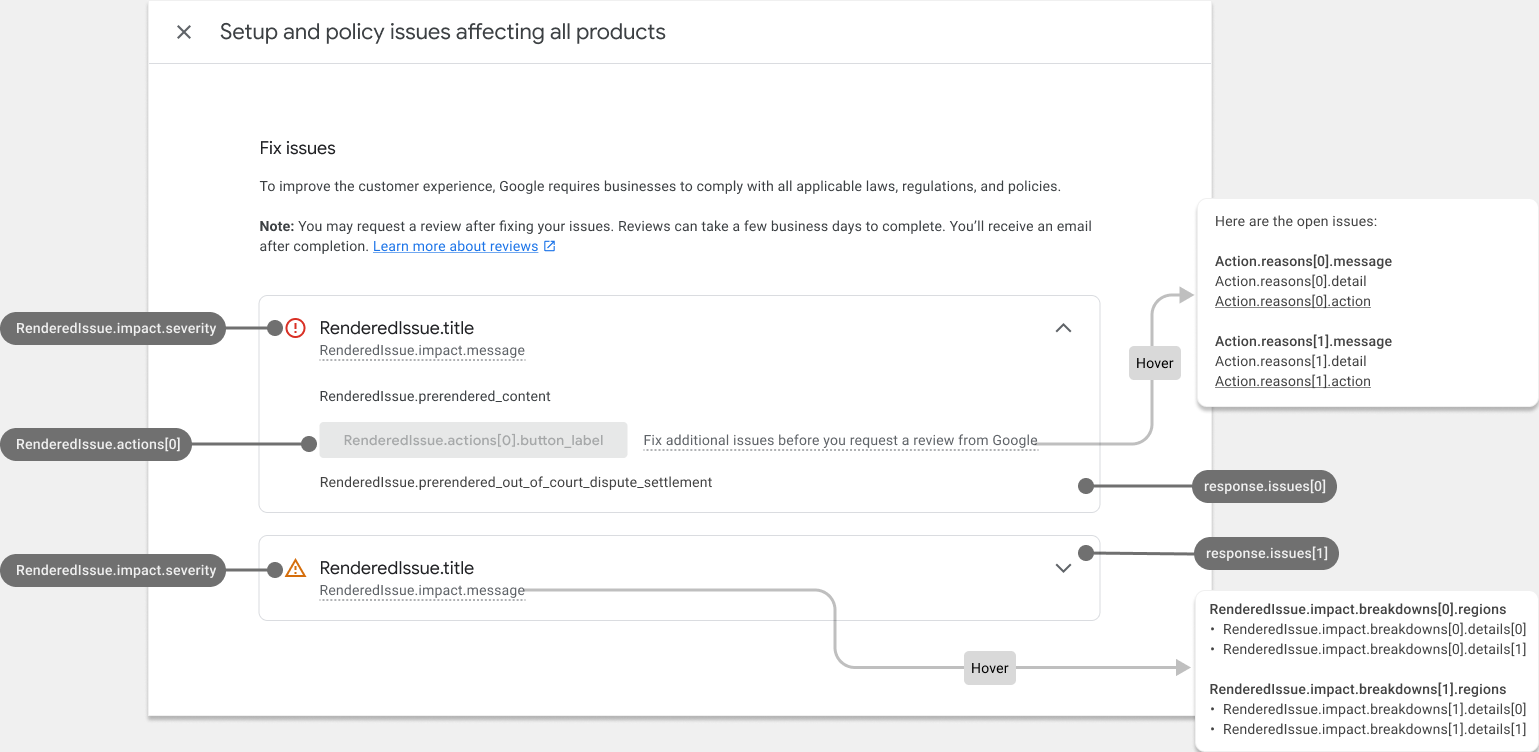
כך נראה דף אבחון החשבון אחרי שהוא מתמלא:

עיצוב HTML שעבר רינדור מראש
התגובה מהקריאה לשירות Issue resolution כוללת את השדה prerendered_content, עם הפרטים של כל בעיה ב-HTML. אתם יכולים להטמיע את תוכן ה-HTML הזה ישירות בממשק המשתמש כדי להציג את הבעיה בפורמט קריא.
יכול להיות שיופיעו רכיבי HTML עם המחלקה new-element. המחלקה new-element מוחלת על רכיבים שנוספים ל-HTML אחרי שמשלבים את השירות IssueResolution. מומלץ להסתיר רכיבים עם המחלקה new-element, כדי שתוכלו לעצב את הרכיבים האלה לפני שהם מוצגים למשתמשים באפליקציה.
דוגמה לערך בשדה prerendered_content:
<div class="issue-detail">
  <div class="callout-banners">
    <div class="callout-banner callout-banner-info"><p><span class="segment">Review requested on Aug 9, 2023. It can take a few days to complete.</span>
    </p></div>
  </div>
  <div class="issue-content"><p class="content-element"><span class="segment">There was a problem identified with the sale of prohibited adult products on your online store. In the case that you are intentionally selling adult items, enable Adult content in Settings in your Merchant Center. In your product file, use the </span><span
      class="segment segment-attribute">adult</span><span class="segment"> attribute for specific products.</span>
  </p>
    <p class="content-element root-causes-intro"><span class="segment">Make sure the products meet the policy requirements</span>
    </p>
    <ul class="content-element root-causes">
      <li><p class="tooltip tooltip-style-info"><span class="segment">Adult oriented content may be prohibited or restricted depending on the product sold and the country it is sold</span><span
          class="tooltip-icon"><br></span><span class="tooltip-text"><span class="segment">See a full list of countries in the HelpCenter</span></span>
      </p></li>
      <li><p class="tooltip tooltip-style-info"><span class="segment">Don't list sexually explicit content that is intended to arouse or includes content such as text, image, audio, or video of graphic sexual acts intended to arouse</span><span
          class="tooltip-icon"><br></span><span class="tooltip-text"><span class="segment">Examples: Graphic depictions of sexual acts in progress, including hardcore pornography, any type of genital, anal, or oral sexual activity; graphic depictions of masturbation or genital arousal and language explicitly referencing arousal, masturbation, cartoon porn, or hentai</span></span>
      </p></li>
    </ul>
    <a href="https://support.google.com/merchants/answer/6150138?hl=en-US#wycd-restricted-adult-content"
       class="content-element">Learn more about the Adult-oriented content policy</a></div>
</div>
כך נראה קוד ה-HTML הקודם
prerendered_content אם מטמיעים אותו באפליקציה בלי עיצוב:

אתם יכולים להשתמש בכמה מחלקות CSS כדי לשנות את האופן שבו התוכן מוצג בממשק המשתמש. הנה דוגמה לקוד CSS שאפשר להשתמש בו:
issue-detail {
  text-align: left;
  width: 700px;
  border-radius: 8px;
  background: white;
  margin: 16px;
  padding: 16px;
}

.content-element {
  margin: 8px 0 8px 0;
  display: block;
}

/* callout banners */
.callout-banners {
  margin: 0 0 16px 0;
}

.callout-banner {
  display: block;
  padding: 16px 16px 6px 16px;
  margin: 0 0 8px 0;
  border-radius: 8px;
}

.callout-banner-info {
  background: #e8f0fe;
}

.callout-banner-warning {
  background: #fef7e0;
}

.callout-banner-error {
  background: #fce8e6;
}

/* add an icon to the callout banner */
.callout-banner p {
  background-repeat: no-repeat;
  padding-left: 32px;
}

.callout-banner-error p {
  background-image: url("https://fonts.gstatic.com/s/i/short-term/release/googlesymbols/error/default/20px.svg");
}

.callout-banner-warning p {
  background-image: url("https://fonts.gstatic.com/s/i/short-term/release/googlesymbols/warning/default/20px.svg");
}

.callout-banner-info p {
  background-image: url("https://fonts.gstatic.com/s/i/short-term/release/googlesymbols/search/default/20px.svg");
}

/* segments with style */
.segment-attribute {
  color: #198639;
  font-family: monospace, monospace;
}

.segment-bold {
  font-weight: bold;
}

.segment-italic {
  font-style: italic;
}

/* tooltip */
.tooltip {
  position: relative;
}

.tooltip-style-info .tooltip-icon:before {
  content: '(i)';
  font-style: normal;
  font-weight: normal;
  text-decoration: inherit;
  margin-left: 5px;
}

.tooltip-style-question .tooltip-icon:before {
  content: '(?)';
  font-style: normal;
  font-weight: normal;
  text-decoration: inherit;
  margin-left: 5px;
}

.tooltip .tooltip-text {
  visibility: hidden;
  text-align: left;
  background: white;
  border-radius: 8px;
  padding: 5px 0;
  border: 1px solid;
  padding: 10px;
  box-shadow: 3px 7px 12px #c1c1c1;
  position: absolute;
  z-index: 1;
}

.tooltip:hover .tooltip-text {
  visibility: visible;
}

/* table */
table.content-element {
  margin: 16px 0 16px 0;
  border: 1px solid #ccc;
  border-collapse: collapse;
  margin: 1em 0;
}

table.content-element th {
  background-color: #eee;
}

table.content-element th, table td {
  border: 1px solid #ddd;
  font-size: 0.9em;
  padding: 0.3em 1em;
}

/* hidde elements added in future, until they are supported in your application */
.new-element {
  visibility: hidden;
}
כך נראה התוכן שעבר עיבוד אם משתמשים ב-CSS שלמעלה:

אפשר גם להגדיר ולהציג הסברים קצרים באמצעות CSS:

הטמעת פעולה מובנית עם קלט מהמשתמשים
פעולה מובנית עם קלט מהמשתמש מאפשרת לכם לספק יכולת אבחון מורכבת כפתרון בתוך האפליקציה. מומלץ להטמיע את זה כתיבת דו-שיח שבה העסק יכול לספק את הקלט שלו, לקרוא מידע נוסף ולאשר את הבקשה.
כל פעולה מכילה תהליך פעולה אחד או יותר. לפעולות מסוימות יכול להיות יותר מתהליך אחד. לדוגמה, יכול להיות תהליך שונה כשהעסק מבקש בדיקה נוספת כי הוא לא מסכים עם ההחלטה, ותהליך שונה כשהוא כבר פתר את הבעיה.
כדי לבקש נתונים להטמעת פעולות מורכבות עם קלט מהמשתמש, צריך להגדיר את השדה user_input_action_option לערך BUILT_IN_USER_INPUT_ACTIONS.
POST https://merchantapi.googleapis.com/issueresolution/v1/accounts/{ACCOUNT_ID}:renderaccountissues?timeZone=America/Los_Angeles&languageCode=en-GB
{
"user_input_action_option": "BUILT_IN_USER_INPUT_ACTIONS"
}
מחליפים את {ACCOUNT_ID} במזהה הייחודי של החשבון שבו רוצים להפעיל את עיבוד הפעולה.
הטמעה
כך אנחנו מציעים לעצב את התהליך בדף האבחון שבו המשתמשים מתבקשים להזין מידע:
המשתמש לוחץ על כפתור הפעולה.
- אם יש כמה תהליכים זמינים, האפליקציה מציעה את כולם כדי שהמשתמש יוכל לבחור אחד מהם, בהתאם לכוונה שלו.
- המשתמש בוחר את התהליך.
באפליקציה מוצגים הכותרת, ההודעה, ההסבר הקצר והטופס לקלט מהמשתמש של תהליך הפעולה שנבחר. מומלץ להציג את הפרטים האלה בתיבת דו-שיח.
- ההסבר, אם הוא קיים, מכיל מידע חשוב שעוזר למשתמש להבין טוב יותר איך הפעולה עובדת ומה צריך לעשות כדי להצליח. מומלץ להדגיש את ההודעה הזו ולעצב אותה בהתאם לחומרת ההערה.
- אם יש שדות להזנת קלט בתהליך, הם צריכים להופיע כדי שהמשתמש יוכל להזין ערכים. אם השדה להזנת קלט מסומן כחובה, האפליקציה לא אמורה לאפשר לעסק לשלוח את הבקשה לפני שהוא מספק את הערך.
המשתמש קורא את המידע ומספק את הערכים המבוקשים.
המשתמש לוחץ על הכפתור כדי לאשר את הבקשה.
האפליקציה מפעילה את עיבוד הפעולה על ידי קריאה לשירות לפתרון בעיות. הנה דוגמה לבקשה:
POST https://merchantapi.googleapis.com/issueresolution/v1/accounts/{ACCOUNT_ID}:triggeraction

{
  actionContext: "ActionContextValue=",
  actionInput: { actionFlowId: "flow1",
  inputValues: [
  { input_field_id: "input1", checkbox_input_value: { value: true } }
  ]
}
מחליפים את {ACCOUNT_ID} במזהה הייחודי של החשבון שבו רוצים להפעיל את עיבוד הפעולה.
באפליקציה מוצגת הודעת האישור שהתקבלה מהשירות
IssueResolution.- אם השירות מחזיר שגיאת אימות עם הסטטוס
INVALID_ARGUMENT, היא מכילה מידע מפורט והודעת שגיאה מקומית שצריך להציג לעסק. מומלץ להציג שגיאה כזו קרוב לשדה להזנת קלט שמושפע. דוגמה לתשובה:
{ "error": { "code": 400, "message": "[actionInput.inputValues] Invalid user input", "status": "INVALID_ARGUMENT", "details": [ { "@type": "type.googleapis.com/google.rpc.ErrorInfo", "reason": "invalid", "domain": "global" }, { "@type": "type.googleapis.com/google.rpc.BadRequest", "fieldViolations": [ { "field": "actionInput.inputValues.input", "description": "The field is required" } ] } ] } }- אם השירות מחזיר מצב לא תקין או שגיאה פנימית, שמסומנים בסטטוסים
FAILED_PRECONDITIONו-INTERNAL, האפליקציה צריכה להורות לעסק לטעון מחדש את הדף או לנסות שוב מאוחר יותר.
- אם השירות מחזיר שגיאת אימות עם הסטטוס