
本快速入门指南可帮助您首次调用 Google Ads API。
主要概念
- 开发者令牌:开发者令牌是由 22 个字符组成的字母数字 字符串,用于向 Google Ads API 服务器标识您的应用。进行 API 调用时,必须提供此令牌。
- **API 访问权限级别**:开发者令牌的 API 访问权限级别控制着您每天可以进行的 API 调用次数以及可以向哪些环境进行 API 调用。
- **Google Ads 经理账号**: Google Ads 经理账号用于 管理其他 Google Ads 账号。Google Ads 经理账号可用于管理 Google Ads 客户账号或其他 Google Ads 经理账号。您需要拥有 Google Ads 经理账号才能获取开发者令牌。
- Google Ads 客户账号 :您要对其进行 API 调用的 Google Ads 账号。
- 客户客户 ID :用于标识 Google Ads 客户账号的 10 位数字。如果您是从 Google Ads 界面复制此 ID,请务必移除连字符。
- **OAuth 2.0**:OAuth 2.0 是一个行业标准 授权协议,所有 Google API 都使用此协议。您需要服务账号和密钥才能生成 OAuth 2.0 凭据以进行 API 调用。
- Google Cloud 项目: Google Cloud 项目是创建、启用和使用所有 Google 服务(包括管理 API 和 OAuth 2.0 API 凭据)的基础。您可以在 Google Cloud 控制台中创建项目 。
- **服务账号**:一种特殊类型的 Google 账号, 属于您的应用,而不是个人用户。它用于向 Google Ads API 验证您的应用。您需要拥有 Google Cloud 项目才能获取服务账号。
- 服务账号密钥 :一个 JSON 应用凭据文件,其中包含服务账号的私钥。它用于生成 OAuth 2.0 凭据,以便在进行 Google Ads API API 调用时对服务账号进行身份验证。您需要拥有服务账号才能获取服务账号密钥。
前提条件
如需进行 Google Ads API 调用,您应完成以下步骤。
获取开发者令牌
如果您之前已注册开发者令牌,则可以在登录 Google Ads 经理账号后访问 API 中心来查找该令牌。
如果您没有开发者令牌,可以在 API 中心注册一个。
如何注册开发者令牌
- 在网络浏览器中访问 API 中心。系统提示时,请登录您的 Google Ads 经理账号。 如果您没有 Google Ads 经理账号,请创建一个。
- 填写 API 访问权限表单 并接受
条款及条件。
- 确保您的信息正确无误,并且您公司的网站 网址可以正常访问。如果网站未上线,Google 可能无法 处理您的申请并拒绝您的申请。
- 确保您提供的 API 联系人电子邮件地址指向一个定期 监控的收件箱。在审核过程中,Google 的 API 合规团队可能会通过此电子邮件 地址与您联系以进行澄清。如果您无法联系, Google 可能不会继续处理您的申请。
- 您可以在 API 中心 中修改 API 联系人电子邮件地址 。 即使在申请流程结束后,也请务必及时更新此信息,以便 Google 向您发送重要的服务公告。
完成申请流程后,开发者令牌会显示 在 API 中心内,状态为待批准 。您的开发者令牌 现在具有 测试账号访问权限 级别。
配置 Google API 控制台项目
Google API 控制台项目用于管理 Google API 和 OAuth 2.0 API 凭据。您可以访问 Google API 控制台,查找现有的 Google API 控制台项目或创建一个项目 。
首先,在您的项目中启用 Google Ads API:
接下来,您需要服务账号和服务账号密钥才能进行 API 调用。如果您已在使用其他 Google API 并已创建 OAuth 2.0 服务账号和密钥,则可以跳过此步骤并重复使用现有凭据。
如何创建服务账号和密钥
- 在 Google Cloud 控制台中,依次前往“菜单” > IAM 和管理 > 服务账号。
- 选择您的服务账号。
- 依次点击密钥 > 添加密钥 > 创建新密钥。
- 选择 JSON ,然后点击 创建 。
接下来系统就会为您生成新的公钥/私钥对并将其下载到您的 计算机,以作为新文件。将下载的 JSON 文件另存为工作目录中的
credentials.json。这对密钥仅此一份。 - 点击关闭 。
配置 Google Ads 客户账号
首先,确定要对其进行 API 调用的 Google Ads 账号。您可以对其进行 API 调用的账号类型取决于 开发者令牌的 API 访问权限级别。请查看 API 中心,了解您的 API 访问权限级别。
探索者、基本和标准访问权限级别
您可以调用 Google Ads 生产账号。不过,您可以按照测试账号访问权限 标签页中的说明创建 Google Ads 测试账号(如果需要)。
测试账号访问权限级别
您的开发者令牌无法 用于对 Google Ads 生产账号进行 API 调用。您只能对 Google Ads 测试账号进行 API 调用。
如何创建 Google Ads 测试账号
以下说明将创建一个 Google Ads 测试经理账号,并在其下创建一个 Google Ads 测试 Google Ads 广告客户账号。
点击蓝色按钮以创建 Google Ads 测试经理账号。 系统提示时,请使用未与您的 Google Ads 生产经理账号关联的 Google 账号登录。如果您没有此类账号,请使用该页面上的 创建账号 按钮创建一个新的 Google 账号。
- 在 Google Ads 测试经理账号中,创建一个 Google Ads 测试客户账号:依次点击账号 > > 创建新账号 ,然后填写表单。您从 Google Ads 测试 经理账号创建的所有 Google Ads 账号都会自动成为 Google Ads 测试账号。
- (可选)从 Google Ads 页面在 Google Ads 测试客户 账号下创建几个广告系列。
如需对 Google Ads 客户进行 API 调用,您必须向服务账号授予对 Google Ads 客户账号的访问权限和适当的权限。为此,您需要拥有对客户账号的管理员访问权限。
如何向服务账号授予对 Google Ads 账号的访问权限
- 首先,以管理员身份登录您的 Google Ads 账号。
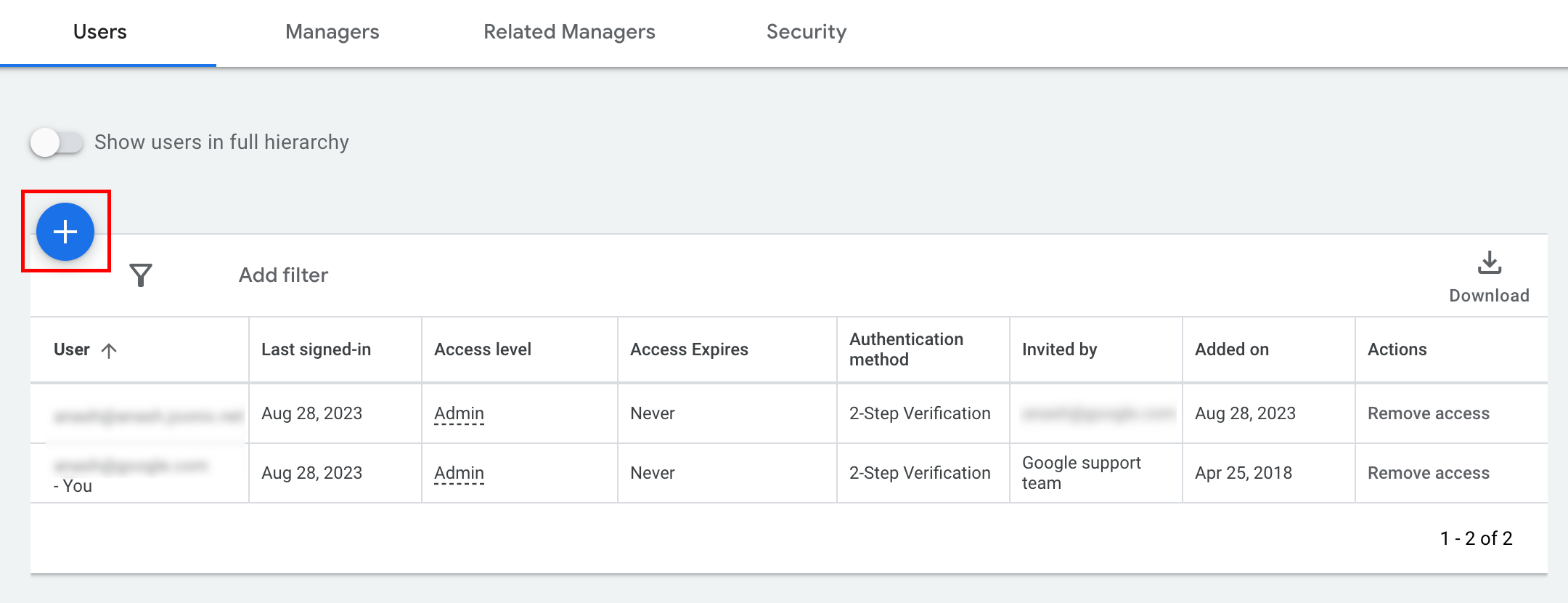
- 依次前往管理 > 访问权限和安全 。
- 点击用户标签页下的
按钮。
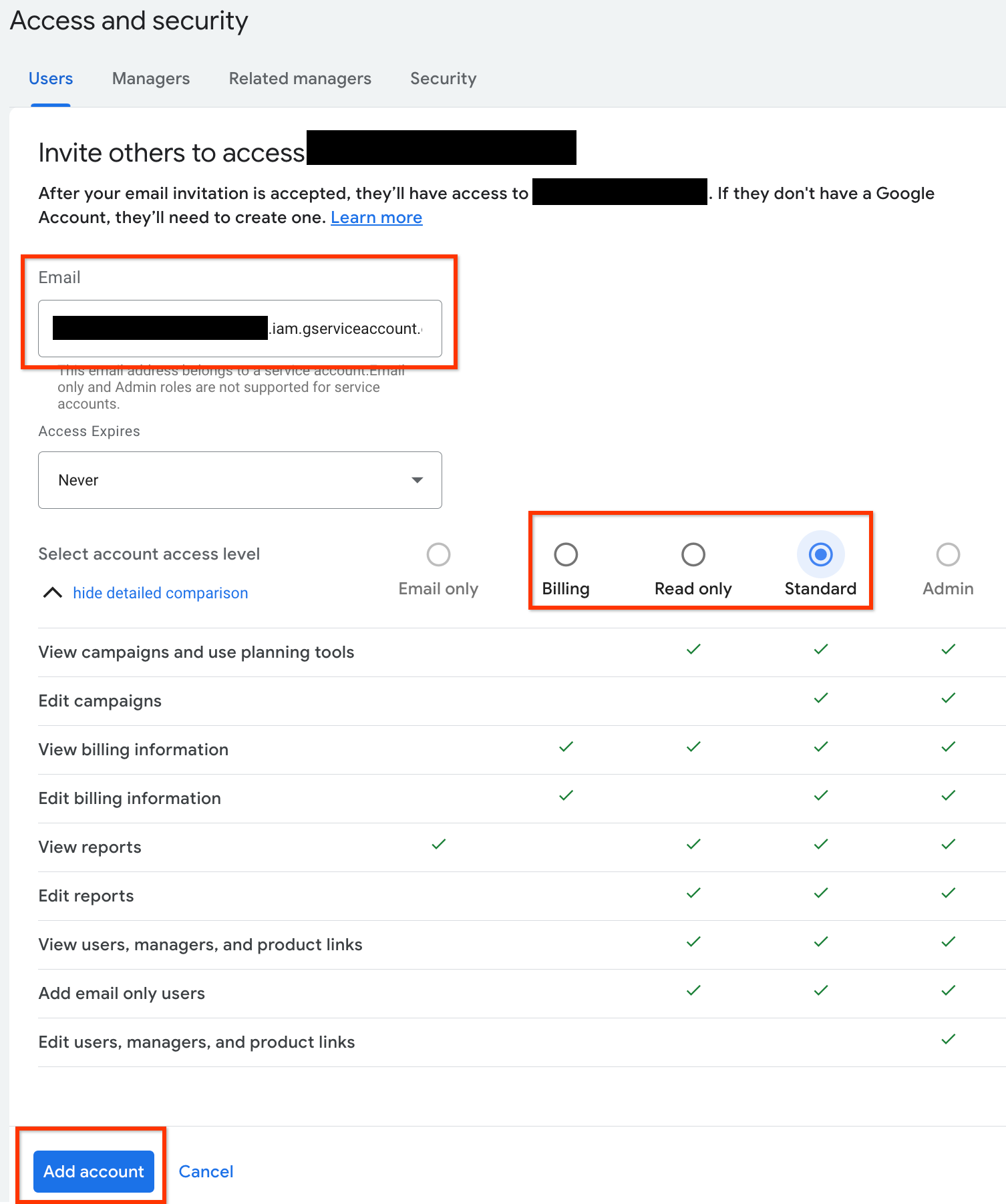
- 在电子邮件地址 输入框中输入服务账号电子邮件地址。
选择适当的账号访问权限级别,然后点击
添加账号 按钮。请注意,服务账号不支持电子邮件地址访问权限级别。
- 系统会向服务账号授予访问权限。
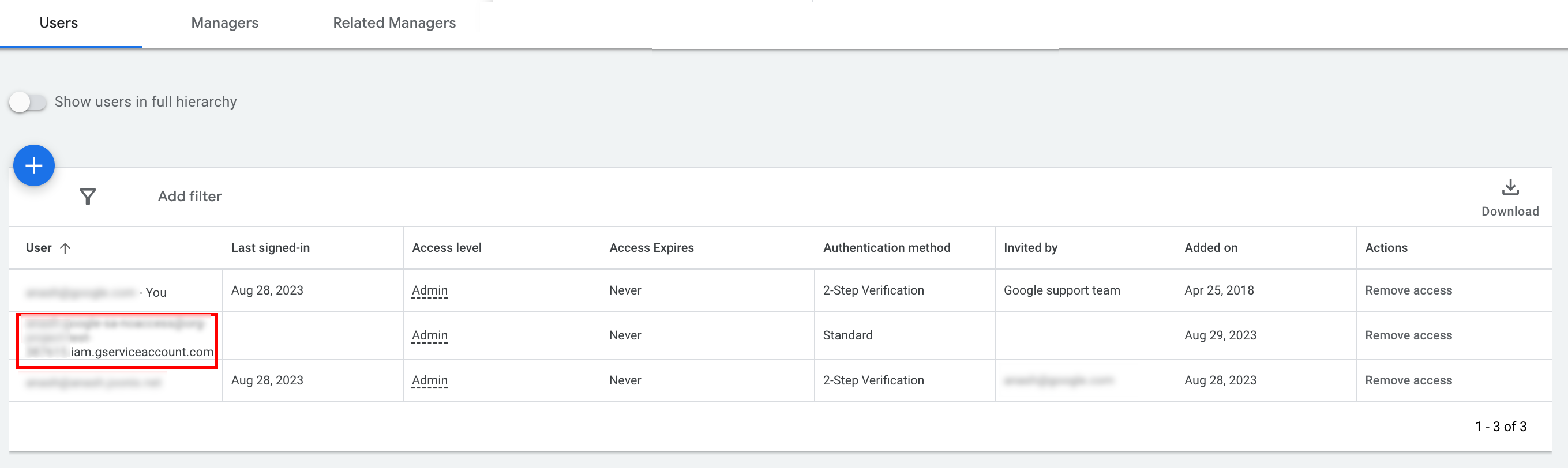
- [可选] 默认情况下,您无法向服务账号授予管理员访问权限。如果您的 API 调用需要管理员访问权限,您可以
升级访问权限,如下所示。
- 点击访问权限级别 列中服务 账号的访问权限级别旁边的下拉箭头。
- 从下拉列表中选择管理员 。
下载工具和客户端库
您可以选择下载客户端库或 HTTP 客户端,具体取决于您希望如何进行 API 调用。
使用客户端库
下载并安装您选择的客户端库。
使用 HTTP 客户端 (REST)
curl
下载并安装 curl,这是一种通过网址 传输数据的命令行工具。
Google Cloud CLI
按照说明安装 gcloud CLI。
本指南其余部分的说明经过验证,可与以下版本的 gcloud 工具搭配使用,但由于应用行为或命令行选项存在差异,可能无法与之前的版本搭配使用。
:~$ gcloud version
Google Cloud SDK 492.0.0
alpha 2024.09.06
beta 2024.09.06
bq 2.1.8
bundled-python3-unix 3.11.9
core 2024.09.06
enterprise-certificate-proxy 0.3.2
gcloud-crc32c 1.0.0
gsutil 5.30
进行 API 调用
选择您偏好的客户端,查看有关如何进行 API 调用的说明:
Java
客户端库制品发布到 Maven 中央 代码库。按如下方式将客户端库作为依赖项添加到您的项目中:
Maven 依赖项为:
<dependency>
  <groupId>com.google.api-ads</groupId>
  <artifactId>google-ads</artifactId>
  <version>43.0.0</version>
</dependency>
Gradle 依赖项为:
implementation 'com.google.api-ads:google-ads:43.0.0'
我们还建议您使用 Google Ads API 物料清单 (BOM) 来管理依赖项版本。如需查看相关说明,请参阅 BOM 指南。
创建一个包含以下内容的 ~/ads.properties 文件:
api.googleads.serviceAccountSecretsPath=JSON_KEY_FILE_PATH
api.googleads.developerToken=INSERT_DEVELOPER_TOKEN_HERE
api.googleads.loginCustomerId=INSERT_LOGIN_CUSTOMER_ID_HERE
按如下方式创建 GoogleAdsClient 对象:
GoogleAdsClient googleAdsClient = null;
try {
  googleAdsClient = GoogleAdsClient.newBuilder().fromPropertiesFile().build();
} catch (FileNotFoundException fnfe) {
  System.err.printf(
      "Failed to load GoogleAdsClient configuration from file. Exception: %s%n",
      fnfe);
  System.exit(1);
} catch (IOException ioe) {
  System.err.printf("Failed to create GoogleAdsClient. Exception: %s%n", ioe);
  System.exit(1);
}
接下来,使用 GoogleAdsService.SearchStream 方法运行广告系列报告,以检索您账号中的
广告系列。
private void runExample(GoogleAdsClient googleAdsClient, long customerId) {
try (GoogleAdsServiceClient googleAdsServiceClient =
googleAdsClient.getLatestVersion().createGoogleAdsServiceClient()) {
String query = "SELECT campaign.id, campaign.name FROM campaign ORDER BY campaign.id";
// Constructs the SearchGoogleAdsStreamRequest.
SearchGoogleAdsStreamRequest request =
SearchGoogleAdsStreamRequest.newBuilder()
.setCustomerId(Long.toString(customerId))
.setQuery(query)
.build();
// Creates and issues a search Google Ads stream request that will retrieve all campaigns.
ServerStream<SearchGoogleAdsStreamResponse> stream =
googleAdsServiceClient.searchStreamCallable().call(request);
// Iterates through and prints all of the results in the stream response.
for (SearchGoogleAdsStreamResponse response : stream) {
for (GoogleAdsRow googleAdsRow : response.getResultsList()) {
System.out.printf(
"Campaign with ID %d and name '%s' was found.%n",
googleAdsRow.getCampaign().getId(), googleAdsRow.getCampaign().getName());
}
}
}
}
C#
客户端库软件包发布到 Nuget.org
代码库。首先,向 Google.Ads.GoogleAds 软件包添加 nuget 引用。
dotnet add package Google.Ads.GoogleAds --version 25.1.0使用相关设置创建 GoogleAdsConfig 对象,并使用该对象创建 GoogleAdsClient 对象。
GoogleAdsConfig config = new GoogleAdsConfig()
{
    DeveloperToken = "******",
    OAuth2Mode = OAuth2Flow.SERVICE_ACCOUNT,
    OAuth2SecretsJsonPath = "PATH_TO_CREDENTIALS_JSON",
    LoginCustomerId = ******
};
GoogleAdsClient client = new GoogleAdsClient(config);
接下来,使用 GoogleAdsService.SearchStream 方法运行广告系列报告,以检索您账号中的
广告系列。本指南不介绍
报告的详细信息。
public void Run(GoogleAdsClient client, long customerId)
{
// Get the GoogleAdsService.
GoogleAdsServiceClient googleAdsService = client.GetService(
Services.V23.GoogleAdsService);
// Create a query that will retrieve all campaigns.
string query = @"SELECT
campaign.id,
campaign.name,
campaign.network_settings.target_content_network
FROM campaign
ORDER BY campaign.id";
try
{
// Issue a search request.
googleAdsService.SearchStream(customerId.ToString(), query,
delegate (SearchGoogleAdsStreamResponse resp)
{
foreach (GoogleAdsRow googleAdsRow in resp.Results)
{
Console.WriteLine("Campaign with ID {0} and name '{1}' was found.",
googleAdsRow.Campaign.Id, googleAdsRow.Campaign.Name);
}
}
);
}
catch (GoogleAdsException e)
{
Console.WriteLine("Failure:");
Console.WriteLine($"Message: {e.Message}");
Console.WriteLine($"Failure: {e.Failure}");
Console.WriteLine($"Request ID: {e.RequestId}");
throw;
}
}
PHP
客户端库软件包发布到 Packagist
代码库。切换到项目的根目录,然后运行以下命令,以在项目根目录的 vendor/ 目录中安装该库及其所有依赖项。
composer require googleads/google-ads-php:32.2.0从 GitHub 代码库复制
google_ads_php.ini
文件,并对其进行修改以添加您的凭据。
[GOOGLE_ADS]
developerToken = "INSERT_DEVELOPER_TOKEN_HERE"
loginCustomerId = "INSERT_LOGIN_CUSTOMER_ID_HERE"

[OAUTH2]
jsonKeyFilePath = "INSERT_ABSOLUTE_PATH_TO_OAUTH2_JSON_KEY_FILE_HERE"
scopes = "https://www.googleapis.com/auth/adwords"
创建 GoogleAdsClient 对象的实例。
$oAuth2Credential = (new OAuth2TokenBuilder())
    ->fromFile('/path/to/google_ads_php.ini')
    ->build();

$googleAdsClient = (new GoogleAdsClientBuilder())
    ->fromFile('/path/to/google_ads_php.ini')
    ->withOAuth2Credential($oAuth2Credential)
    ->build();
接下来,使用 GoogleAdsService.SearchStream 方法运行广告系列报告,以检索您账号中的
广告系列。
public static function runExample(GoogleAdsClient $googleAdsClient, int $customerId)
{
$googleAdsServiceClient = $googleAdsClient->getGoogleAdsServiceClient();
// Creates a query that retrieves all campaigns.
$query = 'SELECT campaign.id, campaign.name FROM campaign ORDER BY campaign.id';
// Issues a search stream request.
/** @var GoogleAdsServerStreamDecorator $stream */
$stream = $googleAdsServiceClient->searchStream(
SearchGoogleAdsStreamRequest::build($customerId, $query)
);
// Iterates over all rows in all messages and prints the requested field values for
// the campaign in each row.
foreach ($stream->iterateAllElements() as $googleAdsRow) {
/** @var GoogleAdsRow $googleAdsRow */
printf(
"Campaign with ID %d and name '%s' was found.%s",
$googleAdsRow->getCampaign()->getId(),
$googleAdsRow->getCampaign()->getName(),
PHP_EOL
);
}
}
Python
客户端库在 PyPI
上分发,可以使用 pip
命令进行安装,如下所示:
python -m pip install google-ads==29.2.0从
GitHub 代码库复制
google-ads.yaml 文件,并对其进行修改以添加您的凭据。
developer_token: INSERT_DEVELOPER_TOKEN_HERE
login_customer_id: INSERT_LOGIN_CUSTOMER_ID_HERE
json_key_file_path: JSON_KEY_FILE_PATH_HERE
通过调用
GoogleAdsClient.load_from_storage 方法创建 GoogleAdsClient 实例。调用该方法时,请将 google-ads.yaml 的路径作为字符串传递给该方法:
from google.ads.googleads.client import GoogleAdsClient
client = GoogleAdsClient.load_from_storage("path/to/google-ads.yaml")
向库的记录器添加处理程序,告知其在何处输出日志。
以下代码将告知库的记录器输出到控制台 (stdout)。
import logging
import sys

logger = logging.getLogger('google.ads.googleads.client')
logger.addHandler(logging.StreamHandler(sys.stdout))
接下来,使用 GoogleAdsService.SearchStream 方法运行广告系列报告,以检索您账号中的
广告系列。
def main(client: GoogleAdsClient, customer_id: str) -> None:
ga_service: GoogleAdsServiceClient = client.get_service("GoogleAdsService")
query: str = """
SELECT
campaign.id,
campaign.name
FROM campaign
ORDER BY campaign.id"""
# Issues a search request using streaming.
stream: Iterator[SearchGoogleAdsStreamResponse] = ga_service.search_stream(
customer_id=customer_id, query=query
)
for batch in stream:
rows: List[GoogleAdsRow] = batch.results
for row in rows:
print(
f"Campaign with ID {row.campaign.id} and name "
f'"{row.campaign.name}" was found.'
)
Ruby
客户端库的 Ruby gem 发布到 Rubygems gem 托管网站。建议使用 bundler 进行安装。向 Gemfile 添加一行:
gem 'google-ads-googleads', '~> 38.0.0'
然后运行以下命令:
bundle install从 GitHub 代码库复制
google_ads_config.rb
文件,并对其进行修改以添加您的凭据。
Google::Ads::GoogleAds::Config.new do |c|
  c.developer_token = 'INSERT_DEVELOPER_TOKEN_HERE'
  c.login_customer_id = 'INSERT_LOGIN_CUSTOMER_ID_HERE'
  c.keyfile = 'JSON_KEY_FILE_PATH'
end
通过传递此文件的保存路径来创建 GoogleAdsClient 实例。
client = Google::Ads::GoogleAds::GoogleAdsClient.new('path/to/google_ads_config.rb')
接下来,使用 GoogleAdsService.SearchStream 方法运行广告系列报告,以检索您账号中的
广告系列。
def get_campaigns(customer_id)
# GoogleAdsClient will read a config file from
# ENV['HOME']/google_ads_config.rb when called without parameters
client = Google::Ads::GoogleAds::GoogleAdsClient.new
responses = client.service.google_ads.search_stream(
customer_id: customer_id,
query: 'SELECT campaign.id, campaign.name FROM campaign ORDER BY campaign.id',
)
responses.each do |response|
response.results.each do |row|
puts "Campaign with ID #{row.campaign.id} and name '#{row.campaign.name}' was found."
end
end
end
Perl
该库在
CPAN上分发。首先,在您选择的目录中克隆 google-ads-perl 代码库。
git clone https://github.com/googleads/google-ads-perl.git切换到 google-ads-perl 目录,然后在命令提示符处运行以下命令,以安装使用该库所需的所有依赖项。
cd google-ads-perlcpan install Module::Buildperl Build.PLperl Build installdeps
从 GitHub 代码库复制
googleads.properties
文件,并对其进行修改以添加您的凭据。
jsonKeyFilePath=JSON_KEY_FILE_PATH
developerToken=INSERT_DEVELOPER_TOKEN_HERE
loginCustomerId=INSERT_LOGIN_CUSTOMER_ID_HERE
通过传递此文件的保存路径来创建 Client 实例。
my $properties_file = "/path/to/googleads.properties";

my $api_client = Google::Ads::GoogleAds::Client->new({
  properties_file => $properties_file
});
接下来,使用 GoogleAdsService.SearchStream 方法运行广告系列报告,以检索您账号中的
广告系列。
sub get_campaigns {
my ($api_client, $customer_id) = @_;
# Create a search Google Ads stream request that will retrieve all campaigns.
my $search_stream_request =
Google::Ads::GoogleAds::V24::Services::GoogleAdsService::SearchGoogleAdsStreamRequest
->new({
customerId => $customer_id,
query =>
"SELECT campaign.id, campaign.name FROM campaign ORDER BY campaign.id"
});
# Get the GoogleAdsService.
my $google_ads_service = $api_client->GoogleAdsService();
my $search_stream_handler =
Google::Ads::GoogleAds::Utils::SearchStreamHandler->new({
service => $google_ads_service,
request => $search_stream_request
});
# Issue a search request and process the stream response to print the requested
# field values for the campaign in each row.
$search_stream_handler->process_contents(
sub {
my $google_ads_row = shift;
printf "Campaign with ID %d and name '%s' was found.\n",
$google_ads_row->{campaign}{id}, $google_ads_row->{campaign}{name};
});
return 1;
}
curl
首先,在 gcloud CLI 中将服务账号设置为有效凭据。
gcloud auth login --cred-file=PATH_TO_CREDENTIALS_JSON接下来,获取 Google Ads API 的 OAuth 2.0 访问令牌。
gcloud auth \
  print-access-token \
  --scopes='https://www.googleapis.com/auth/adwords'
接下来,使用 GoogleAdsService.SearchStream 方法运行广告系列报告,以检索您账号中的
广告系列。
curl -i -X POST https://googleads.googleapis.com/v24/customers/CUSTOMER_ID/googleAds:searchStream \
   -H "Content-Type: application/json" \
   -H "Authorization: Bearer ACCESS_TOKEN" \
   -H "developer-token: DEVELOPER_TOKEN" \
   -H "login-customer-id: LOGIN_CUSTOMER_ID" \
   --data-binary "@query.json"
query.json 的内容如下:
{
  "query": "SELECT campaign.id, campaign.name, campaign.network_settings.target_content_network FROM campaign ORDER BY campaign.id"
}
如果您在进行首次调用时遇到错误,请参阅 处理 API 错误,了解 问题排查指南。