

Google 広告アカウントには、Google 広告 MCC アカウントと Google 広告広告主アカウントの 2 種類があります。これらの用語と他の用語(クライアント アカウントや顧客など)との関係について詳しくは、アカウントの種類をご覧ください。
MCC アカウントでは、他の Google 広告 MCC アカウントや Google 広告広告主アカウントを管理できます。広告主アカウントをマネージャー アカウントにリンクすると、マネージャー アカウントから広告主アカウントを管理できます。リンクされた構造全体は、リーフレベルに広告主アカウントがある有向非巡回グラフです。
個々のユーザーまたはサービス アカウントに Google 広告アカウントへのアクセス権を付与できます。ユーザーに広告主アカウントへのアクセス権を付与するには、次の 2 つの方法があります。
- 広告主アカウントにユーザーを招待して、そのアカウントへの直接アクセス権を付与します。
- 広告主アカウントにリンクされている MCC アカウントにユーザーを招待して、広告主アカウントへの間接的なアクセス権を付与します。MCC アカウントには、リンクされているすべてのアカウントへのアクセス権があるため、ユーザーは広告主アカウントにアクセスできるようになります。
アカウントの管理にユーザーを招待するときに、ユーザーロールを割り当てることもできます。
次のアカウント階層について考えてみましょう。すべてのユーザーに標準アクセス権があるとします。
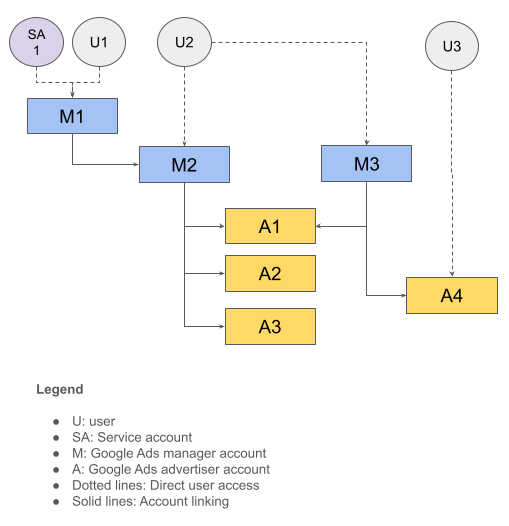
次の表に、このアカウント構造の概要を示します。
| ユーザー | 直接アクセスできる | 間接アクセス権あり |
|---|---|---|
| U1、SA1 | M1 | M2、A1、A2、A3 |
| U2 | M2、M3 | A1、A2、A3、A4 |
| U3 | A4 |
ログイン用お客様 ID
ユーザーは複数のアカウント階層にアクセスできる場合があります。このような場合に API 呼び出しを行うときは、使用するルート アカウントを指定して、認可とアカウントのアクセスレベルを正しく判断する必要があります。これを行うには、API リクエストに login-customer-id ヘッダーを含めます。
次の表は、前の例のアカウント階層を使用して、使用できるログインのお客様 ID と、呼び出し可能なアカウントの対応するリストを示しています。
| ユーザー | 使用するログイン用お客様 ID | API 呼び出しを行うアカウント |
|---|---|---|
| U1、SA1 | M1 | M1、M2、A1、A2、A3 |
| U2 | M2 | M2、A1、A2、A3 |
| U2 | M3 | M3、A1、A4 |
| U3 | A4 | A4 |
呼び出し先の Google 広告アカウントにユーザーが直接アクセスできる場合は、login-customer-id ヘッダーを指定する必要はありません。たとえば、U3 認証情報を使用して A4 を呼び出す場合、login-customer-id ヘッダーを指定する必要はありません。Google 広告サーバーは、お客様 ID(A4)からアクセスレベルを正しく判断できるためです。
Google Ads API クライアント ライブラリを使用する場合は、次の設定を使用して login-customer-id ヘッダーを指定します。
Java
ads.properties ファイルに次の設定を追加します。
api.googleads.loginCustomerId=INSERT_LOGIN_CUSTOMER_ID_HERE
.NET
GoogleAdsConfig オブジェクトを初期化するときに次の設定を追加し、それを使用して GoogleAdsClient オブジェクトを作成します。
GoogleAdsConfig config = new GoogleAdsConfig()
{
    // ...
    LoginCustomerId = "INSERT_LOGIN_CUSTOMER_ID_HERE"
};
GoogleAdsClient client = new GoogleAdsClient(config);
Python
google-ads.yaml ファイルに次の設定を追加します。
login_customer_id: INSERT_LOGIN_CUSTOMER_ID_HERE
PHP
google_ads_php.ini ファイルに次の設定を追加します。
[GOOGLE_ADS]
loginCustomerId = "INSERT_LOGIN_CUSTOMER_ID_HERE"
Ruby
google_ads_config.rb ファイルに次の設定を追加します。
Google::Ads::GoogleAds::Config.new do |c|
  c.login_customer_id = 'INSERT_LOGIN_CUSTOMER_ID_HERE'
end
このファイルを保存するパスを渡して、GoogleAdsClient インスタンスを作成します。
client = Google::Ads::GoogleAds::GoogleAdsClient.new(
  'path/to/google_ads_config.rb'
)
Perl
googleads.properties ファイルに次の設定を追加します。
loginCustomerId=INSERT_LOGIN_CUSTOMER_ID_HERE
curl
curl コマンドを実行するときに、次のコマンドライン引数を指定します。
-H "login-customer-id: INSERT_LOGIN_CUSTOMER_ID_HERE"CustomerService.ListAccessibleCustomers メソッドを使用して、ユーザーが直接アクセスできるアカウントのリストを取得できます。これらのアカウントは、login-customer-id ヘッダーの有効な値として使用できます。
Java
private void runExample(GoogleAdsClient client) { // Optional: Change credentials to use a different refresh token, to retrieve customers // available for a specific user. // // UserCredentials credentials = // UserCredentials.newBuilder() // .setClientId("INSERT_OAUTH_CLIENT_ID") // .setClientSecret("INSERT_OAUTH_CLIENT_SECRET") // .setRefreshToken("INSERT_REFRESH_TOKEN") // .build(); // // client = client.toBuilder().setCredentials(credentials).build(); try (CustomerServiceClient customerService = client.getLatestVersion().createCustomerServiceClient()) { ListAccessibleCustomersResponse response = customerService.listAccessibleCustomers( ListAccessibleCustomersRequest.newBuilder().build()); System.out.printf("Total results: %d%n", response.getResourceNamesCount()); for (String customerResourceName : response.getResourceNamesList()) { System.out.printf("Customer resource name: %s%n", customerResourceName); } } }
C#
public void Run(GoogleAdsClient client) { // Get the CustomerService. CustomerServiceClient customerService = client.GetService(Services.V26.CustomerService); try { // Retrieve the list of customer resources. string[] customerResourceNames = customerService.ListAccessibleCustomers(); // Display the result. foreach (string customerResourceName in customerResourceNames) { Console.WriteLine( $"Found customer with resource name = '{customerResourceName}'."); } } catch (GoogleAdsException e) { Console.WriteLine("Failure:"); Console.WriteLine($"Message: {e.Message}"); Console.WriteLine($"Failure: {e.Failure}"); Console.WriteLine($"Request ID: {e.RequestId}"); throw; } }
PHP
public static function runExample(GoogleAdsClient $googleAdsClient) { $customerServiceClient = $googleAdsClient->getCustomerServiceClient(); // Issues a request for listing all accessible customers. $accessibleCustomers = $customerServiceClient->listAccessibleCustomers(new ListAccessibleCustomersRequest()); print 'Total results: ' . count($accessibleCustomers->getResourceNames()) . PHP_EOL; // Iterates over all accessible customers' resource names and prints them. foreach ($accessibleCustomers->getResourceNames() as $resourceName) { /** @var string $resourceName */ printf("Customer resource name: '%s'%s", $resourceName, PHP_EOL); } }
Python
def main(client: GoogleAdsClient) -> None: customer_service: CustomerServiceClient = client.get_service( "CustomerService" ) accessible_customers: ListAccessibleCustomersResponse = ( customer_service.list_accessible_customers() ) result_total: int = len(accessible_customers.resource_names) print(f"Total results: {result_total}") resource_names: List[str] = accessible_customers.resource_names for resource_name in resource_names: # resource_name is implicitly str print(f'Customer resource name: "{resource_name}"')
Ruby
def list_accessible_customers() # GoogleAdsClient will read a config file from # ENV['HOME']/google_ads_config.rb when called without parameters client = Google::Ads::GoogleAds::GoogleAdsClient.new accessible_customers = client.service.customer.list_accessible_customers().resource_names accessible_customers.each do |resource_name| puts "Customer resource name: #{resource_name}" end end
Perl
sub list_accessible_customers { my ($api_client) = @_; my $list_accessible_customers_response = $api_client->CustomerService()->list_accessible_customers(); printf "Total results: %d.\n", scalar @{$list_accessible_customers_response->{resourceNames}}; foreach my $resource_name (@{$list_accessible_customers_response->{resourceNames}}) { printf "Customer resource name: '%s'.\n", $resource_name; } return 1; }
curl
# Returns the resource names of customers directly accessible by the user # authenticating the call. # # Variables: # API_VERSION, # OAUTH2_ACCESS_TOKEN: # See https://developers.google.com/google-ads/api/rest/auth#request_headers # for details. # curl -f --request GET \ "https://googleads.googleapis.com/v${API_VERSION}/customers:listAccessibleCustomers" \ --header "Content-Type: application/json" \ --header "Authorization: Bearer ${OAUTH2_ACCESS_TOKEN}" \
ListAccessibleCustomers メソッドでお客様 ID を取得できない場合はどうすればよいですか?
CustomerService.ListAccessibleCustomers メソッドで、結果に表示されるはずのお客様 ID が取得されなかった場合は、いくつかの原因が考えられます。
お客様 ID へのアクセス権はあるが、そのアクセス権は親 MCC アカウントを通じて発行されている。たとえば、前の例でユーザー
U1の認証情報を使用してListAccessibleCustomersメソッドを呼び出すと、U1がより多くのアカウントにアクセスできる場合でも、メソッドは結果にM1のみを返します。この可能性を確認するには、ListAccessibleCustomersメソッドによって返された各アカウントのcustomer_clientリソースに対してsearchクエリまたはsearchStreamクエリを実行して、アカウント階層を取得します。これを行うには、前のセクションで説明したように、これらの各アカウントをlogin-customer-idとして設定します。ターゲット アカウントにアクセスできる場合は、アカウント階層の 1 つとして取得できます。間違った OAuth 認証情報を使用している。最も一般的なシナリオは、別のユーザーの認証情報を使用している場合です。たとえば、サンドボックスまたはデベロッパーの認証情報を本番環境の認証情報と誤って混同したり、データベースまたはローカル キャッシュから別のユーザーの認証情報を誤って読み取ったりすることが原因である可能性があります。この問題のトラブルシューティング方法の一つは、Google People API を使用してログイン ユーザーの名前とメールアドレスを取得し、想定していたメールアドレスと一致するかどうかを確認することです。
アカウントへのアクセス権がありません。アカウント アクセス ガイドに沿って、正しい顧客アカウントへのアクセス権を取得します。
ユーザーロール
Google Ads API には独自のアクセスモデルはなく、機能を制限するために個別の OAuth 2.0 スコープを使用することもありません。たとえば、Google Ads API では、読み取り専用オペレーションと読み取り / 書き込みオペレーションに同じスコープを使用します。代わりに、Google Ads API は Google 広告がサポートする同じユーザーロールに従います。マネージャー レベルでアカウントにユーザーロールが付与されると、そのロールは階層内のアカウントに継承されます。ユーザーに特定のアカウントに対して競合するロールがある場合、正しいレベルは API リクエストで指定された login-customer-id アカウントによって解決されます。
次の表は、前の例のアカウント階層を使用して、ユーザーにさまざまなユーザーロールを付与した場合の影響を示しています。
| ユーザー | ユーザーロールが付与されました | login-customer-id | 有効なアクセスレベル |
|---|---|---|---|
| SA1 | アカウント M1 の標準権限 | M1 | M1、M2、A1、A2、A3 の標準権限 |
| U2 |
M2 での標準権限 M3 での読み取り専用権限 |
M2 | M2、A1、A2、A3 の標準権限 |
| U2 |
M2 での標準権限 M3 での読み取り専用権限 |
M3 | M3、A1、A4 に対する読み取り専用アクセス権 |