

Video: Informationen zu Eintragsgruppen aus dem Workshop von 2019
Anzeigengruppen für Hotelanzeigen unterstützen die Partitionierung Ihrer Hotels in viele Eintragsgruppen für Hotels über mehrere Dimensionen hinweg. So lassen sich Gebote für jede Gruppe entsprechend anpassen. Im folgenden Beispiel wurden die Hotels auf der ersten Ebene in 5-Sterne-Hotels, 4-Sterne-Hotels und andere Hotelkategorien unterteilt. Auf der zweiten Ebene wurden die Hotels in anderen Hotelkategorien in Hotels in den USA, Hotels im Vereinigten Königreich und Hotels in anderen Regionen unterteilt.
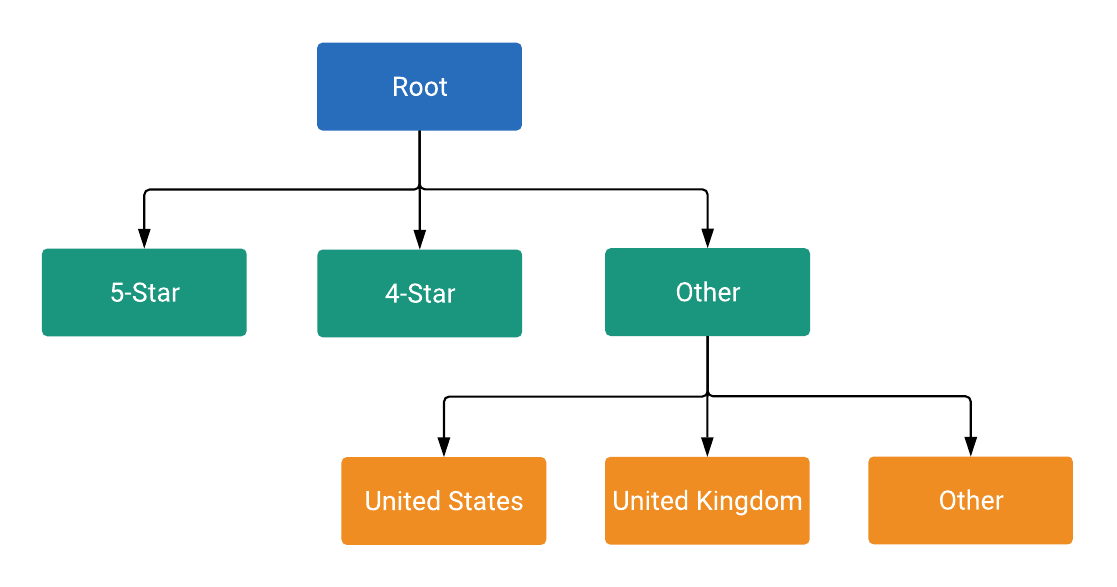
Jeder Knoten im Baum ist entweder eine Unterteilung oder eine Einheit, wie in ListingGroupType definiert.
Durch eine Unterteilung wird eine neue Ebene im Baum eingeführt, während Einheiten die Blätter des Baums sind. Jede Unterteilung muss immer vollständig partitioniert sein und daher einen Knoten für Andere enthalten. Im Beispiel sind die Knoten „root“ und Hotel Class: (Other) Unterteilungen. Mit dieser Baumstruktur mit Unterteilungen und Einheiten können Sie Gebote auf Einheitenebene festlegen. Außerdem wird so dafür gesorgt, dass jeder Hoteleintrag in genau einen Einheitenknoten im Baum fällt.
Knoten sind Objekte der Klasse ListingGroupInfo, die das Feld ListingGroupType enthält, das angibt, ob die Knoten Einheiten oder Unterteilungen sind. Wenn Sie ListingGroupInfo auf listing_group von AdGroupCriterion festlegen, wird sie mit der AdGroup verknüpft.
CPC-Gebote (Prozent) festlegen
Sie dürfen percent_cpc_bid_micros von AdGroupCriterion nur für Einheitenknoten festlegen. Bei einem entsprechenden Versuch auf Unterteilungs-Knoten wird ein Fehler ausgegeben.
Dimensionen auflisten
Ein ListingGroupInfo hat auch ein case_value, das ein ListingDimensionInfo mit einem von mehreren Dimensionstypen ist. Ein ListingGroupInfo steht für die Werte, die mit Ihren Hotels verknüpft sind, z. B. Hotel-ID, Hotelstandort oder Hotelkategorie. Eine vollständige Beschreibung der verfügbaren ListingDimensionInfo-Typen finden Sie in der Referenzdokumentation.
Jedes unmittelbare untergeordnete Element einer Unterteilung muss einen case_value desselben ListingDimensionInfo-Untertyps haben. Nur der Root-Knoten hat keine case_value.
Denken Sie daran, dass jede Unterteilung ein „leeres“ case_value des richtigen Typs enthalten muss, das „alle anderen Werte“ darstellt.
Weitere Informationen finden Sie im folgenden Code-Snippet, in dem die erste Ebene der Hierarchie der Eintragsgruppe hinzugefügt wird.
Java
private static String addLevel1Nodes( long customerId, long adGroupId, String rootResourceName, List<AdGroupCriterionOperation> operations, long percentCpcBidMicroAmount) { // Creates hotel class info and dimension info for 5-star hotels. ListingDimensionInfo fiveStarredDimensionInfo = ListingDimensionInfo.newBuilder() .setHotelClass(HotelClassInfo.newBuilder().setValue(5).build()) .build(); // Creates listing group info for 5-star hotels as a UNIT node. ListingGroupInfo fiveStarredUnit = ListingGroupInfo.newBuilder() .setType(ListingGroupType.UNIT) .setParentAdGroupCriterion(rootResourceName) .setCaseValue(fiveStarredDimensionInfo) .build(); // Creates an ad group criterion for 5-star hotels. AdGroupCriterion fiveStarredAdGroupCriterion = createAdGroupCriterion(customerId, adGroupId, fiveStarredUnit, percentCpcBidMicroAmount); // Decrements the temp ID for the next ad group criterion. AdGroupCriterionOperation operation = generateCreateOperation(fiveStarredAdGroupCriterion); operations.add(operation); // You can also create more UNIT nodes for other hotel classes by copying the above code in // this method and modifying the value passed to HotelClassInfo() to the value you want. // For instance, passing 4 instead of 5 in the above code will create a UNIT node of 4-star // hotels instead. // Creates hotel class info and dimension info for other hotel classes by not specifying // any attributes on those object. ListingDimensionInfo otherHotelsDimensionInfo = ListingDimensionInfo.newBuilder() .setHotelClass(HotelClassInfo.newBuilder().build()) .build(); // Creates listing group info for other hotel classes as a SUBDIVISION node, which will be // used as a parent node for children nodes of the next level. ListingGroupInfo otherHotelsSubdivision = createListingGroupInfo( ListingGroupType.SUBDIVISION, rootResourceName, otherHotelsDimensionInfo); // Creates an ad group criterion for other hotel classes. AdGroupCriterion otherHotelsAdGroupCriterion = createAdGroupCriterion( customerId, adGroupId, otherHotelsSubdivision, percentCpcBidMicroAmount); operation = generateCreateOperation(otherHotelsAdGroupCriterion); operations.add(operation); return otherHotelsAdGroupCriterion.getResourceName(); }
C#
private string AddLevel1Nodes(long customerId, long adGroupId, string rootResourceName, List<AdGroupCriterionOperation> operations, long percentCpcBidMicroAmount) { // Create listing dimension info for 5-star class hotels. ListingDimensionInfo fiveStarredListingDimensionInfo = new ListingDimensionInfo { HotelClass = new HotelClassInfo { Value = 5 } }; // Create a listing group info for 5-star hotels as a UNIT node. ListingGroupInfo fiveStarredUnit = CreateListingGroupInfo(ListingGroupType.Unit, rootResourceName, fiveStarredListingDimensionInfo); // Create an ad group criterion for 5-star hotels. AdGroupCriterion fiveStarredAdGroupCriterion = CreateAdGroupCriterion(customerId, adGroupId, fiveStarredUnit, percentCpcBidMicroAmount); // Create an operation and add it to the list of operations. operations.Add(new AdGroupCriterionOperation { Create = fiveStarredAdGroupCriterion }); // Decrement the temp ID for the next ad group criterion. nextTempId--; // You can also create more UNIT nodes for other hotel classes by copying the above code // in this method and modifying the value passed to HotelClassInfo(). // For instance, passing 4 instead of 5 in the above code will instead create a UNIT // node of 4-star hotels. // Create hotel class info and dimension info for other hotel classes by *not* // specifying any attributes on those object. ListingDimensionInfo otherHotelsListingDimensionInfo = new ListingDimensionInfo { HotelClass = new HotelClassInfo() }; // Create listing group info for other hotel classes as a SUBDIVISION node, which will // be used as a parent node for children nodes of the next level. ListingGroupInfo otherHotelsSubdivisionListingGroupInfo = CreateListingGroupInfo (ListingGroupType.Subdivision, rootResourceName, otherHotelsListingDimensionInfo); // Create an ad group criterion for other hotel classes. AdGroupCriterion otherHotelsAdGroupCriterion = CreateAdGroupCriterion(customerId, adGroupId, otherHotelsSubdivisionListingGroupInfo, percentCpcBidMicroAmount); // Create an operation and add it to the list of operations. operations.Add(new AdGroupCriterionOperation { Create = otherHotelsAdGroupCriterion }); // Decrement the temp ID for the next ad group criterion. nextTempId--; return otherHotelsAdGroupCriterion.ResourceName; }
PHP
private static function addLevel1Nodes( int $customerId, int $adGroupId, string $rootResourceName, array &$operations, int $percentCpcBidMicroAmount ) { // Creates hotel class info and dimension info for 5-star hotels. $fiveStarredDimensionInfo = new ListingDimensionInfo([ 'hotel_class' => new HotelClassInfo(['value' => 5]) ]); // Creates listing group info for 5-star hotels as a UNIT node. $fiveStarredUnit = self::createListingGroupInfo( ListingGroupType::UNIT, $rootResourceName, $fiveStarredDimensionInfo ); // Creates an ad group criterion for 5-star hotels. $fiveStarredAdGroupCriterion = self::createAdGroupCriterion( $customerId, $adGroupId, $fiveStarredUnit, $percentCpcBidMicroAmount ); // Decrements the temp ID for the next ad group criterion. self::$nextTempId--; $operation = self::generateCreateOperation($fiveStarredAdGroupCriterion); $operations[] = $operation; // You can also create more UNIT nodes for other hotel classes by copying the above code in // this method and modifying the value passed to HotelClassInfo() to the value you want. // For instance, passing 4 instead of 5 in the above code will create a UNIT node of 4-star // hotels instead. // Creates hotel class info and dimension info for other hotel classes by *not* specifying // any attributes on those object. $othersHotelsDimensionInfo = new ListingDimensionInfo([ 'hotel_class' => new HotelClassInfo() ]); // Creates listing group info for other hotel classes as a SUBDIVISION node, which will be // used as a parent node for children nodes of the next level. $otherHotelsSubDivision = self::createListingGroupInfo( ListingGroupType::SUBDIVISION, $rootResourceName, $othersHotelsDimensionInfo ); // Creates an ad group criterion for other hotel classes. $otherHotelsAdGroupCriterion = self::createAdGroupCriterion( $customerId, $adGroupId, $otherHotelsSubDivision, $percentCpcBidMicroAmount ); $operation = self::generateCreateOperation($otherHotelsAdGroupCriterion); $operations[] = $operation; self::$nextTempId--; return $otherHotelsAdGroupCriterion->getResourceName(); }
Python
def add_level1_nodes( client: GoogleAdsClient, customer_id: str, ad_group_id: str, root_resource_name: str, operations: List[AdGroupCriterionOperation], percent_cpc_bid_micro_amount: int, ) -> str: """Creates child nodes on level 1, partitioned by the hotel class info. Args: client: The Google Ads API client. customer_id: The Google Ads customer ID. ad_group_id: The ad group ID to which the hotel listing group will be added. root_resource_name: The string resource name of the listing group's root node. operations: A list of AdGroupCriterionOperations. percent_cpc_bid_micro_amount: The CPC bid micro amount to be set on created ad group criteria. Returns: The string resource name of the "other hotel classes" node, which serves as the parent node for the next level of the listing tree. """ global next_temp_id # Create listing dimension info for 5-star class hotels. five_starred_listing_dimension_info: ListingDimensionInfo = client.get_type( "ListingDimensionInfo" ) five_starred_listing_dimension_info.hotel_class.value = 5 # Create a listing group info for 5-star hotels as a UNIT node. five_starred_unit: ListingGroupInfo = create_listing_group_info( client, client.enums.ListingGroupTypeEnum.UNIT, root_resource_name, five_starred_listing_dimension_info, ) # Create an ad group criterion for 5-star hotels. five_starred_ad_group_criterion: AdGroupCriterion = ( create_ad_group_criterion( client, customer_id, ad_group_id, five_starred_unit, percent_cpc_bid_micro_amount, ) ) # Create an operation and add it to the list of operations. five_starred_ad_group_criterion_operation: AdGroupCriterionOperation = ( client.get_type("AdGroupCriterionOperation") ) client.copy_from( five_starred_ad_group_criterion_operation.create, five_starred_ad_group_criterion, ) operations.append(five_starred_ad_group_criterion_operation) # Decrement the temp ID for the next ad group criterion. next_temp_id -= 1 # You can also create more UNIT nodes for other hotel classes by copying the # above code in this method and modifying the hotel class value. # For instance, passing 4 instead of 5 in the above code will instead create # a UNIT node of 4-star hotels. # Create hotel class info and dimension info without any specifying # attributes. This node will then represent hotel classes other than those # already covered by UNIT nodes at this level. other_hotels_listing_dimension_info: ListingDimensionInfo = client.get_type( "ListingDimensionInfo" ) # Set "hotel_class" as the oneof field on the ListingDimensionInfo object # without specifying the optional hotel_class field. client.copy_from( other_hotels_listing_dimension_info.hotel_class, client.get_type("HotelClassInfo"), ) # Create listing group info for other hotel classes as a SUBDIVISION node, # which will be used as a parent node for children nodes of the next level. other_hotels_subdivision_listing_group_info: ListingGroupInfo = ( create_listing_group_info( client, client.enums.ListingGroupTypeEnum.SUBDIVISION, root_resource_name, other_hotels_listing_dimension_info, ) ) # Create an ad group criterion for other hotel classes. other_hotels_ad_group_criterion: AdGroupCriterion = ( create_ad_group_criterion( client, customer_id, ad_group_id, other_hotels_subdivision_listing_group_info, percent_cpc_bid_micro_amount, ) ) # Create an operation and add it to the list of operations. other_hotels_ad_group_criterion_operation: AdGroupCriterionOperation = ( client.get_type("AdGroupCriterionOperation") ) client.copy_from( other_hotels_ad_group_criterion_operation.create, other_hotels_ad_group_criterion, ) operations.append(other_hotels_ad_group_criterion_operation) # Decrement the temp ID for the next ad group criterion. next_temp_id -= 1 return other_hotels_ad_group_criterion.resource_name
Ruby
def add_level1_nodes( client, customer_id, ad_group_id, root_resource_name, operations, percent_cpc_bid_micro_amount) # Creates hotel class info and dimension info for 5-star hotels. five_starred_dimension_info = client.resource.listing_dimension_info do |d| d.hotel_class = client.resource.hotel_class_info do |c| c.value = 5 end end # Creates listing group info for 5-star hotels as a UNIT node. five_starred_unit = create_listing_group_info( client, :UNIT, root_resource_name, five_starred_dimension_info, ) # Creates an ad group criterion for 5-star hotels. five_starred_ad_group_criterion = create_ad_group_criterion( client, customer_id, ad_group_id, five_starred_unit, percent_cpc_bid_micro_amount, ) operations << generate_create_operation( client, five_starred_ad_group_criterion, ) # You can also create more UNIT nodes for other hotel classes by copying the # above code in this method and modifying the value passed to HotelClassInfo() # to the value you want. # For instance, passing 4 instead of 5 in the above code will create a UNIT # node of 4-star hotels instead. # Creates hotel class info and dimension info for other hotel classes # by *not* specifying any attributes on those object. other_hotels_dimention_info = client.resource.listing_dimension_info do |d| d.hotel_class = client.resource.hotel_class_info end # Creates listing group info for other hotel classes as a SUBDIVISION node, # which will be used as a parent node for children nodes of the next level. other_hotels_subdivision = create_listing_group_info( client, :SUBDIVISION, root_resource_name, other_hotels_dimention_info, ) # Creates an ad group criterion for other hotel classes. other_hotels_ad_group_criterion = create_ad_group_criterion( client, customer_id, ad_group_id, other_hotels_subdivision, percent_cpc_bid_micro_amount, ) operations << generate_create_operation( client, other_hotels_ad_group_criterion, ) other_hotels_ad_group_criterion.resource_name end
Perl
sub add_level_1_nodes { my ($customer_id, $ad_group_id, $root_resource_name, $operations, $percent_cpc_bid_micro_amount) = @_; # Create hotel class info and dimension info for 5-star hotels. my $five_starred_dimension_info = Google::Ads::GoogleAds::V24::Common::ListingDimensionInfo->new({ hotelClass => Google::Ads::GoogleAds::V24::Common::HotelClassInfo->new({ value => 5 })}); # Create listing group info for 5-star hotels as a UNIT node. my $five_starred_unit = create_listing_group_info(UNIT, $root_resource_name, $five_starred_dimension_info); # Create an ad group criterion for 5-star hotels. my $five_starred_ad_group_criterion = create_ad_group_criterion($customer_id, $ad_group_id, $five_starred_unit, $percent_cpc_bid_micro_amount); my $operation = generate_create_operation($five_starred_ad_group_criterion); push @$operations, $operation; # You can also create more UNIT nodes for other hotel classes by copying the # above code in this method and modifying the value passed to HotelClassInfo # to the value you want. For instance, passing 4 instead of 5 in the above code # will create a UNIT node of 4-star hotels instead. # Create hotel class info and dimension info for other hotel classes by *not* # specifying any attributes on those object. my $others_hotels_dimension_info = Google::Ads::GoogleAds::V24::Common::ListingDimensionInfo->new({ hotelClass => Google::Ads::GoogleAds::V24::Common::HotelClassInfo->new()} ); # Create listing group info for other hotel classes as a SUBDIVISION node, which # will be used as a parent node for children nodes of the next level. my $other_hotels_subdivision = create_listing_group_info(SUBDIVISION, $root_resource_name, $others_hotels_dimension_info); # Create an ad group criterion for other hotel classes. my $other_hotels_ad_group_criterion = create_ad_group_criterion($customer_id, $ad_group_id, $other_hotels_subdivision, $percent_cpc_bid_micro_amount); $operation = generate_create_operation($other_hotels_ad_group_criterion); push @$operations, $operation; return $other_hotels_ad_group_criterion->{resourceName}; }
curl
Verfügbare Dimensionen für ListingDimensionInfo
Die folgenden ListingDimensionInfo-Typen sind für Hotelanzeigen verfügbar:
Temporäre IDs
Anzeigengruppenkriterien werden erst dann IDs zugewiesen, wenn die Mutate-Anfrage, mit der sie erstellt werden, vom Server verarbeitet wird. Ein ListingGroupInfo ist jedoch erst gültig, wenn es vollständig ist. Wenn Sie also eine Unterteilung erstellen, müssen Sie im selben Vorgang auch mindestens eines ihrer untergeordneten Elemente erstellen.
Damit Sie die parent_ad_group_criterion von ListingGroupInfo für die untergeordneten Knoten festlegen können, können Sie temporäre Kriterien-IDs verwenden. Das sind lokal eindeutige (nicht global eindeutige) Kennungen, die nur im Kontext einer einzelnen Mutate-Anfrage gelten. Als temporäre ID kann eine beliebige negative Ganzzahl verwendet werden, z. B. -1.
Wenn die Anfrage verarbeitet wird, wird jeder AdGroupCriterion wie gewohnt eine positive globale ID zugewiesen.